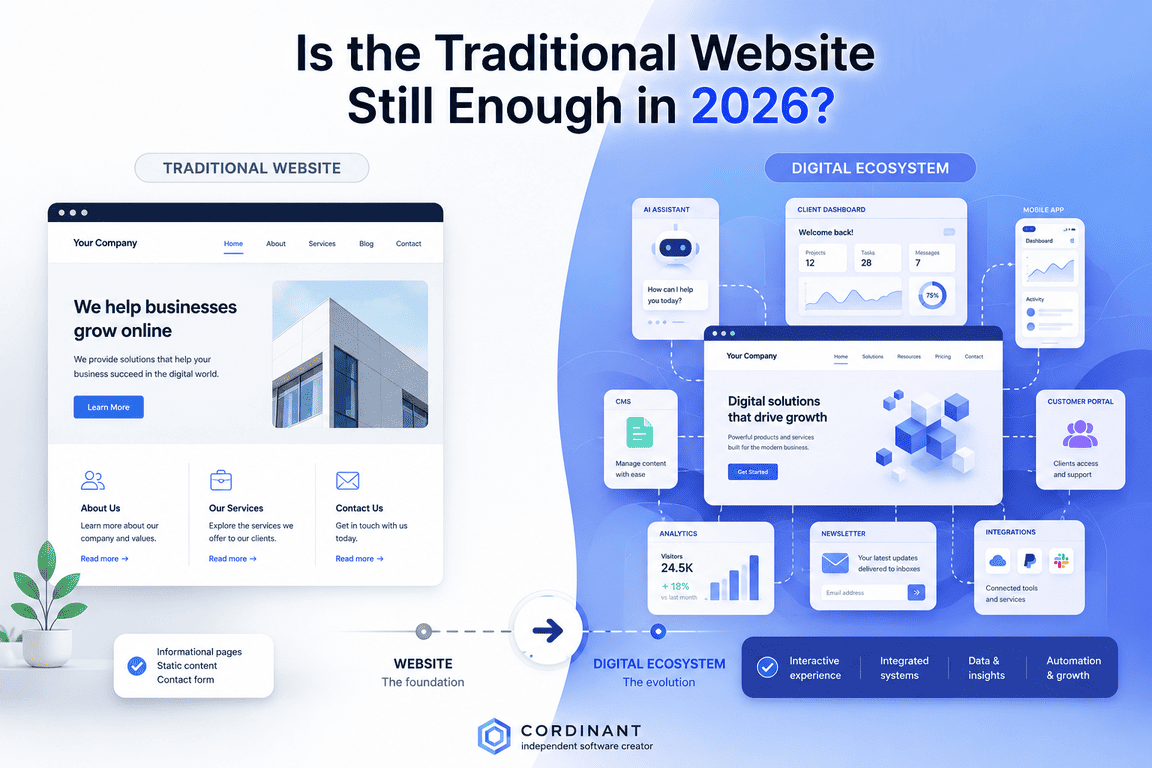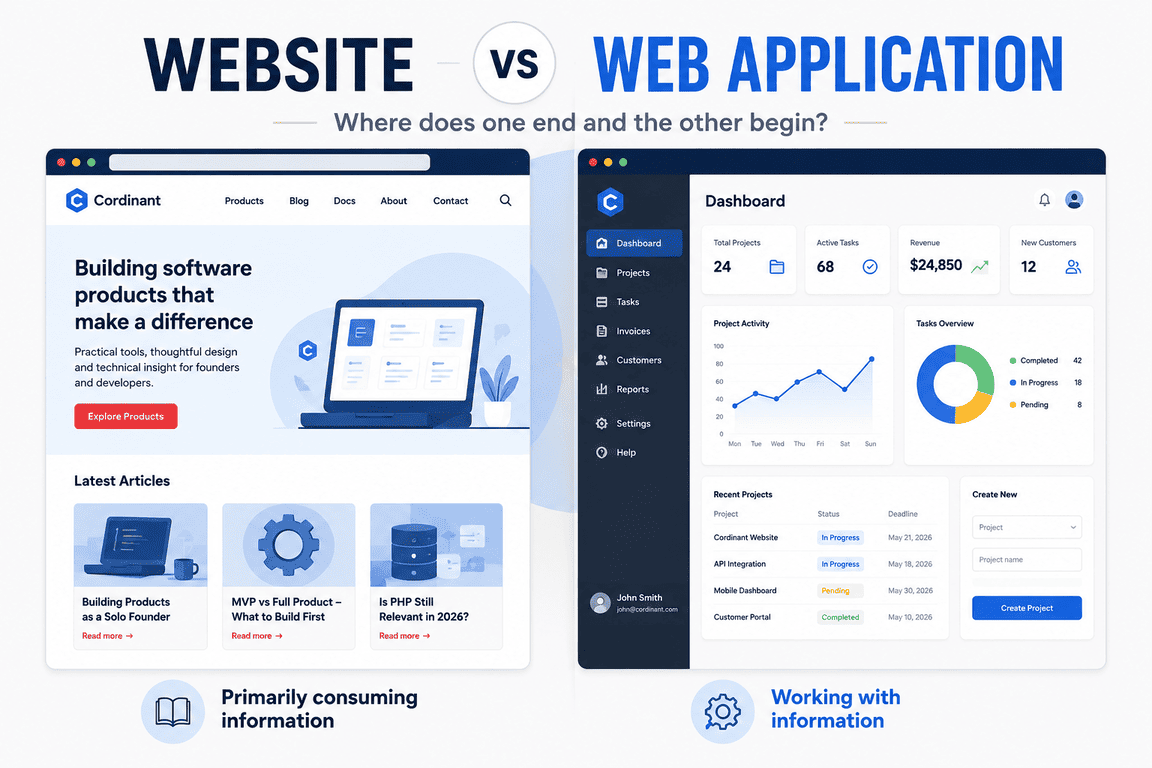
At some point while working on Cordinant, I realised that calling it a “website” no longer described everything I was building. The public side still looked like one: there was a homepage, product pages, a blog, documentation and the usual pages people expect to find. A visitor could arrive from Google, read an article, look at a product and leave without interacting with anything particularly unusual. From that perspective, “website” was still a perfectly reasonable description.
Behind those pages, however, the project was becoming something quite different. There was a database and an admin panel, followed by product management, blog management, media management, documentation tools, authentication and increasingly structured ways of controlling what appeared on the public site. More and more of my development time was being spent not on pages that visitors would read, but on software that allowed me to manage those pages and the information behind them. That made me reconsider a surprisingly basic question: what is the difference between a website and a web application?
The obvious answer is that a website presents information while a web application lets people do things. It is a useful starting point, but it begins to fall apart as soon as you look at many real projects. Modern websites have accounts, dashboards, booking systems and interactive tools, while web applications often have blogs, landing pages and documentation. Somewhere between the traditional company website and something like Google Docs, the boundary becomes much less obvious.
The Traditional Website Is Relatively Easy to Recognise
There are plenty of projects that nobody would seriously struggle to classify. A small company site containing a homepage, services, an about page and contact information is a website. So is a personal portfolio, a straightforward blog or a documentation site. Their primary purpose is usually communication: the owner publishes something, and visitors arrive to read, view or find that information.
Technically, these websites can still be surprisingly sophisticated. They may use a CMS, databases, APIs, caching, analytics, search and complicated deployment infrastructure. A large publishing site can have an enormous amount happening behind what appears to be a collection of articles. Technical complexity alone therefore doesn't make something a web application.
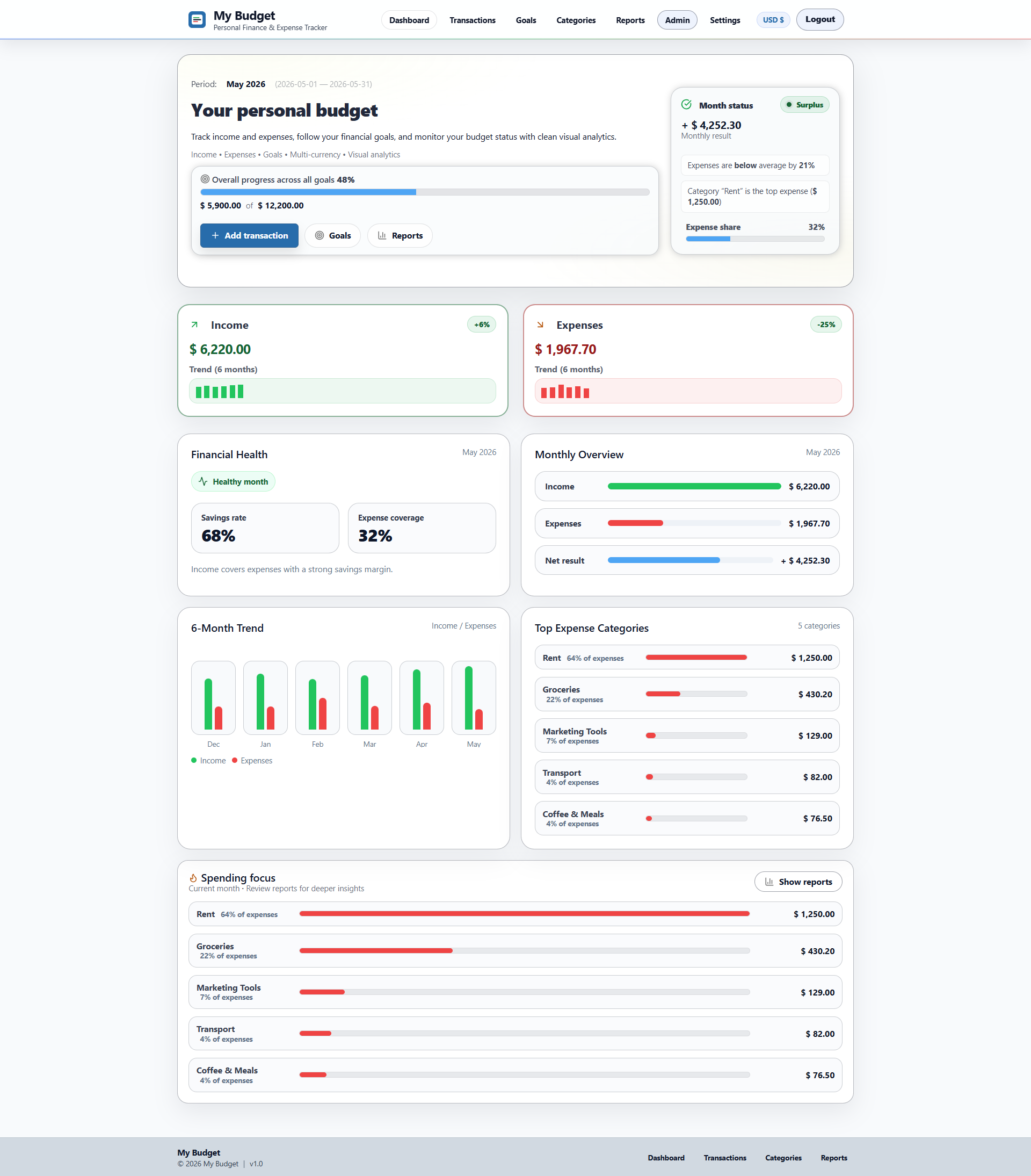
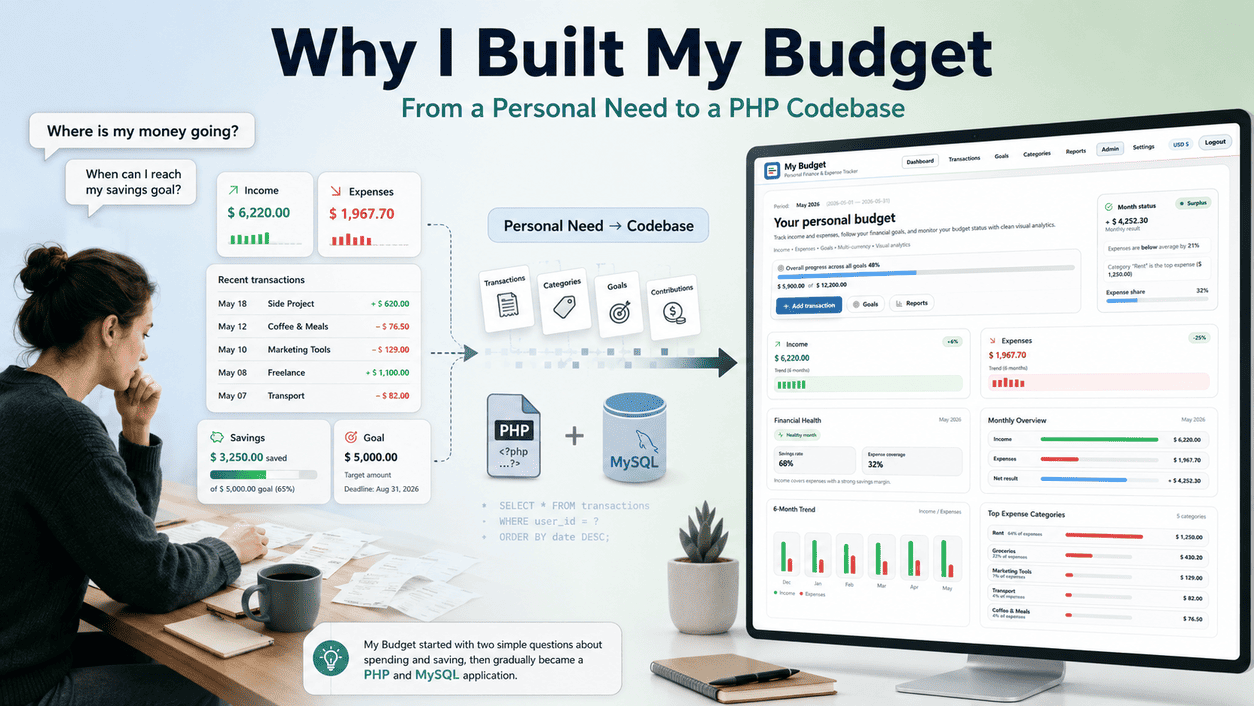
This is one reason I don't find the technology stack particularly useful when trying to define the difference. A PHP project backed by MySQL could be a five-page company website, while another PHP and MySQL project could contain authentication, dashboards, financial records and complex business logic. The technologies tell us how something was built. They don't necessarily tell us what was built.
A Web Application Has a Different Relationship With the User
Consider Google Docs. Calling it a website isn't technically absurd: you open it in a browser, it has URLs and it communicates with web servers. Yet “website” feels incomplete because the main reason someone opens Google Docs isn't to consume pages published by Google. They go there to create documents, edit them, organise them, collaborate with other people and manage their own information.
The same distinction appears in products such as Figma, Notion, Trello and online banking. The browser is still the interface, but the relationship between the user and the software has changed. Instead of the publisher creating most of the meaningful information before the visitor arrives, the user becomes an active part of the system. Their actions change data, and those changes affect what the software shows them later.
On a conventional website, most of the important information already exists before the visitor arrives. In a web application, much of the meaningful information may exist because the user created, changed or organised it.
That makes interaction a useful way of thinking about the distinction. On a conventional website, an article has already been written, a product description has already been published and a portfolio already contains its projects. In a web application, much of the meaningful information may exist because a user created a project, added a transaction, uploaded a file, changed a status or configured an account. The interface is no longer simply presenting information; it is providing access to a system.
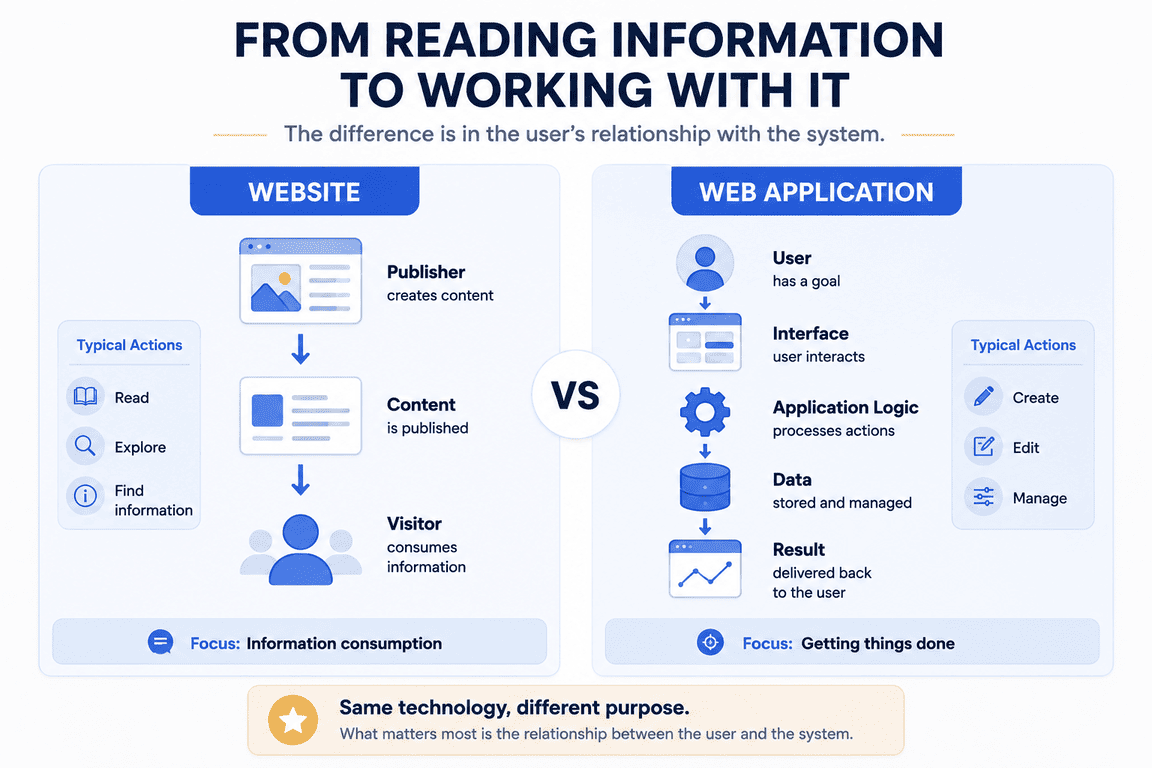
Even this distinction has limitations. A public statistics dashboard may contain charts, filters and sophisticated JavaScript without really behaving like an application in the same way as a personal finance dashboard where every user manages their own records. Two interfaces can look remarkably similar while doing very different things underneath. What the user can change, and what the system remembers about those changes, often tells us more than the appearance of the interface.
Then the Boundary Starts to Fall Apart
Imagine a fairly ordinary company website. It begins with a homepage, services, an about page, a blog and a contact form. Nobody has much reason to call it a web application, because visitors mainly move through information that the company has published.
Then the company adds customer accounts. Customers can log in and view invoices, and later they can upload documents, manage their profiles, communicate with the company, track orders and download personalised reports. The public marketing website is still there, but behind the login is something that behaves much more like software.
Calling the entire thing a website ignores a substantial application sitting inside it, while calling the whole thing a web application ignores the fact that most visitors may still experience it as a conventional website.
Both descriptions can be correct depending on which part of the project we are discussing, and this hybrid structure is no longer unusual. Ecommerce makes the distinction even less comfortable. An online shop contains very website-like category pages, product descriptions, editorial content and landing pages, but it may also contain accounts, wishlists, baskets, order histories, payments and customer dashboards.
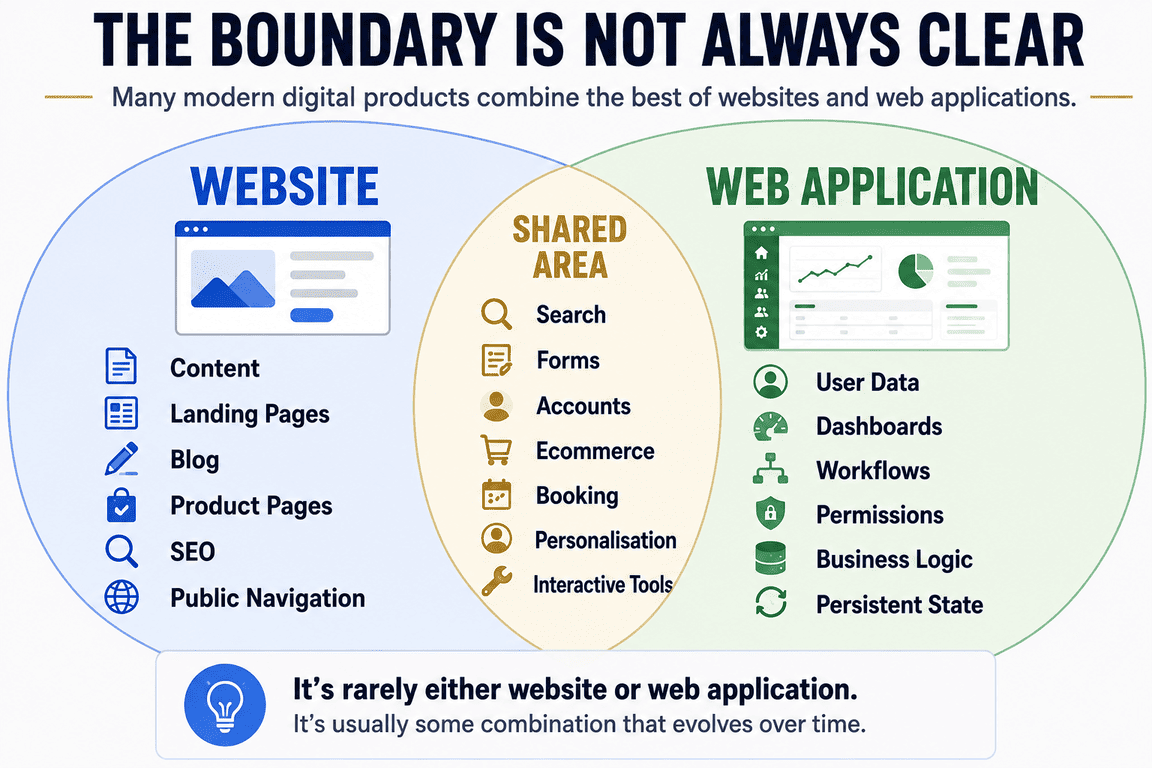
A booking site presents information until someone selects dates, checks availability and makes a reservation. A membership site may contain hundreds of normal articles while surrounding them with authentication, subscriptions and personalised content. It becomes difficult to point to one feature and declare that everything before it is a website and everything after it is a web application. The transition is usually gradual, and sometimes the distinction depends more on what a particular user is doing at that moment than on what we call the entire project.
Web Applications Have Websites Too
The confusion works in the other direction. A software company may have its application on one part of a domain while the main site contains marketing pages, pricing, documentation, a blog and support content. From the company's perspective, all of this may belong to one product, even though from an architectural perspective it could consist of several completely different systems.
The marketing site might use a CMS while the application uses another framework entirely. Documentation could be generated separately, authentication might be handled by another service, and payments could pass through another system again. The person using the product doesn't necessarily know or care about these boundaries. They see one brand and a collection of pages that open in a browser.
Developers tend to see the systems behind those pages, which may explain part of the disagreement around terminology. To a customer, an online service can simply be “the website”. To the people building it, the same service might consist of a public website, a web application, an admin application, an API and several background services. Neither perspective is necessarily wrong; they are describing the product from different sides.
The Admin Panel Creates an Interesting Paradox
Content management systems make this distinction particularly strange. Take an ordinary blog: to the reader, it is clearly a website. The reader opens articles, follows categories and searches through content without needing to know anything about how that content got there.
The person running the same blog may have a completely different experience. They log into an administration area containing forms, media management, categories, publishing workflows, database operations and perhaps several levels of user permissions. The public side behaves like a website, while the administration side behaves very much like a web application. Both can be part of exactly the same codebase and use exactly the same database.
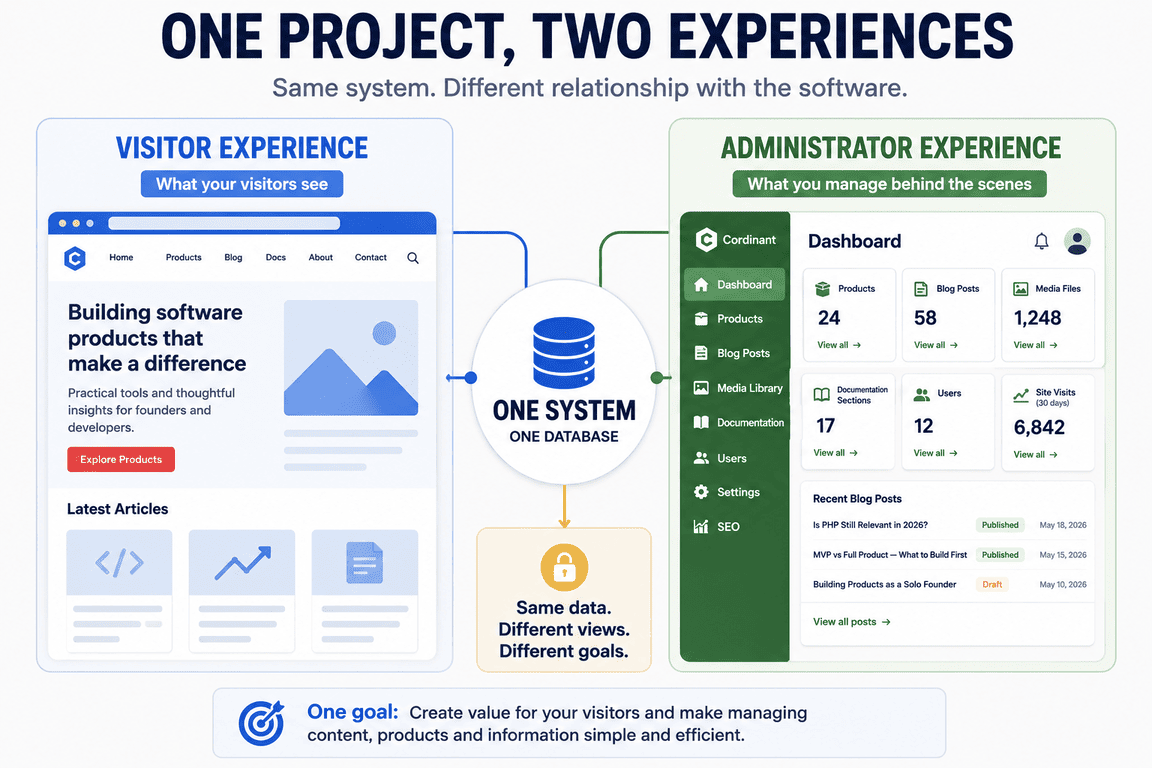
I ran into this directly while building Cordinant. The public pages were only one part of the work, because I also needed ways to manage what appeared on those pages without manually editing the code every time. Once an admin interface becomes important, a project starts developing two personalities: visitors experience content, while the administrator experiences software.
Cordinant Started as a Website
When I began working on Cordinant, I thought about it primarily as my website. I needed somewhere to present my software products, publish articles and explain what I was building, so the initial mental model was mostly page-based. There would be a homepage, product pages, a blog, an about page and a contact page. Nothing about that description suggested that I was building a web application.
The interesting part was what happened afterwards. Every time I wanted the public website to become easier to manage, something had to exist behind it. Products needed structured data instead of hard-coded content, blog posts needed categories and editing tools, images needed management, documentation needed its own structure, and product pages gradually required more editable sections. SEO information also needed somewhere to live rather than being manually inserted into templates.
None of these additions suddenly transformed Cordinant into a completely different project. There was no morning when I opened the code and thought, “Yesterday this was a website; today it is a web application.” It simply accumulated application behaviour as I solved practical problems around managing the public website.
That experience is one reason I find the usual definitions slightly unsatisfying. From the outside, Cordinant is still primarily a website. From the admin side, much of what I interact with every day is a custom application for managing products, articles, documentation and other structured information. The same project looks different depending on which side of the login screen I am standing on.
The Database Wasn't the Turning Point
It would be convenient to say that adding a database marks the transition from website to web application, but traditional websites have used databases for decades. WordPress stores posts, pages, users, settings and other information in a database, yet a simple WordPress company site is still normally described as a website. A database makes a project dynamic; it doesn't automatically make it an application.
Authentication isn't enough either. A password-protected content site doesn't suddenly become a web application simply because users have to log in. Forms don't solve the definition, nor do JavaScript, APIs or interactive components. Each of those technologies can appear on both sides of the supposed boundary.
Even the distinction between static and dynamic websites answers a different question. Static versus dynamic is largely about how information is generated and delivered, while website versus web application is more closely connected to purpose and interaction. The concepts overlap, but treating them as interchangeable creates more confusion rather than less.
Perhaps the Better Question Is What the User Is Actually Trying to Accomplish
Someone might visit a restaurant's site to read the menu and then use the same domain to book a table. A person might read an article on a financial website and later log into a dashboard where they enter financial information and generate personalised calculations. In both cases, the same website moves between content consumption and application-like interaction.
Trying to classify the whole domain may therefore be less useful than looking at the experience the software is providing at a particular moment. A modern digital product can contain both website and application behaviour without needing to choose one identity for every part of the system.
The Difference Matters More When You Have to Build It
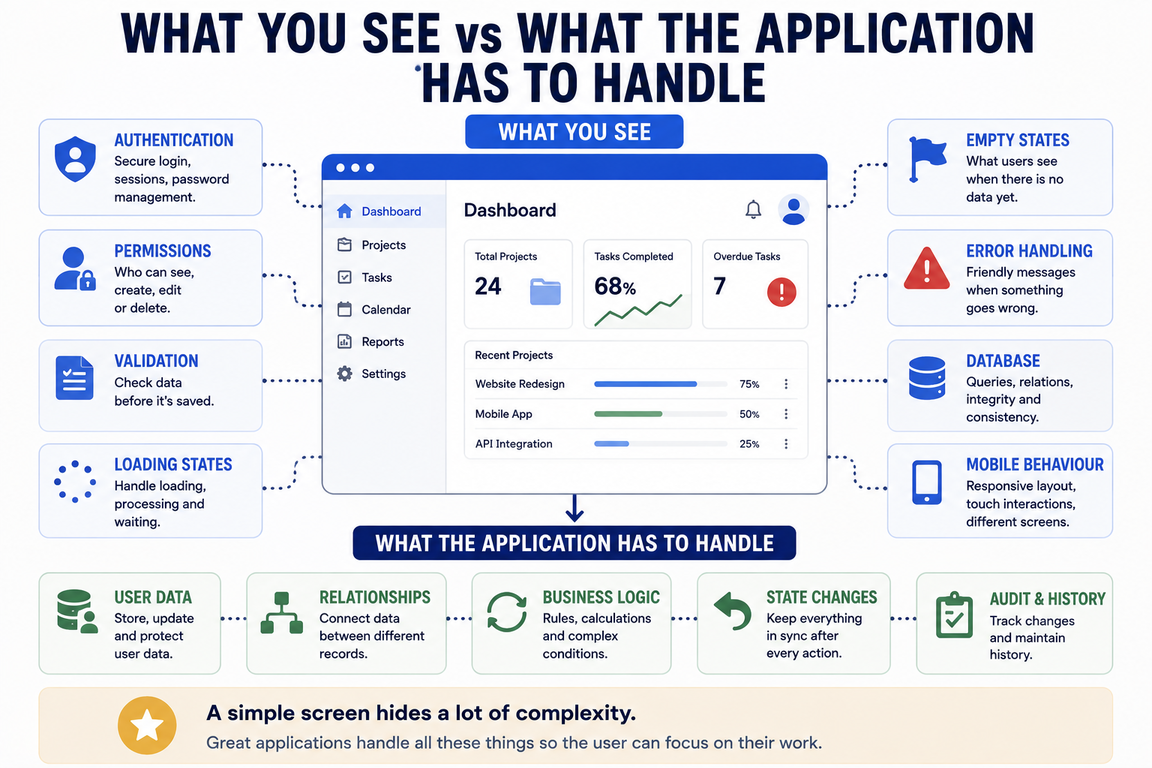
From the outside, the distinction can feel semantic. During development, it becomes much more practical because a mostly informational website and a data-driven web application create different kinds of problems. Once users have accounts and persistent data, the project has to consider permissions, validation, failures, data ownership, sessions and what happens when something changes unexpectedly.
The UX changes as well. On an informational website, navigation, hierarchy, readability and content presentation usually dominate much of the experience. An application has to deal with many more states and situations that may never appear in a static design.
- Empty accounts and empty states
- Loading and processing states
- Error and validation messages
- Successful operations and confirmations
- Permissions and restricted actions
- Actions that can or cannot be undone
The number of screens may remain relatively small while the number of situations those screens need to handle grows considerably. This is probably one of the differences I notice most when working on software products. A website page can often be considered as a composition, while an application screen has to be considered over time.
What does the user see before they create anything? What happens after they press a button, what happens when something fails, and what does the same screen look like after hundreds of records have accumulated? A screenshot can show what an application looks like, but it cannot fully show how it works. Much of application design exists between screenshots, in the transitions and states that only become visible when someone actually starts using the software.
A Working Screen Isn't Necessarily a Finished Feature
This also changes what “finished” means. A relatively small website can reach a fairly clear point where all pages exist, the content is complete, the contact form works and the site is ready to publish. Applications have a habit of revealing additional cases after the main workflow already appears to work.
Creating a record may work perfectly until you try to edit it. Deleting it may work until you discover related data has been left behind. A dashboard can look convincing with sample data and then feel completely empty or confusing when a new user logs in for the first time. A desktop workflow may make perfect sense while its mobile version becomes awkward.
I have found that the central feature can sometimes be surprisingly quick to build. Making it behave sensibly around everything else often takes much longer. That isn't always because the underlying code is exceptionally sophisticated; there are simply more possible states and more interactions between them.
A project may contain only ten visible screens while hiding authentication, user-specific data, permissions, validation, error handling and several different workflows underneath them.
This is also where a seemingly modest “website” project can expand dramatically if its requirements are actually application requirements. A sitemap might contain only ten screens, but those ten screens can hide authentication, permissions, user-specific data, validation, error handling and multiple workflows. Counting pages doesn't tell you very much about the real size of such a project.
The Technology Stack Still Doesn't Give You the Answer
There was a period when “web application” often suggested something technologically different from a traditional website. Today that assumption is much harder to maintain because a website and a web application can both use PHP, JavaScript, React or Vue, communicate with APIs and connect to MySQL or PostgreSQL. They can both be responsive, use server-side rendering and sit behind the same web server or CDN.
A single project can also mix several approaches. A server-rendered PHP product page can exist beside a highly interactive JavaScript interface backed by the same database. One part may be designed primarily for search engines and reading, while another exists entirely for authenticated users completing tasks.
| Website | Web Application |
|---|---|
| Primarily presents published information | Primarily allows users to perform tasks |
| Content often exists before the visitor arrives | User actions often create or modify meaningful data |
| Navigation and readability are central | Workflows and application states are central |
| May use databases, APIs and JavaScript | May use exactly the same technologies |
| Usually has fewer user-specific states | Often requires authentication, permissions and persistent data |
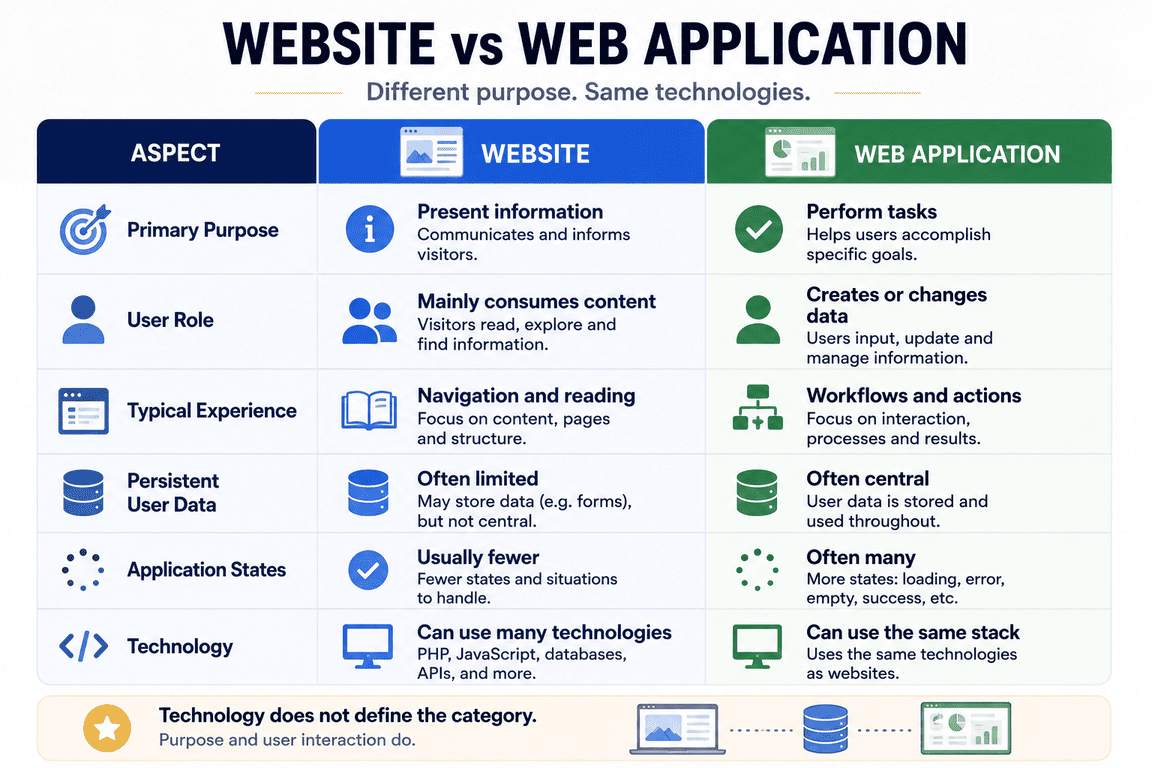
This is why choosing between “website” and “web application” based on the presence of React, PHP or a database doesn't tell us very much. Architecture matters enormously when building the project, but it doesn't determine what role that project plays for its users.
Not Every Business Needs a Web Application
There is a temptation in software to treat more functionality as progress. A website sounds ordinary, while a platform or application sounds more substantial. Yet if a small business simply needs to explain its services, establish credibility, publish useful information and receive enquiries, adding accounts and custom workflows may create development and maintenance work without solving an additional problem.
Every interactive feature creates consequences. Accounts need authentication, user information needs to be stored and protected, custom workflows need testing, and systems that store data eventually need maintenance. A feature that sounds small in a planning document can introduce several less visible requirements around it.
Sometimes a straightforward website is exactly the right product. I also find the phrase “just a website” misleading for that reason. A good website can be a substantial digital product without needing to imitate an application, and its usefulness doesn't increase simply because users can log in.
Someone may ask for a “website” and then describe customer registration, individual accounts, subscriptions, dashboards, messaging, document uploads, payments, reporting and an administration system. At that point the word website no longer communicates the real development scope very well.
The reverse problem happens too. Someone may ask for a “website” and then describe customer registration, individual accounts, subscriptions, dashboards, messaging, document uploads, payments, reporting and an administration system. A brochure site with ten pages and a custom business application with ten screens are not comparable pieces of work because the application contains behaviour, data relationships and states that aren't visible from the sitemap alone.
Projects Rarely Stay Inside Their Original Category
One of the more interesting things about digital products is how easily their identity changes as new requirements appear. A project may begin as a landing page, grow into a marketing website, add a blog and documentation, then acquire user accounts, a customer portal and eventually a substantial application behind the public pages. There is rarely a formal moment when somebody changes its category.
A rough progression might look like this:
- Landing page — one focused message or offer.
- Website — structured public information and content.
- Interactive website — forms, search, filtering, booking or personalised elements.
- Web application — persistent user data, workflows and substantial application logic.
- Platform — several connected systems, services or user groups.
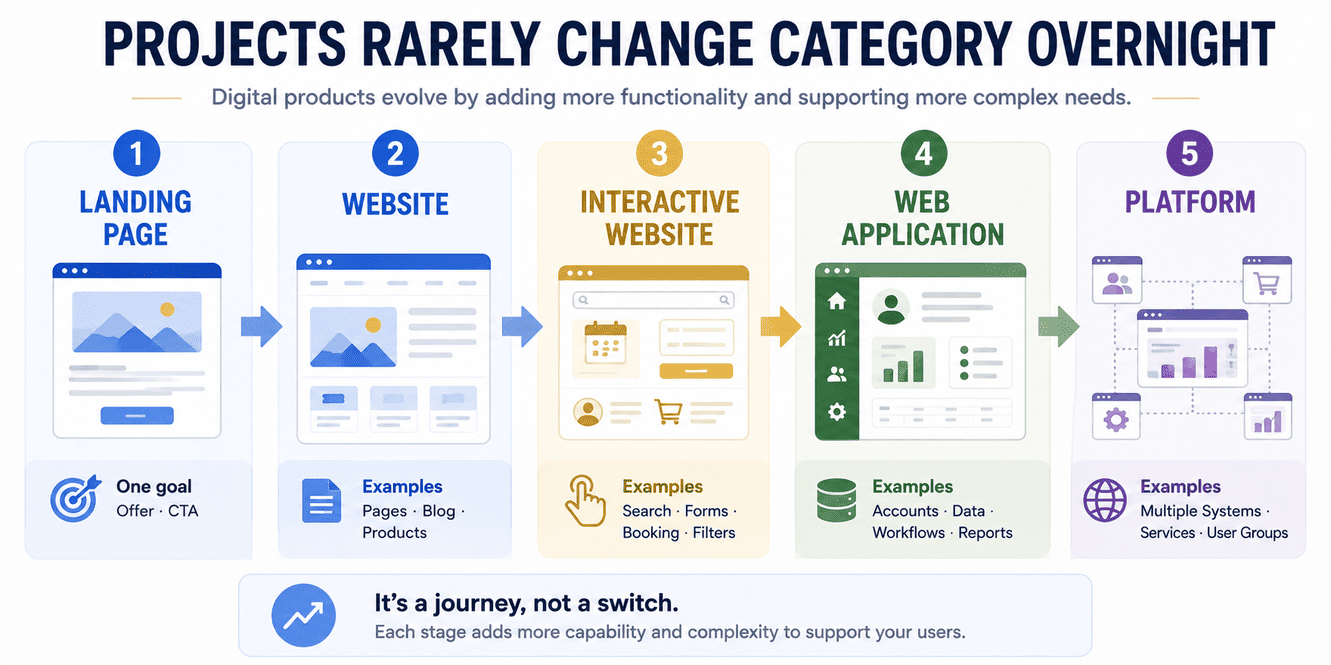
I wouldn't treat this as a formal technical classification, because real products don't evolve according to such a neat sequence. Some applications begin as applications from day one, and many excellent websites never need to become anything else. What the progression does illustrate is how scope can expand while the user continues to experience everything through exactly the same browser.
AI Can Make the Transition Look Smaller Than It Really Is
AI-assisted development adds another interesting layer to this distinction. It can help generate forms, database queries, CRUD interfaces, validation logic and UI components quickly, which makes adding application-like functionality feel easier than it once did. I use AI in my own development work, and for some tasks it genuinely shortens the distance between an idea and a working first version.
The problem is that visible progress can be misleading. Generating an admin form isn't particularly helpful if the generated code handles relationships incorrectly, and producing a dashboard quickly doesn't remove the need to think about empty states, permissions or what happens when the data is inconsistent. Authentication code appearing on the screen doesn't automatically mean authentication has been implemented safely.
In some cases, AI has helped me create a working version quickly and then required considerable correction when that version had to interact with the rest of the system. It is good at making functionality appear, but the difficult part of application development is often not making something appear. It is making that functionality behave correctly in all the situations that surround the obvious path.
That experience has made me less interested in how quickly a feature can be generated and more interested in what is happening underneath it. The visible jump from website to application may be getting smaller, while the architectural jump remains very real.
So Where Does Cordinant Fit?
I still call Cordinant a website because that is what most visitors experience and it remains the simplest description. Someone arrives, reads an article, explores a product or looks through documentation. From their perspective, there is little reason to use another term, and explaining the internal web architecture would not make their experience any clearer.
From my side of the screen, the description feels less complete. I work with structured data, administration interfaces, content relationships, product management, documentation systems and other functionality that behaves much more like an application. Those systems exist to support the website, but building and using them feels much closer to software development than to assembling pages.
Cordinant can be a website to its visitors and an application to the person managing it. The same project doesn't need to have exactly the same identity from every direction.
A Boundary That Keeps Moving
The phrase website vs web application suggests that every project should fit cleanly into one of two boxes. I am increasingly unsure that this is a useful way to think about many modern digital products. There are obvious websites and obvious web applications, but between them sits a large area containing ecommerce stores, customer portals, membership sites, publishing systems, booking services, dashboards and countless custom combinations.
For me, the more interesting distinction is no longer whether a project technically qualifies as one or the other. It is what role the browser is playing for the person using it. Sometimes the browser is mainly delivering information; sometimes it is providing an interface to software; and in many projects it changes between those roles without the user giving the distinction a second thought.
That is more or less what happened with Cordinant. I started by building pages, then gradually found myself building systems to support those pages. I can still call the result a website without being wrong, but I now understand why that single word tells only part of the story.