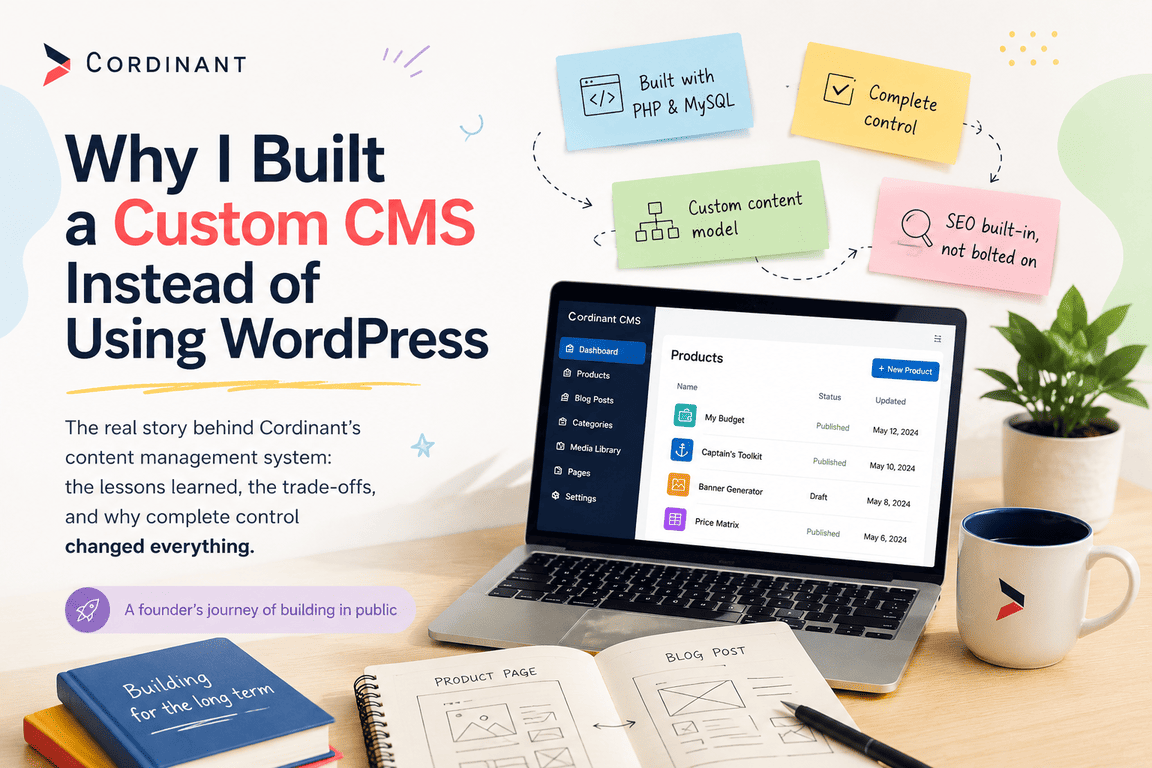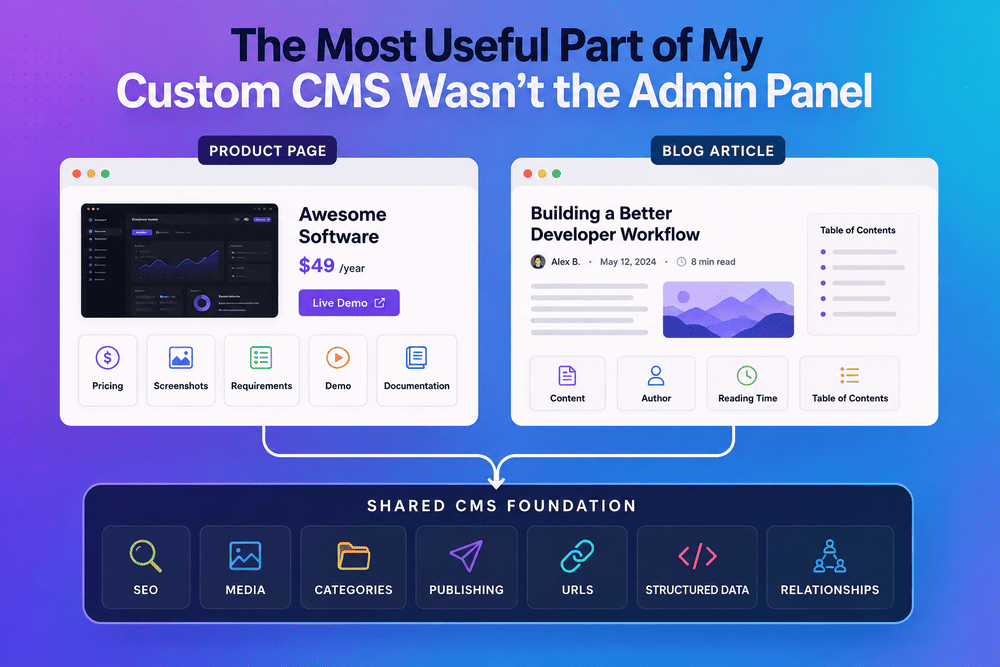
When I started building the custom CMS behind Cordinant, I thought I was building two content systems.
One would manage my products. The other would manage blog articles. That seemed obvious because the pages themselves looked completely different. A product page needed pricing, screenshots, technical requirements, documentation and links to a live demo, while an article needed long-form content, an author, reading time and a table of contents.
So my first instinct was to design them independently.
It took a while before I realised that I was looking at the wrong part of the problem.
Products and Articles Look Very Different From the Frontend
If you open a product page and a blog article on Cordinant, there is not much reason to think they belong to the same system.
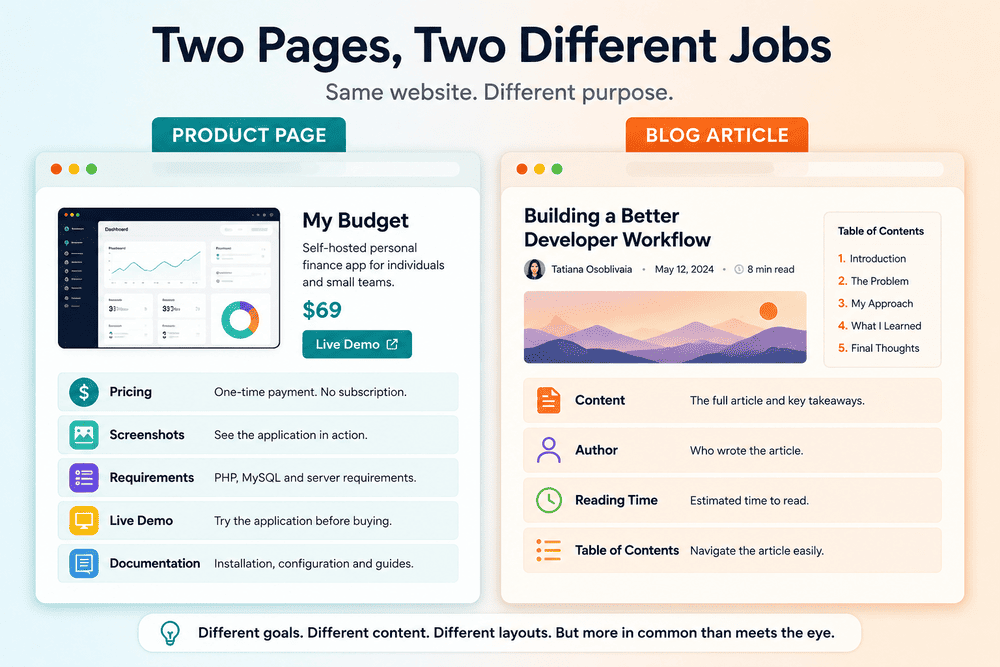
The purpose of a product page is fairly specific. It needs to explain what the software does, show how it looks, describe its requirements and features, provide documentation, and eventually give someone a way to buy it. The structure naturally becomes a mixture of marketing content, technical information and product-specific data.
An article has a different job. Most of the page is the article itself, surrounded by information such as the author, category, publication date, reading time, featured image and table of contents.
From the browser, these are clearly two different types of content.
From the database, the difference is less dramatic.
The Similarities Appeared Below the Page
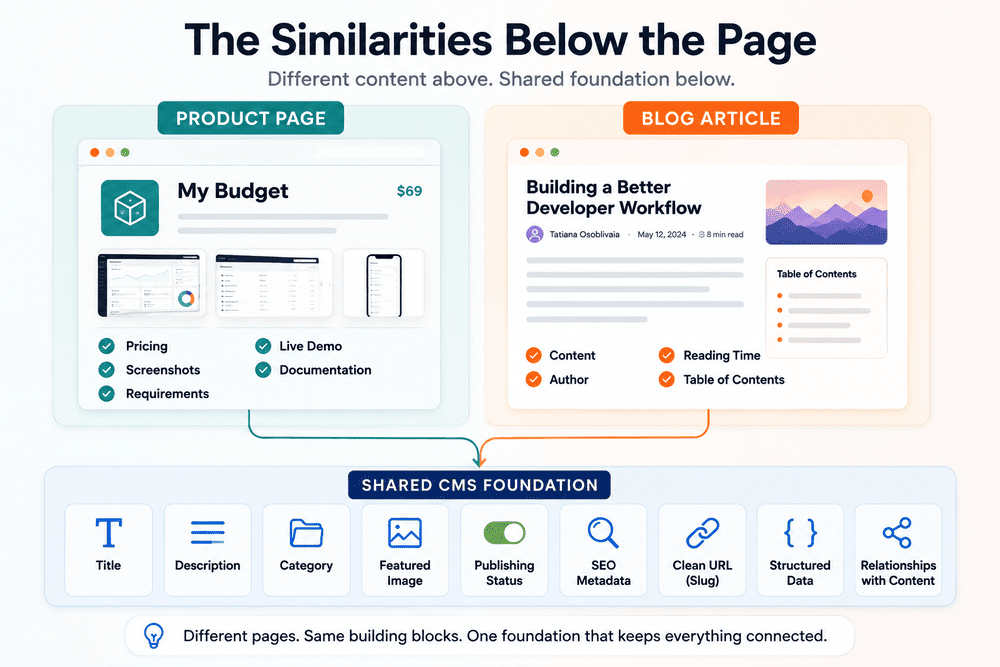
Once I stopped thinking about the visible layouts and started looking at the information the CMS actually needed to manage, I kept encountering the same things.
Both products and articles needed a title and description. Both needed categories, featured images and a publishing status. Both needed SEO metadata, clean URLs and some form of structured data. Eventually, both also needed relationships with other content on the site.
The specialised fields were still there, of course. A product might need a price, version, technical requirements, demo URL and documentation settings. An article might need an author, body content and information used to calculate or display reading time.
But those differences sat on top of a surprisingly similar foundation.
That changed the problem from “How do I build two content managers?” to something closer to “Which parts of these content managers are actually the same?”
I Had Started With the Exceptions
Looking back, my original approach was understandable. When designing an interface, the differences are the easiest things to notice.
A price field obviously has nothing to do with an article. A table of contents has little reason to appear in a product editor. Screenshots, documentation links and software requirements belong naturally to one side of the CMS, while long-form text belongs to the other.
If I designed the system around those visible differences, however, I would also end up implementing many of the same underlying behaviours twice.
Publishing is a good example. A product and an article may contain completely different information, but the CMS still needs to know whether either item is a draft or published. SEO metadata is another example. The fields may contain different text, but the rules around storing and rendering titles, descriptions and canonical URLs are largely shared concerns.
Media created the same kind of repetition. So did categories, slugs and the relationships between pieces of content.
The more of the CMS I built, the harder those repeated patterns became to ignore.
Shared Foundation, Different Editors
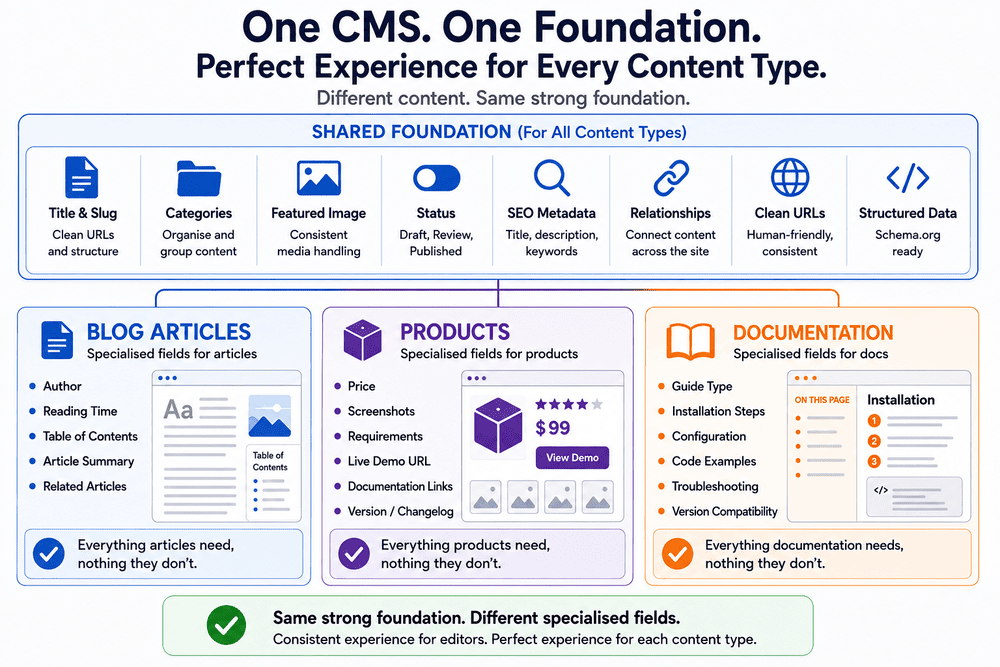
I eventually moved towards a structure where products and articles could remain separate where separation was useful without pretending that everything underneath them was unrelated.
They still have different admin editors. I would not want a product editor filled with irrelevant article fields simply because both content types happen to share some infrastructure. Their frontend templates are also different because visitors expect very different experiences from a software product page and a blog post.
The shared part sits lower.
Publishing behaviour can follow common rules. Media can use the same underlying system. SEO handling does not have to be reinvented for every content type. URLs can follow consistent conventions, and relationships between different types of content can be treated as part of the same website rather than as connections between isolated applications.
This sounds fairly obvious when described after the fact. It was much less obvious while I was building it.
The Useful Part Appeared Later
The real value of this architecture became clearer when the site started needing connections I had not considered at the beginning.
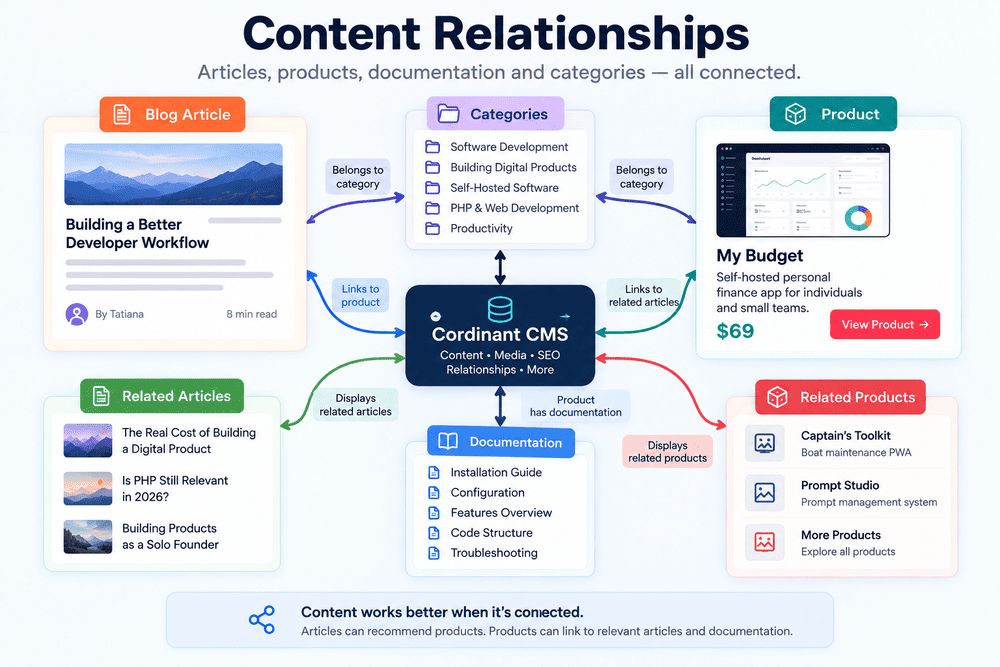
Suppose I write an article about building self-hosted software and want to recommend one of my products from it. If articles and products live in completely isolated systems, that relationship needs another mechanism: perhaps a manually entered URL, a special field or some new piece of code that knows how to connect the two.
Once the CMS already understands both as content within a shared foundation, the problem becomes smaller. An article can reference a product as another entity managed by the site.
The relationship can also work in the opposite direction. A product page can point readers towards relevant articles that explain the thinking, technical decisions or development experiences behind it.
That was more interesting to me than simply saving a little duplicate PHP.
The CMS was beginning to understand relationships between things rather than merely storing pages.
A CMS Becomes More Interesting When Content Stops Being Isolated
This is not particularly unusual in content management systems. Many mature CMS architectures distinguish between shared content concepts and fields that belong only to particular content types.
The implementation varies considerably. Some systems use generic content models with configurable fields. Others use separate database tables connected through shared services, taxonomies or relationship tables. There are also perfectly reasonable projects where keeping content types mostly independent is simpler and easier to maintain.
I do not think there is one database structure that every CMS should follow.
What interested me in my own project was how the requirement emerged. I did not begin by studying CMS architecture and deciding that Cordinant needed an elegant abstract content model. I began with concrete pages, created the fields they needed, and gradually noticed that I was solving some of the same problems repeatedly.
The abstraction followed the repetition rather than preceding it.
There Is Also a Risk in Sharing Too Much
Once you discover that several things have common behaviour, it is tempting to keep abstracting.
Products and articles have titles, so perhaps they should be the same type of object. They both have images, categories and metadata, so perhaps every field should go through a universal content engine. With enough abstraction, almost anything can eventually be described as “content.”
That does not necessarily make the software easier to work with.
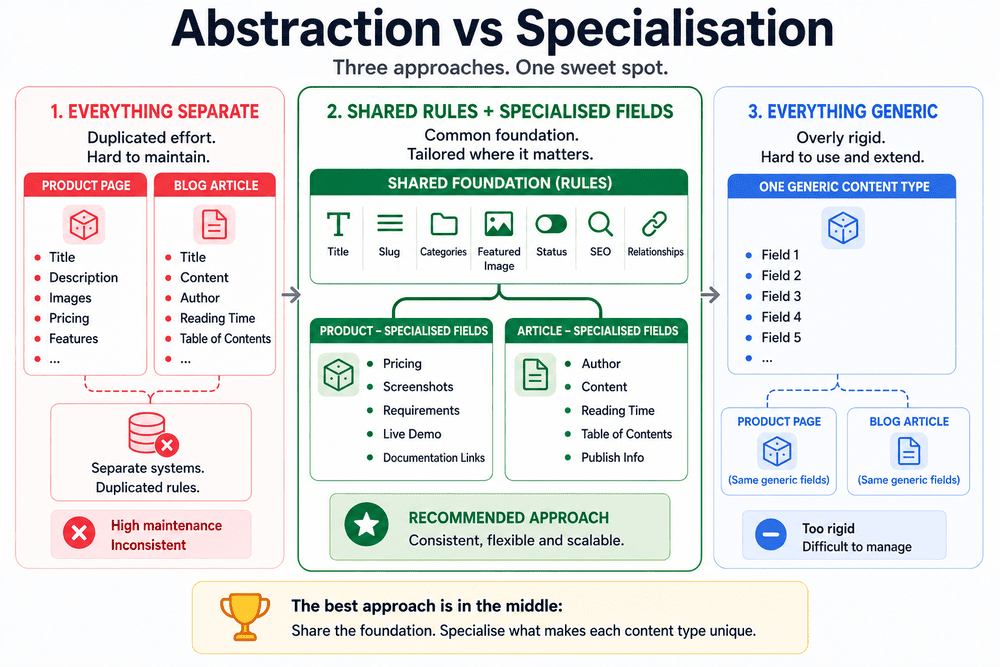
A product is still a product. It has behaviour and information that would make little sense for an article. If the shared layer becomes too generic, simple changes can start requiring an understanding of abstractions that exist mainly to make the architecture look consistent.
I have become more cautious about this while building my own applications. Repeated code can be annoying, but an abstraction created too early can be harder to remove than duplication.
The useful question for me became not “Can these things share a system?” but “Which rules are genuinely shared?”
The Admin Panel Was Only the Visible Part
When I originally thought about building a custom CMS, much of my attention was on the admin interface.
I needed forms where I could create products, edit articles, upload images and change metadata. Those were the visible pieces, and finishing them gave the satisfying feeling that the CMS was becoming real.
But the admin panel turned out not to be the most useful part.
The more valuable part was the structure behind it: deciding which concepts belonged to the whole website and which belonged only to one content type. That structure made later features easier because new requirements could often connect to something that already existed instead of creating another isolated mechanism.
It also changed how I look at other parts of software development.
Sometimes the Pattern Appears Only After the Second Version
There is a common attraction in software architecture to getting the structure right before building very much. I understand why. A good architecture can prevent expensive changes later.
My experience with this CMS was almost the reverse.
I needed some duplication before I could see what was actually duplicated. I needed separate product and article requirements before I could distinguish meaningful differences from superficial ones. Some of the architecture became obvious only after enough real features existed to expose the pattern.
If I had tried to design a universal content architecture at the very beginning, I might have produced something much more elaborate than the site required. I did not yet know which similarities would matter.
Building first created some mess, but the mess contained information.
The repeated fields, repeated queries and repeated behaviours were showing me where the boundaries of the system might actually belong.
Different on the Surface, Shared Underneath
Products and articles still look very different on Cordinant, and I want them to.
Visitors do not need to know that parts of their publishing, SEO, media and relationship logic come from the same foundation. From their perspective, each page should simply behave like the type of page it is.
For me, though, discovering what those pages shared changed the CMS more than designing another admin screen did.
I started the project assuming that specialised pages required specialised systems. What I eventually found was slightly different: sometimes the specialised part is only the top layer, while most of the interesting architecture is hiding underneath it.
I did not see that structure when I began building the CMS. I needed to build enough of the wrong boundaries first.
Perhaps that is one reason architecture often looks much more obvious when looking backwards.