PHP & MySQL Finance App Source Code
My Budget — Self-Hosted PHP Personal Finance App Source Code
Start with a Complete Finance Application, Not an Empty Project.
A complete, customizable foundation for building a personal finance or budgeting application with PHP and MySQL. Includes transaction management, financial dashboards, categories, savings goals, reports, CSV export, authentication, an installation wizard and documentation.
Full Source Code
PHP + MySQL
Self-Hosted
Installation Wizard
Responsive Interface
Documentation Included
Product Overview
My Budget - PHP Finance App Source Code at a Glance
The essential technical and product details before you explore the application.
Overview
What Is My Budget?
My Budget is a self-hosted personal finance application built with PHP and MySQL. It provides a working application for managing income, expenses, transaction categories, savings goals and financial reports through a responsive web interface.
How It Is Delivered
My Budget is supplied as source code and installed on your own compatible hosting environment. Developers can modify the application, adapt its interface and extend its functionality for their own project requirements.
Inside the Package
What’s Included
The product package contains the application and the core resources needed to install, configure, and work with the codebase.
Application Source Code
Complete PHP application source code for installation, customization and further development.
Database Schema
The MySQL database structure required by the application.
Installation Wizard
A browser-based first-time installer for preparing the application and database connection.
Configuration Templates
Configuration templates for setting up the application environment.
Frontend Assets
HTML, CSS and JavaScript assets used throughout the responsive application interface.
Email Integration
PHPMailer integration for SMTP-based application email functionality such as password reset.
Technical Documentation
Detailed buyer documentation covering installation, configuration, customization, troubleshooting and deployment.
Features
Key Features
My Budget combines the main tools needed for personal finance tracking in one application. Users can record financial activity, organize transactions, track savings goals, review reports and export supported data.
Financial Dashboard
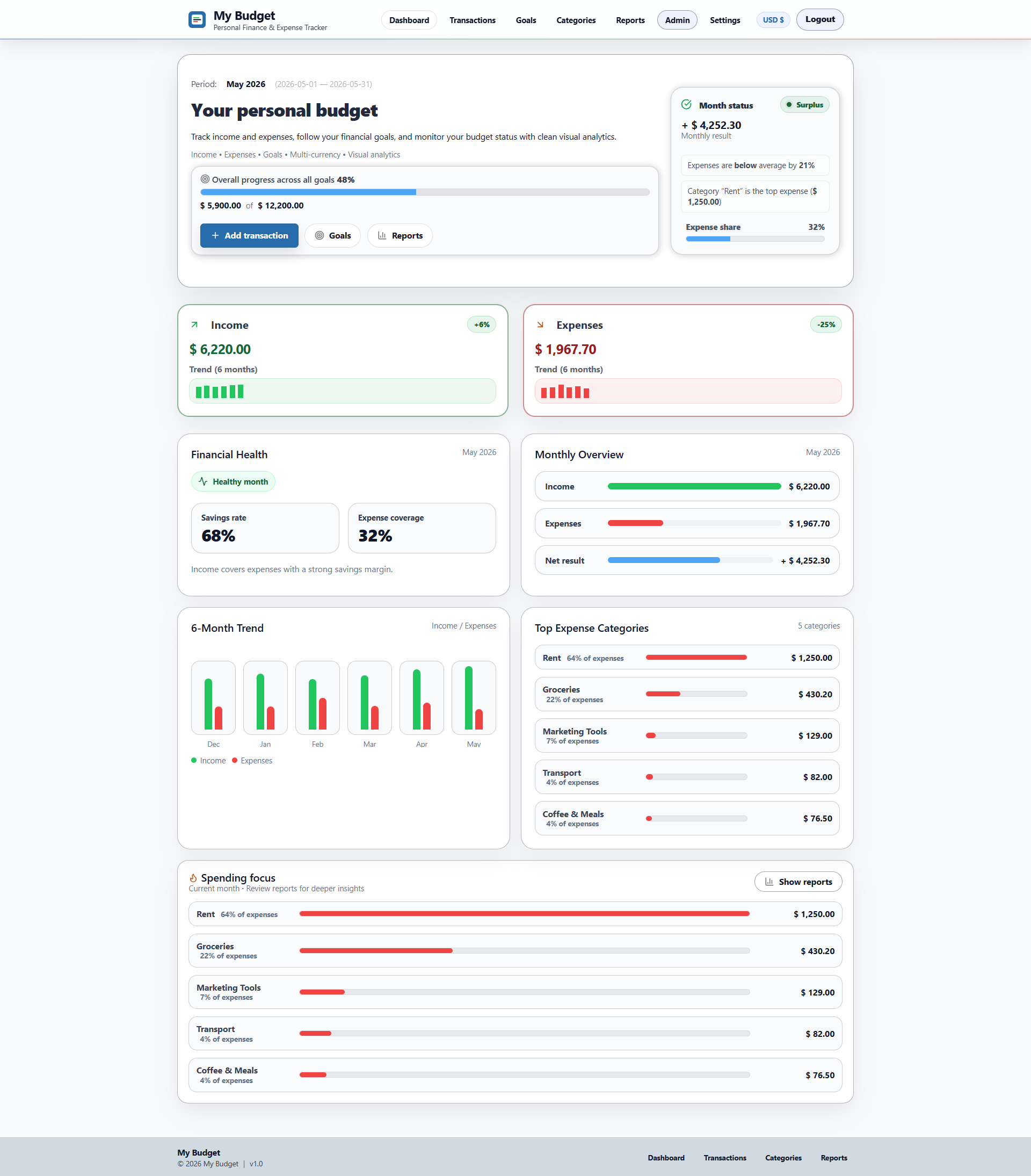
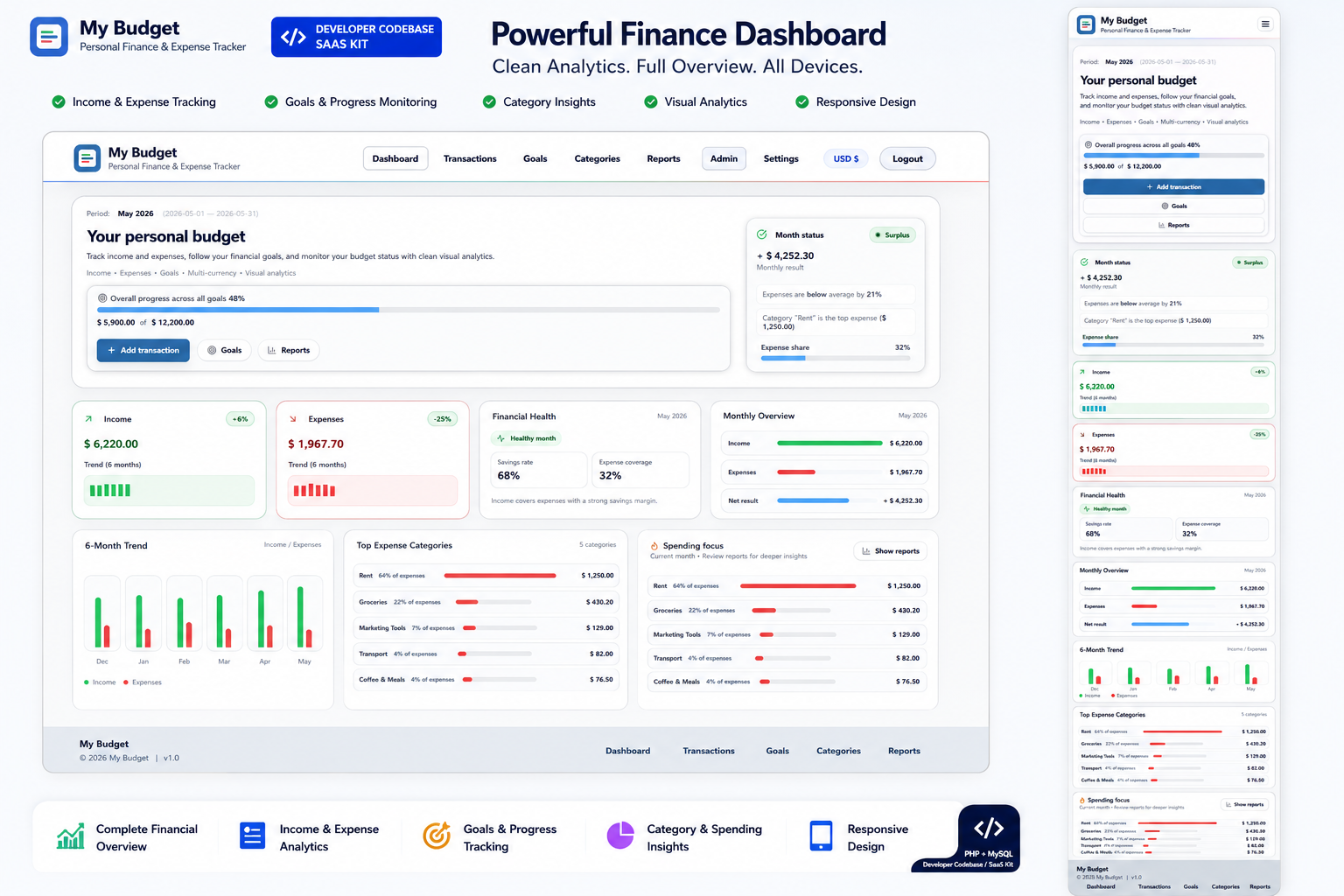
View income, expenses, balance, savings rate, financial health, recent trends and top expense categories.
Transactions
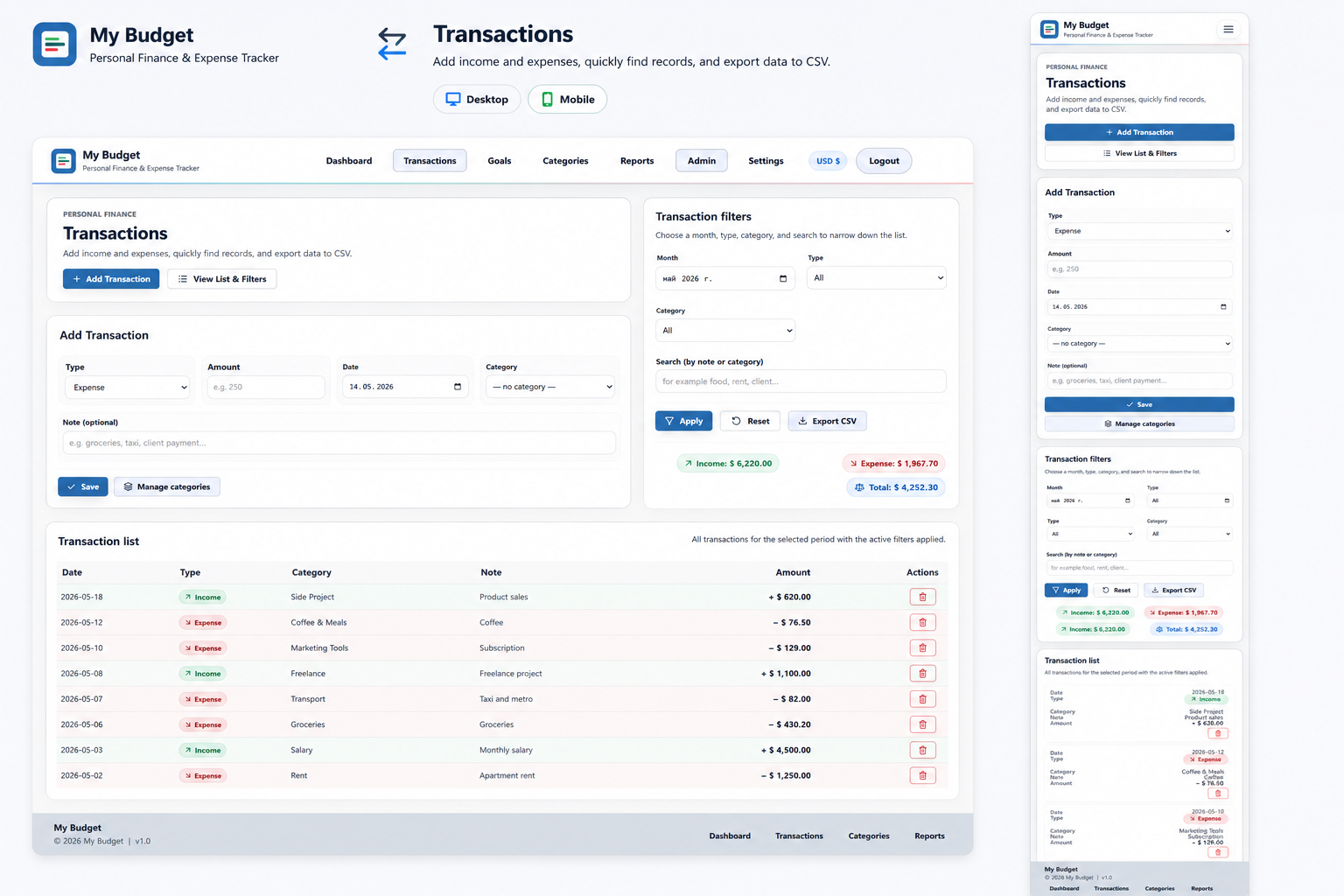
Record and manage income and expense entries in a structured transaction list.
Categories
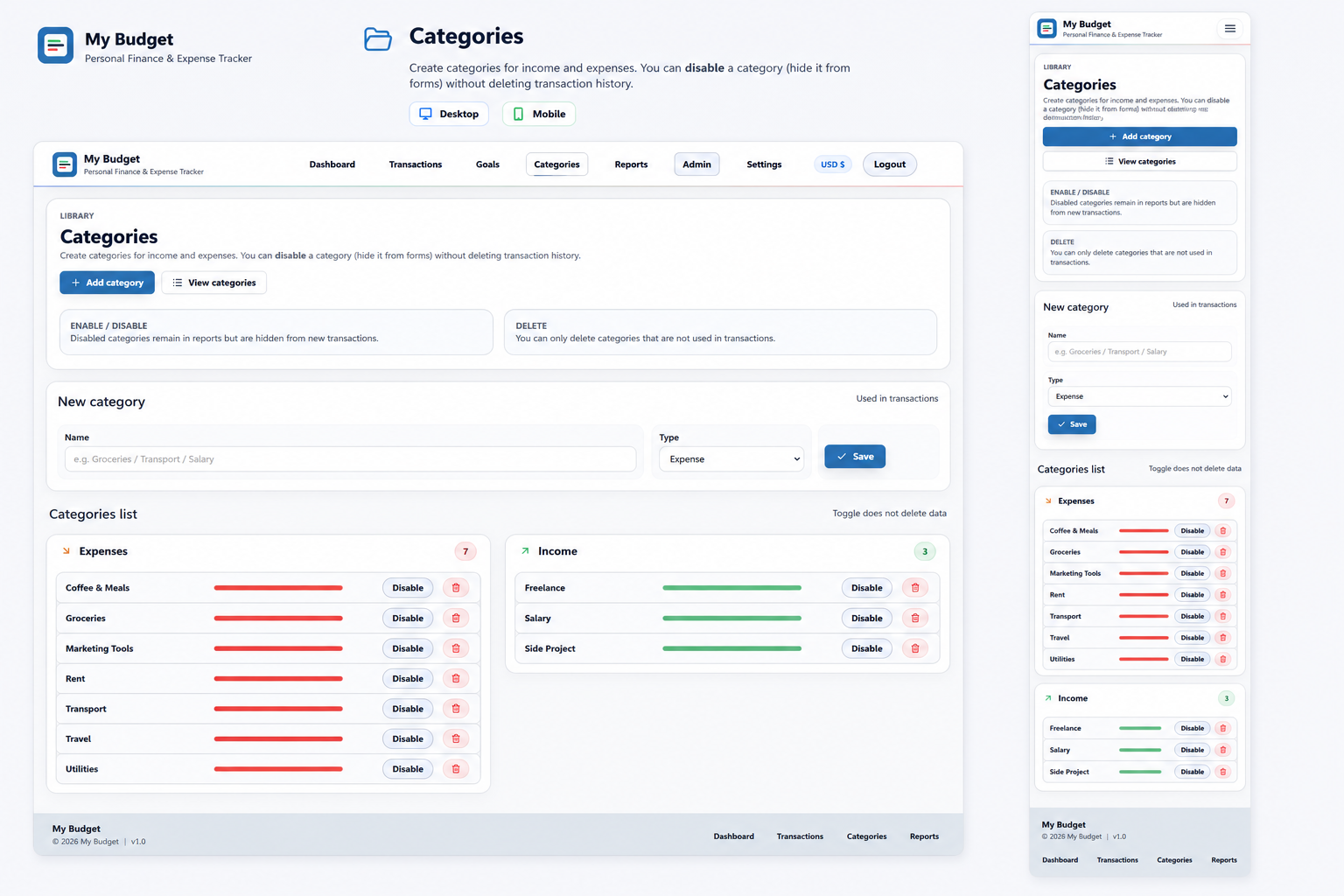
Organize financial transactions using manageable income and expense categories.
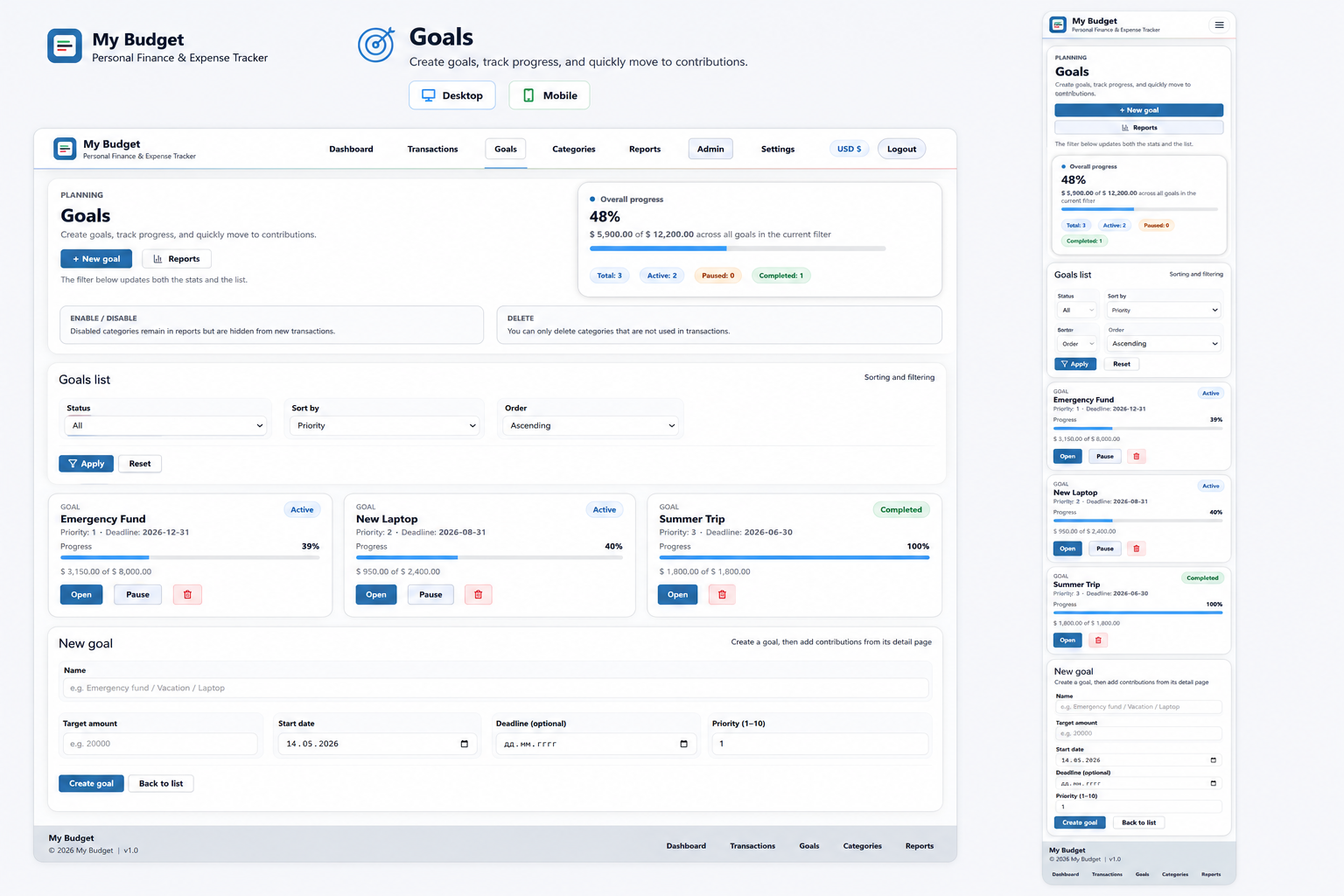
Savings Goals
Create financial goals and track contributions toward them.
Reports
Review financial information through dedicated reporting and analysis pages.
CSV Export
Export supported financial data including transactions, goals, contributions and report information.
Multi-Currency
Use the documented USD, EUR and GBP currency options.
User Accounts
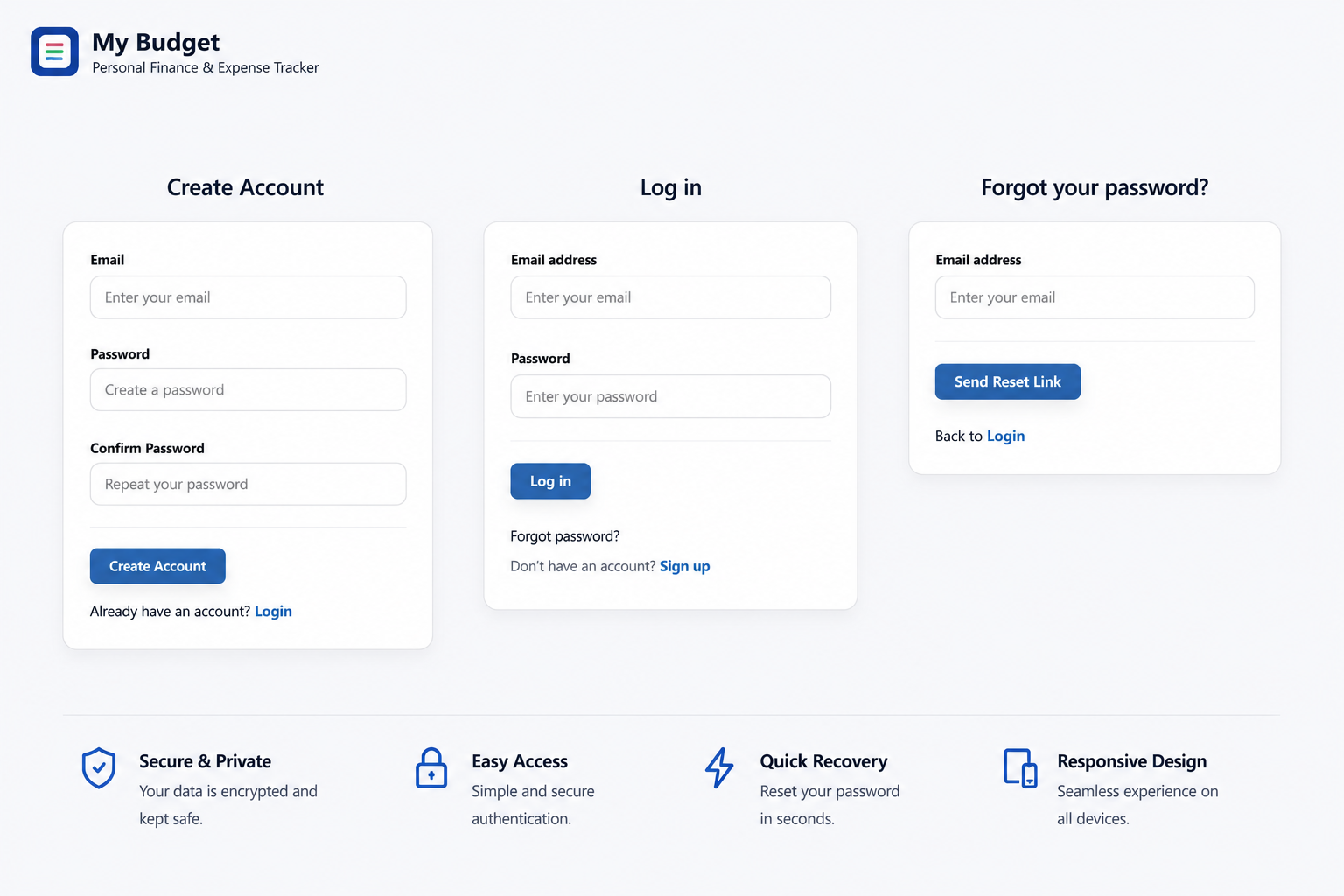
Registration, login, logout, forgot-password and password-reset flows are included.
Admin Access
A lightweight administration area provides user overview, search, role filtering and role management.
PDO Database Access
Database operations use PDO and prepared statements.
Environment Configuration
Installation-specific settings are separated from the main application through environment configuration.
Editable PHP Codebase
The PHP application source code can be modified or extended for project requirements.
CSRF Protection
CSRF protection helpers are included for supported application forms and actions.
Browser-Based Installer
A first-time installation wizard guides the initial application setup.
Self-Hosted Deployment
Install the application in your own compatible PHP and MySQL hosting environment.
Subfolder Support
The application supports installation in the domain root or a configured subfolder.
SMTP Integration
Configure SMTP for password-reset email functionality.
Preview
Product Preview
The preview section shows the main parts of the application, including the dashboard, transactions, categories, goals, reports, account settings, and responsive layout.
Get a complete overview of your personal finances with income, expenses, savings goals, and interactive charts. The dashboard helps you understand spending trends and monitor your financial progress at a glance.
Record, edit and organize every income and expense with categories and notes.
Create custom categories to keep your finances structured and easy to analyze.
Protect access with user authentication and secure account management.
Set savings targets, track progress and monitor contributions over time.
Use Cases
A Foundation for Different Projects
Adapt the same underlying application to different project types without presenting features the product does not actually include.
PHP Developers
Use the existing finance application as a technical starting point for a custom PHP project.
Personal Budget Tracker
Adapt the existing finance modules into a personal budgeting application.
Expense Management Application
Use the transaction and category structure as the basis for an expense-focused project.
Savings Tracker
Build on the existing financial goals and contributions functionality.
Financial Dashboard
Extend the existing dashboard and reporting features for a custom finance project.
Agencies & Freelancers
Adapt the application for finance-related client projects where an existing PHP codebase provides a useful starting point.
Branded Client Finance Portal
Adapt the interface and branding for an eligible client project.
Expense Tracking System
Customize transactions, categories and reporting around a client workflow.
Custom Budgeting Application
Use My Budget as the foundation for a tailored budgeting project.
Internal Finance Dashboard
Adapt the dashboard and reporting modules for an internal client tool.
Startup Founders
Use the existing application to explore or validate a finance-product concept before investing in a completely new codebase.
Personal Finance MVP
Use the existing application as a technical foundation for testing a personal finance concept.
Budgeting Product Prototype
Adapt the existing workflows into a prototype for a budgeting product.
Expense Management Concept
Build on the transaction and reporting modules for an expense-focused product idea.
Finance Dashboard Concept
Extend the dashboard and analytics interface around a specific finance use case.
Businesses
Adapt the application for internal financial tracking where a lightweight self-hosted PHP solution is appropriate.
Internal Budget Tracker
Adapt My Budget for internal income, expense and budget tracking.
Expense Management Tool
Use the transaction and category modules for structured expense records.
Finance Dashboard
Customize the existing dashboard for internal financial reporting.
Small-Business Budgeting System
Adapt the finance workflows around the requirements of a small business.
Technical Details
Technical Requirements
My Budget uses a conventional PHP and MySQL stack and is installed on your own compatible hosting environment. Check the server requirements before purchasing or installing the application.
Application Stack
- Backend
- PHP
- Database
- MySQL / MariaDB
- Database Access
- PDO
- Frontend
- HTML5, CSS3 & Vanilla JavaScript
- Authentication
- Session-based authentication
- PHPMailer via SMTP
- Security
- CSRF protection and prepared database statements
Server Requirements
- PHP
- PHP 8.0 or higher
- Database
- MySQL 5.7+ or compatible MariaDB
- Web Server
- Apache or another compatible PHP environment
- PHP Extensions
- PDO and pdo_mysql
- Hosting
- Linux PHP hosting recommended; cPanel or a similar environment can be used
- SMTP
- Required only when password-reset email functionality is needed
Explore Before You Buy
Documentation Included
Review the public documentation for My Budget before purchasing. Explore the application structure, core features, technical requirements, installation process, configuration, and deployment information.
Read My Budget DocumentationThe public documentation provides an overview of My Budget before purchase. The downloadable product package includes the buyer documentation required for installation, configuration, and working with the source code.
Pricing
Choose Your License
Choose the license that matches how you intend to use My Budget.
Standard License
For one personal or commercial project.
$69
- Full source code
- Single project use
- Commercial use
- Installation files
- Buyer documentation
- Multiple deployments
- Client projects
Extended License
For broader commercial use including eligible client work and multiple deployments, subject to the Extended License terms.
$149
- Full source code
- Multiple project use
- Commercial use
- Eligible client projects
- Installation files
- Buyer documentation
Review the complete licence terms before purchasing. The selected licence determines how the source code may be used, deployed, and incorporated into commercial or client projects.
Before You Buy
Questions Before Buying
Is My Budget a hosted SaaS service?
No. My Budget is a self-hosted PHP and MySQL application. You install it on your own compatible hosting environment.
Is the full source code included?
Yes. The product package contains the editable PHP application source code together with the database structure and frontend assets.
What PHP version does My Budget require?
My Budget requires PHP 8.0 or higher together with PDO and pdo_mysql.
What database does My Budget use?
My Budget uses MySQL 5.7+ and is documented for compatible MariaDB environments.
Can I customize the application?
Yes. The PHP source code, interface assets and supported configuration areas can be modified for your project.
Can I change the branding?
Yes. The application name, logo, interface styling and other supported branding elements can be adapted. Commercial and client use still depends on the selected license.
Can I use My Budget for a client project?
Client-project use depends on the selected license. Review the Standard and Extended License terms before purchasing.
Does My Budget work on shared hosting?
It can run on compatible PHP hosting where the required PHP version, database and extensions are available. Linux hosting with cPanel or a similar environment is recommended.
Is an installer included?
Yes. My Budget includes a browser-based installation wizard for the initial application setup.
Is documentation included?
Yes. Public documentation is available before purchase, and detailed buyer documentation is included with the downloadable product package.
Can I see the application before purchasing?
Yes. The live demo lets you explore the application interface and main finance workflows before choosing a license.
Does the purchase include hosting?
No. Hosting, domain registration, server administration and custom development services are not included with the source-code product.
Explore My Budget Before You Choose
Try the live application, review the documentation or compare the available licenses before purchasing.