A contact form is one of the simplest parts of a website. At least it looks that way.
A visitor enters a name, email address and message, clicks Send, and the website delivers the enquiry. There is not much to think about until automated submissions start appearing.
That happened with the contact form on my personal website - Cordinant. I wanted to reduce bot submissions, but I did not particularly like the most obvious solution: putting a CAPTCHA in front of every person who wanted to contact me.
So I tried a different approach.
Instead of asking visitors to prove that they were human, I made the server look for signs that a submission probably was not.
I Wanted the Protection to Be Mostly Invisible
For a normal visitor, I wanted the contact page to remain boring.
Open the page. Write a message. Click Send.
There should not be an extra puzzle or another third-party widget to interact with unless there was a real reason for it. This meant moving most of the protection behind the visible form.
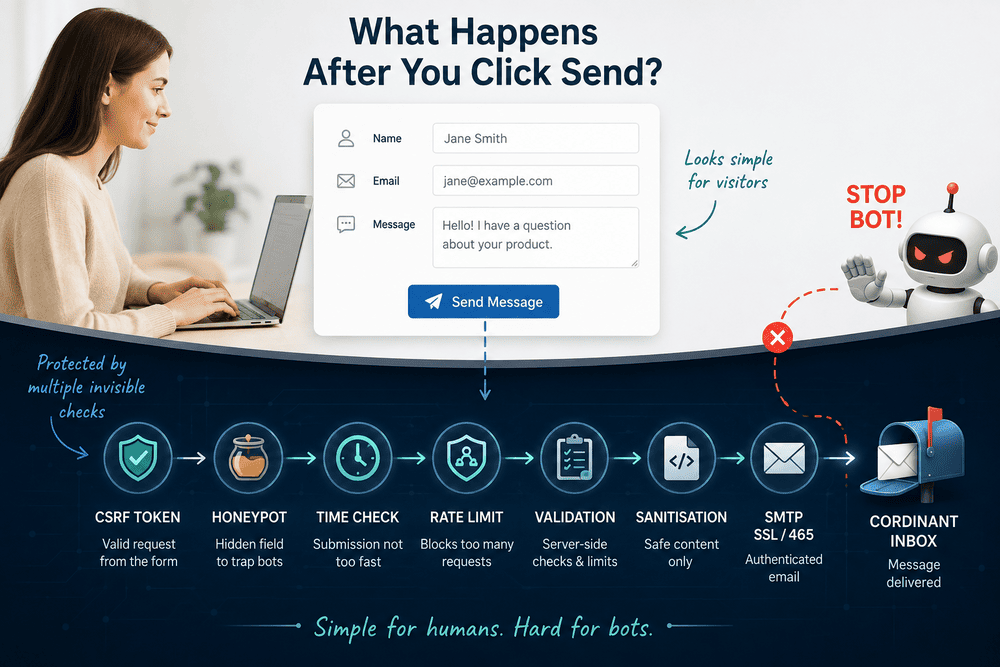
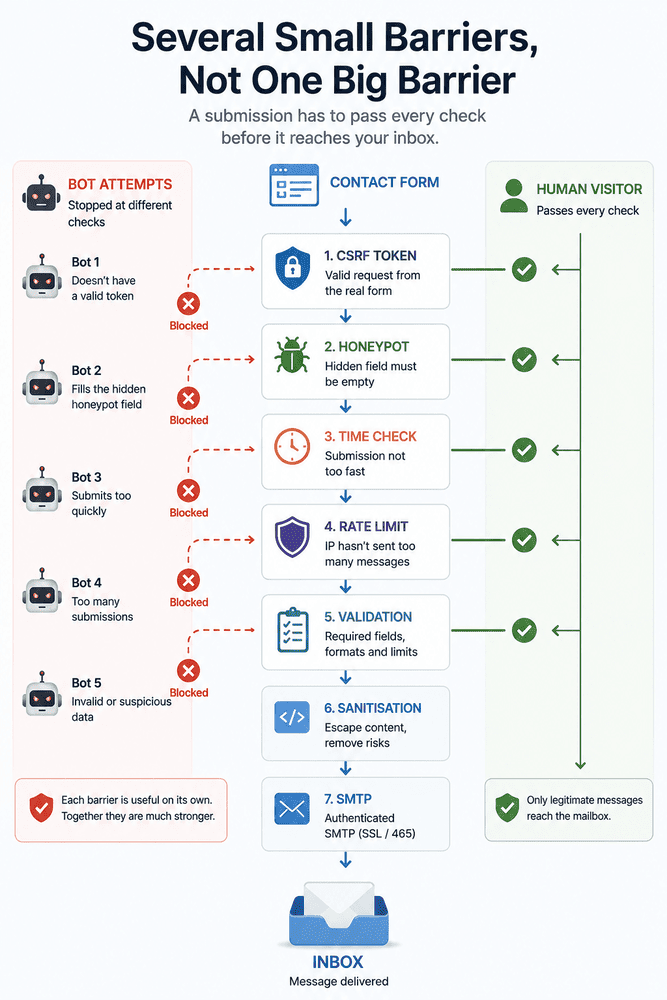
The PHP application could examine a submission in several different ways before deciding whether it should be allowed to reach my inbox. Did the request come through the real form? Did it fill something that a human would never see? How quickly was it submitted? How many other messages had recently come from the same source?
None of those questions provides a perfect answer by itself. That became an important part of the design.
I was not trying to find one clever test that could identify every bot. I was trying to make automated submissions pass several small tests before they could do anything useful.
The First Trap Is a Field Nobody Should Fill In
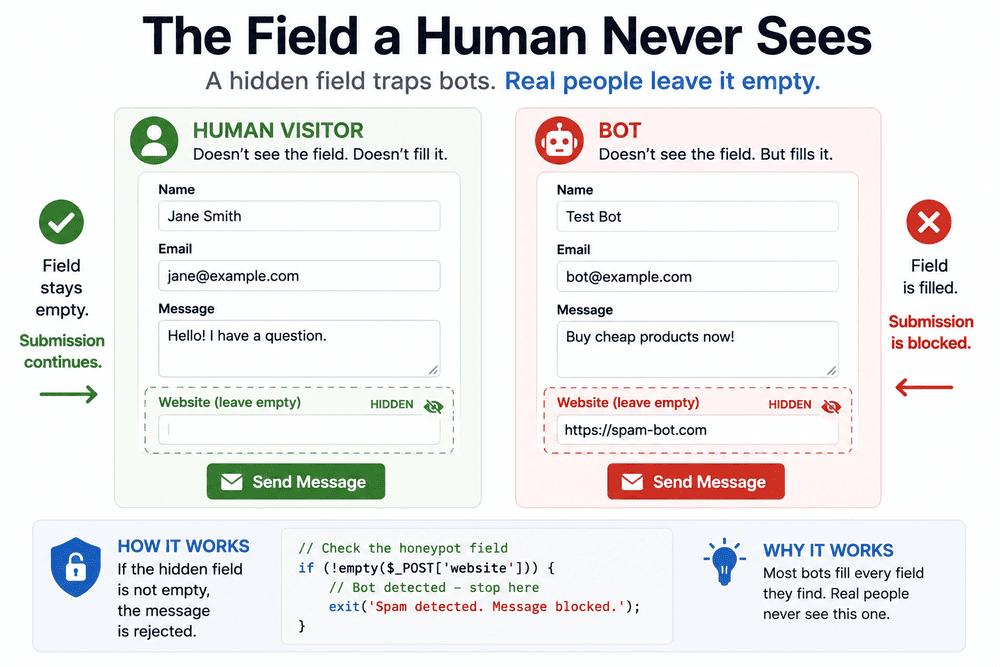
One of the simplest checks is a honeypot.
The contact form contains an additional field called website. It is present in the HTML, but CSS moves it away from the visible interface and it is removed from the normal keyboard tab order.
A real visitor has no reason to interact with it.
<input
    type="text"
    name="website"
    autocomplete="off"
    tabindex="-1"
    class="contact-honeypot"
>
The CSS can be very simple:
.contact-honeypot {
    position: absolute;
    left: -9999px;
}
A basic form bot may see the situation differently. It finds fields called name, email, website and message, and tries to populate all of them.
That makes the otherwise useless website field useful.
On the server, PHP can check whether it contains anything:
<?php
if (!empty($_POST['website'] ?? '')) {
    exit;
}
?>
If it does, the message does not need to go any further.
There is also no particular reason to explain this to the bot. A suspicious request can receive an ordinary-looking response even though no email was sent.
Giving detailed feedback about which anti-spam check failed would only make the form easier to probe.
A honeypot is wonderfully simple, but that simplicity also means it cannot be the entire defence. A bot can learn not to fill hidden fields.
Humans Usually Need More Than One Second to Write a Message
The next signal comes from something the visitor is already doing: spending time on the page.
When Cordinant displays the contact form, PHP records the current time in the session.
<?php
$_SESSION['contact_form_time'] = time();
?>
When the POST request arrives, the server can compare the stored value with the current time.
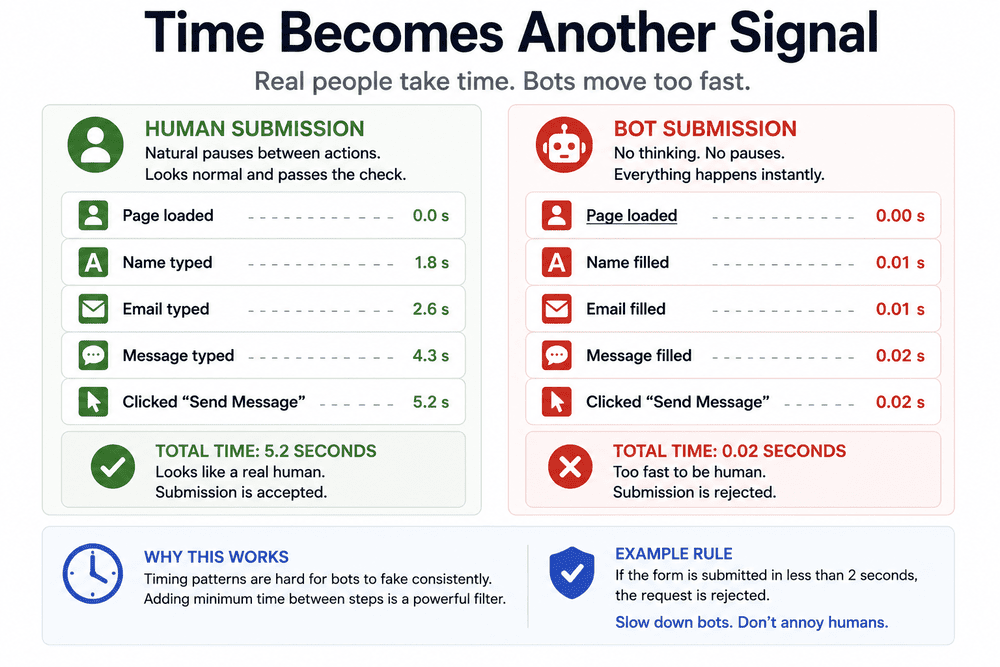
<?php
$startedAt = $_SESSION['contact_form_time'] ?? 0;

if ($startedAt && (time() - $startedAt) < 4) {
    exit;
}
?>
There is nothing magical about four seconds. I considered a range of roughly three to five seconds when working on the form.
The interesting part is the difference in behaviour.
A person needs to look at the page, enter a name, type an email address and write some kind of message. A request that arrives almost immediately after the form was served looks different.
Timing is not a verdict. Someone may use autofill, visitors type at different speeds, and a more capable bot can simply wait before submitting.
So timing is not a verdict. It is another signal.
A Valid POST Has to Come Through the Form
The contact page also creates a CSRF token when the form is loaded and stores it in the visitor's session.
For example:
<?php
$_SESSION['csrf_token'] = bin2hex(random_bytes(32));
?>
The same value is placed in a hidden form field:
<input
    type="hidden"
    name="csrf_token"
    value="<?= htmlspecialchars($_SESSION['csrf_token']) ?>"
>
When the form comes back as a POST request, PHP compares the submitted token with the session value.
<?php
$token = $_POST['csrf_token'] ?? '';

if (
    empty($_SESSION['csrf_token']) ||
    !hash_equals($_SESSION['csrf_token'], $token)
) {
    exit;
}
?>
CSRF protection is not really an anti-spam mechanism. Its main purpose is different: protecting an application from forged requests.
But in this particular architecture it has a useful secondary effect. A very primitive script cannot just discover the contact endpoint and repeatedly fire arbitrary POST requests at it. It first needs to interact with the application sufficiently to obtain a valid form and session.
Again, this is not enough to stop a determined bot.
It is one more barrier.
I Still Don't Trust What the Browser Says
The visible form already contains familiar browser-side validation. An email field can be declared like this:
<input type="email" name="email" required>That is useful for people. It can catch a missing field or an obviously malformed email before the form is submitted.
But the server cannot assume that the browser was involved at all.
An automated client can send a POST request directly to the PHP endpoint. It does not have to render the form, obey required, respect type="email" or interact with the interface in the way I intended.
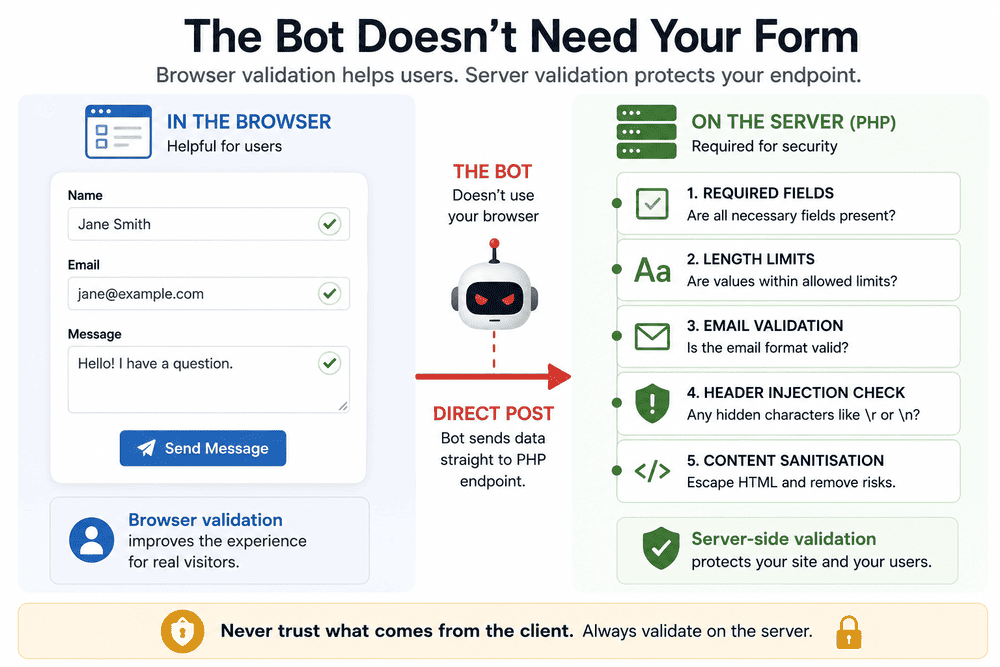
So the values are checked again on the server.
<?php
$name = trim($_POST['name'] ?? '');
$email = trim($_POST['email'] ?? '');
$message = trim($_POST['message'] ?? '');

if ($name === '' || $email === '' || $message === '') {
    // Validation error
}

if (!filter_var($email, FILTER_VALIDATE_EMAIL)) {
    // Invalid email
}
?>
I also added sensible length limits. A name does not need to contain thousands of characters, and neither does an email address.
For Cordinant, the limits considered were 100 characters for the name, 254 for the email address and 5,000 for the message.
- Name: up to 100 characters
- Email: up to 254 characters
- Message: up to 5,000 characters
These checks are partly about spam, but not entirely. Once a public endpoint accepts arbitrary input from the internet, basic validation is useful regardless of whether the person on the other side is a spammer, a bot or simply someone who submitted unexpected data.
The Email Address Can Be More Dangerous Than It Looks
There is another reason not to blindly trust contact-form values.
Some of them may eventually be used while constructing an email. That creates the possibility of email header injection if values are handled carelessly.
A malicious value could attempt to introduce new lines followed by headers such as BCC:, CC: or Content-Type:.
One simple check is to reject carriage-return or newline characters in values that may reach email headers:
<?php
if (preg_match('/[\r\n]/', $email)) {
    exit;
}
?>
The same principle applies to other user-controlled values if they are used when constructing headers.
A contact form is not only an anti-spam problem. It is also an interface between anonymous internet traffic and an email-sending system.
Escaping the Message Is a Different Problem Again
The message field creates another question.
Someone can submit text that looks like HTML:
<script>...</script>Or links and other markup.
That does not mean the application should treat it as trusted HTML.
When user content is displayed, it can be escaped with htmlspecialchars(). If the contact email itself uses HTML, the message can still be escaped before line breaks are added:
<?php
$safeMessage = nl2br(
    htmlspecialchars($message, ENT_QUOTES, 'UTF-8')
);
?>
This is not a bot detector. A perfectly legitimate visitor could include angle brackets in a message, while a bot could send completely harmless-looking plain text.
It is simply another example of why several different concerns meet inside something as ordinary as a contact form.
What If the Bot Learns to Behave Like a Human?
The limitations of the first checks become more obvious if I imagine a slightly better bot.
Instead of blindly submitting data, it could do this:
- GET
contact.php - Keep the session and CSRF token
- Leave the honeypot empty
- Wait five seconds
- POST the message
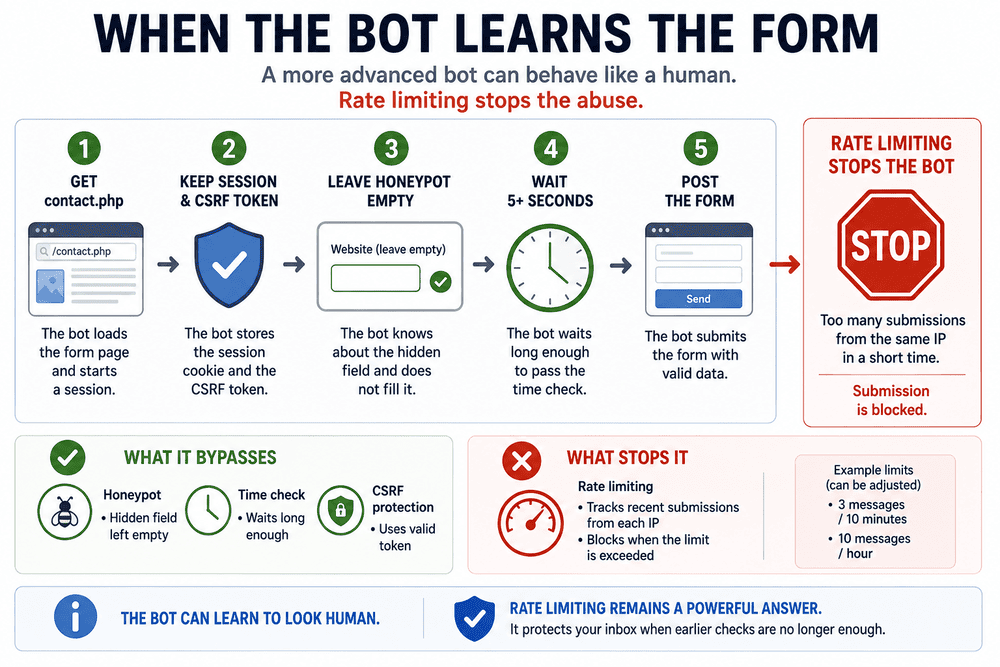
At that point, several of my checks have been successfully passed.
This is where rate limiting becomes much more useful.
The server can keep track of recent submissions and reject a source that sends too many messages within a particular period.
For a small contact form, limits such as three messages in ten minutes or a broader limit of ten per hour are examples of the kind of thresholds I considered.
| Example Limit | Purpose |
|---|---|
| 3 messages / 10 minutes | Stops rapid repeated submissions |
| 10 messages / hour | Adds a broader long-term limit |
The exact numbers are not the interesting part. They depend on the website and what normal usage looks like.
The important difference is that rate limiting asks another question entirely.
- The honeypot asks what the client filled in.
- Timing asks how quickly it acted.
- CSRF asks whether it interacted with a valid form and session.
- Rate limiting asks how often it keeps coming back.
A bot can imitate one piece of human behaviour and still look suspicious when viewed from another angle.
Rate Limiting Is Only as Good as the IP You Trust
IP-based limiting introduces its own complication: determining which IP address actually belongs to the client.
When an application receives traffic directly, $_SERVER['REMOTE_ADDR'] is the basic starting point.
Things become more complicated when a trusted proxy or service such as Cloudflare sits in front of the application. In that situation, information supplied by the proxy may be needed to determine the original client.
I would not blindly trust any X-Forwarded-For header sent to the application. A client can supply arbitrary HTTP headers unless the application knows the request came through trusted proxy infrastructure.
If an application accepts an arbitrary forwarded IP without first establishing that the request came through trusted proxy infrastructure, a bot may simply claim to have a different address.
A rate limiter built on untrusted identity information is not much of a limiter.
Blocking Bots Is Useful. Knowing What Was Blocked Is Better.
Initially, it is tempting to make every suspicious condition end with exit; and forget about it.
That stops the request, but it also removes useful information.
For some rejected submissions, I would rather record a small security event containing things such as the timestamp, IP address, user agent and reason for rejection.
A log might say:
2026-09-01 18:43
Reason: honeypot
Or:
Reason: submitted-too-fastOr:
Reason: rate-limitThis makes the protection observable.
If almost everything is being stopped by the honeypot, that tells me something. If requests begin consistently passing the early checks and reaching the rate limiter, that tells me something else.
A security log does not need everything. I would not put passwords, CSRF tokens or complete private contact messages into it just because those values are available.
The purpose is to understand what the protection is doing, not to create another collection of sensitive data.
SMTP Is the Last Step, Not the First
Eventually a legitimate contact request needs to become an email.
For Cordinant, the important part is the order in which that happens.
POST → method check → CSRF → honeypot → timing → rate limit → required fields → length limits → email validation → header-injection check → sanitisation → SMTP
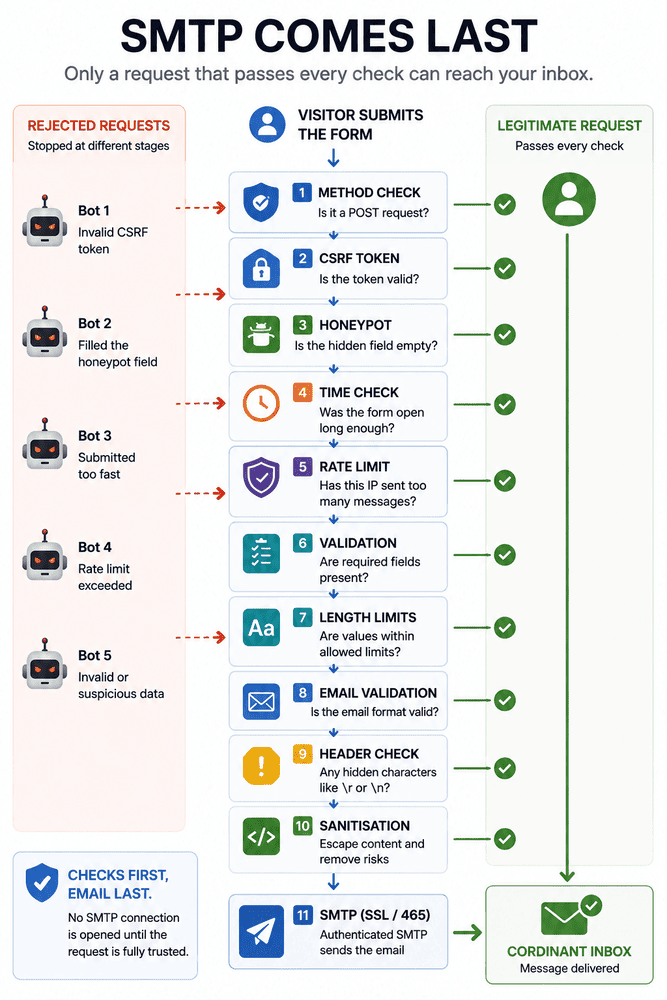
Only then does the application try to send anything.
This order prevents an obviously rejected request from unnecessarily reaching the mail-sending stage. A bot should not be able to make the application repeatedly open SMTP connections before it has passed the cheaper checks.
For Cordinant, I use authenticated SMTP rather than relying on a basic PHP mail() call.
While working on the contact system, I also had to correct the SMTP configuration itself. The setup eventually used SSL on port 465.
| Stage | Cordinant Setup |
|---|---|
| Transport | Authenticated SMTP |
| Encryption | SSL |
| Port | 465 |
So the actual journey of a successful message is closer to this:
Visitor → contact.php → anti-spam and validation checks → authenticated SMTP → Cordinant inbox
The visible Send button is only the beginning of that path.
SPF, DKIM and DMARC Solve Another Part of the Problem
Email infrastructure adds another set of familiar security terms: SPF, DKIM and DMARC.
They matter, but they solve a different problem.
Those mechanisms operate at the domain email level. They help establish which systems are authorised to send mail for a domain, authenticate messages and define how receiving systems should handle authentication failures.
They do not prevent a bot from filling in my contact form.
That distinction matters because it is easy to put everything under a broad label such as "email security." The contact endpoint and the domain's outgoing email identity are different layers, and they need different protections.
Why I Still Haven't Added CAPTCHA
None of this means CAPTCHA is bad.
It also does not mean that a honeypot, timing check and rate limiter will stop every automated system indefinitely.
The question for me was whether every legitimate Cordinant visitor should encounter additional friction before I had evidence that it was necessary.
For now, the contact form can rely on a combination of honeypot, timing, CSRF protection, server-side validation and rate limiting.
Most of that is invisible to somebody simply trying to write to me.
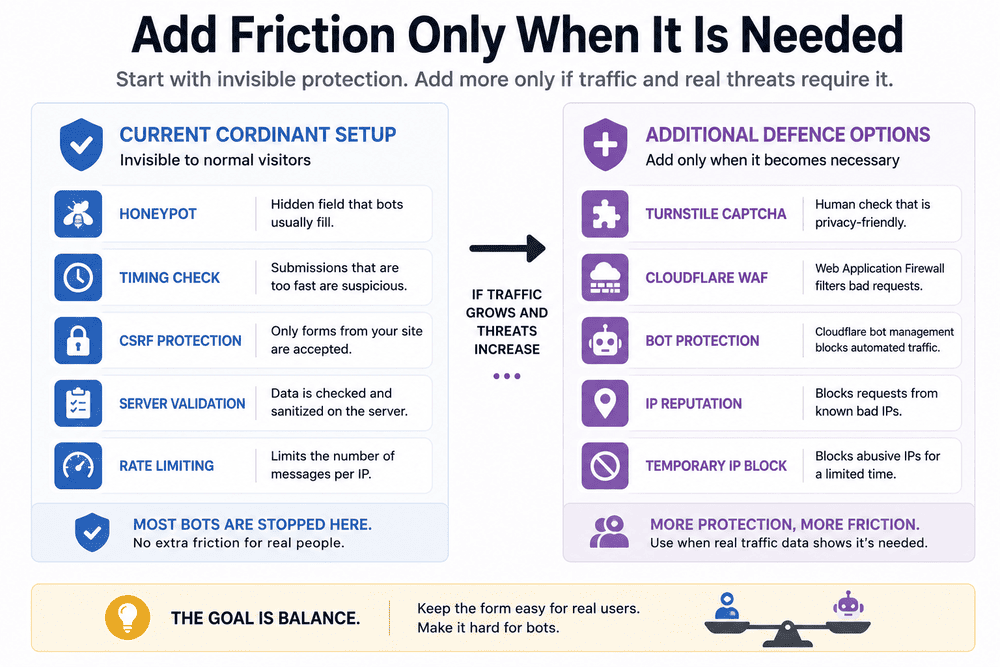
If that stops being sufficient, there are other layers available.
Cloudflare Turnstile would be one possible next step. Cloudflare's firewall and bot-related controls could provide another layer at the infrastructure level, and repeated abusive sources could potentially be blocked temporarily.
I prefer that order.
Start with protection that does not change the normal experience. Observe what is actually happening. Add more friction when the traffic gives you a reason to add it.
The Interesting Part Is Everything the Visitor Doesn't See
The Cordinant contact page still looks like a contact page.
There is a name field, an email field, a message box and a button.
A real visitor does not see the honeypot. They do not see the timestamp stored in the session. They do not see the CSRF comparison, rate limiter, header checks or sanitisation. They certainly do not need to think about when the SMTP connection is opened.
That hidden part ended up being much more interesting than the visible form.
It is also something I keep encountering while building software. A feature can occupy a tiny amount of space in an interface while most of the work required to make it dependable happens somewhere behind it.
The Send button is simple. Everything that decides whether pressing it should actually send something is not.