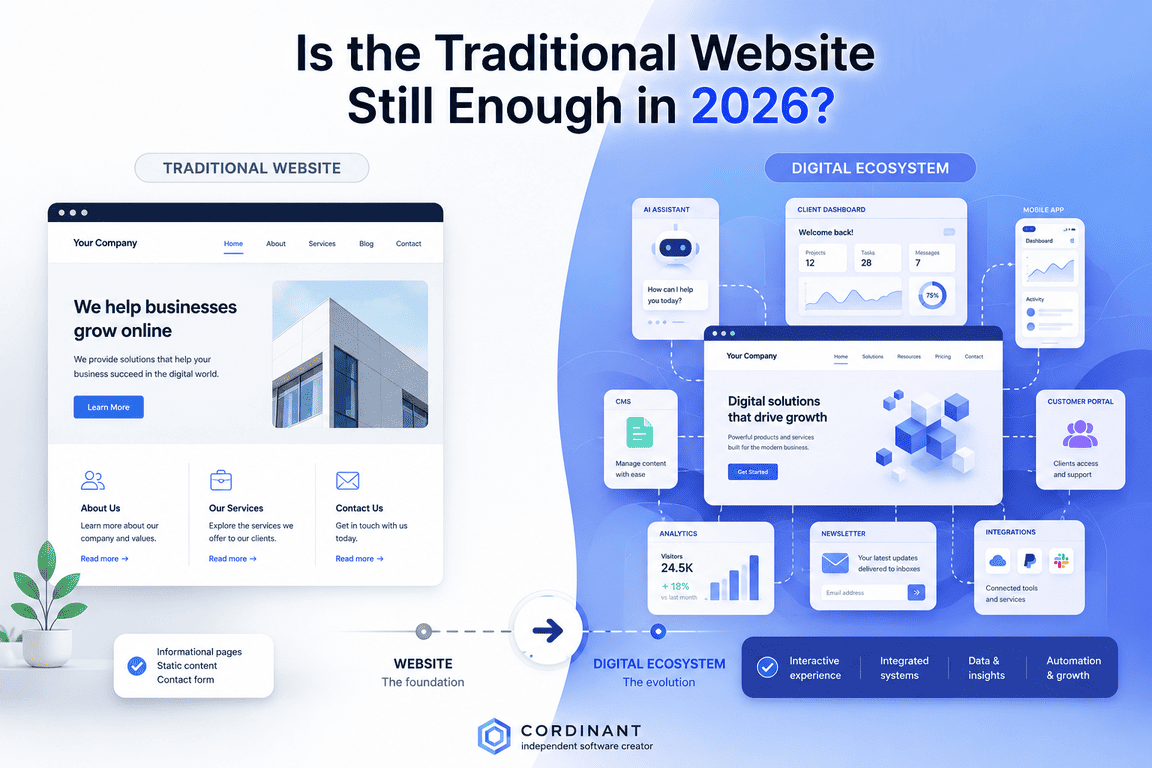
A website can look surprisingly simple from the outside.
You open it, see a navigation menu, click Blog, read an article, perhaps visit a product page and then use the contact form. Everything appears to be a collection of pages connected by links.
When I worked on Cordinant, my personal website, I became much more aware of how misleading that simplicity can be.
Cordinant has a homepage, product pages, a blog, documentation, contact and other public pages. Behind them is an admin area where I manage products, articles, media and documentation. There are URLs to organise, relationships between different types of content, metadata for search engines, databases storing information and templates deciding how that information eventually appears on a screen.
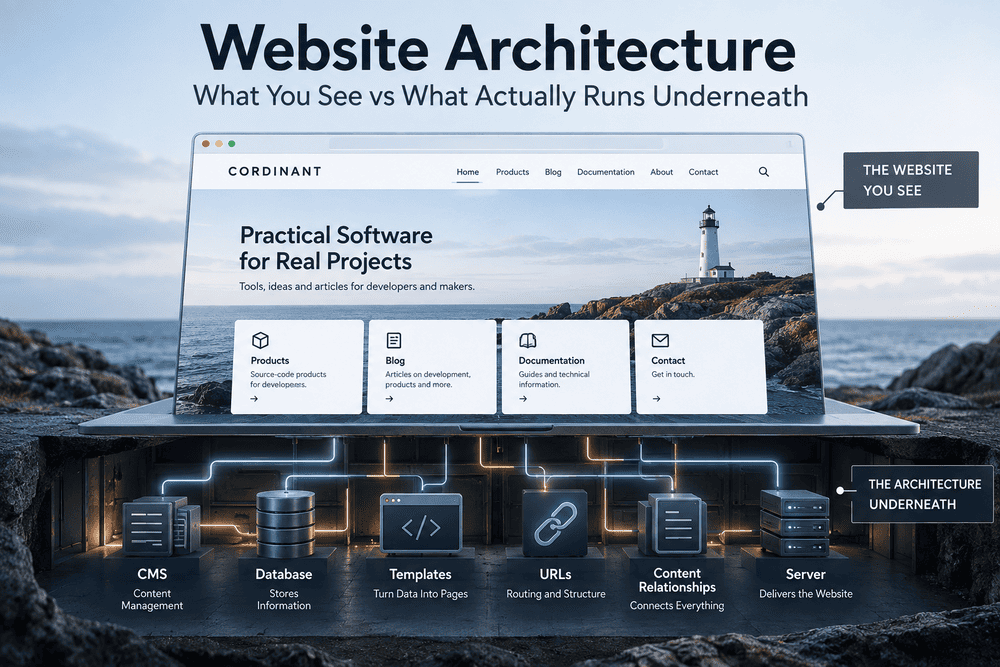
The visual design is only the part visitors see.
Underneath it is the website architecture.
And once a website grows beyond a few pages, that invisible structure starts to matter surprisingly quickly.
Website Architecture Is More Than a Sitemap
The phrase website architecture sounds more technical than the basic idea really is.
Think about a building. Looking at the finished building tells you something about it, but not everything. Behind the walls are electrical cables, pipes, ventilation, supporting structures and connections between different floors and rooms.
A website has its own version of that hidden infrastructure.
At the simplest level, website architecture describes how the different parts of a website are organised and how they work together. That includes pages and navigation, but it can also include URLs, templates, databases, server-side code, content relationships and the systems used to manage everything.
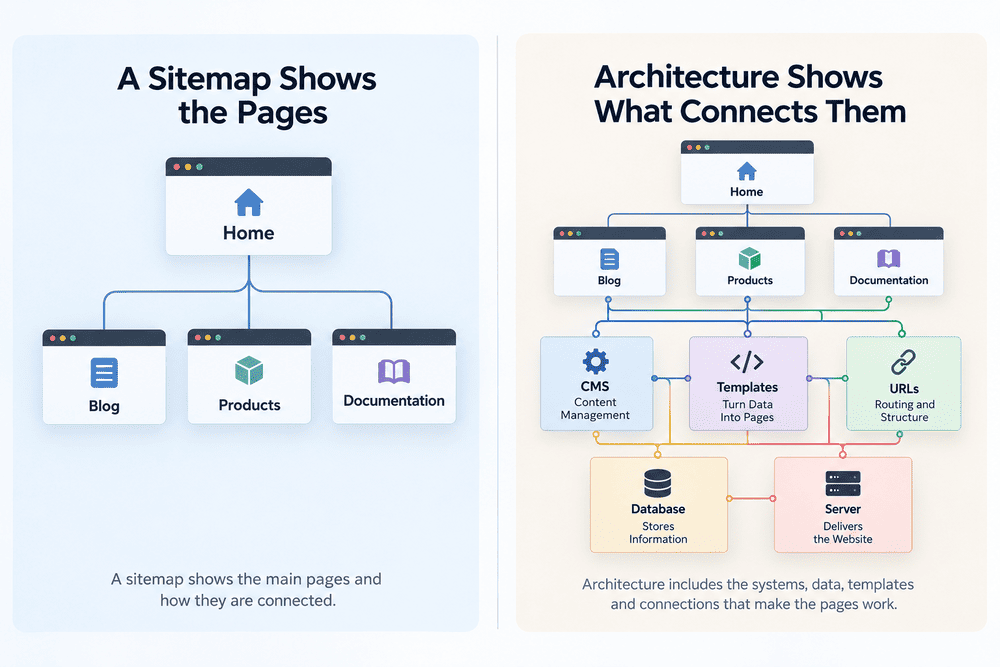
A sitemap might tell us that Cordinant contains sections such as:
- Home → Products → Individual Product
- Home → Blog → Individual Article
- Home → Documentation → Product Documentation
That is useful, but it describes only one layer.
Behind an individual blog article, for example, there may be a database record containing its title, slug, content, category, featured image, SEO information and publication status. A PHP template retrieves that information and turns it into the page the visitor sees.
So the page is not necessarily a separate file sitting somewhere on the server waiting to be opened.
It may be assembled when someone requests it.
A website page can be the final result of several systems working together rather than a single standalone file.
That distinction is one of the first things that makes websites more interesting than they initially appear.
What the Visitor Sees and What Actually Exists
Suppose someone opens a Cordinant blog article.
From the visitor's perspective, the process is simple: click a link and read the article.
From the website's perspective, several things may be happening behind that click.
The URL identifies which article is being requested. The application finds the corresponding information. The database provides the stored content. A template determines how that content should be presented. Shared parts such as the header and footer are added, and the server sends the resulting page to the visitor's browser.
The browser then renders the HTML, CSS, images and other assets into something that looks like a finished website.
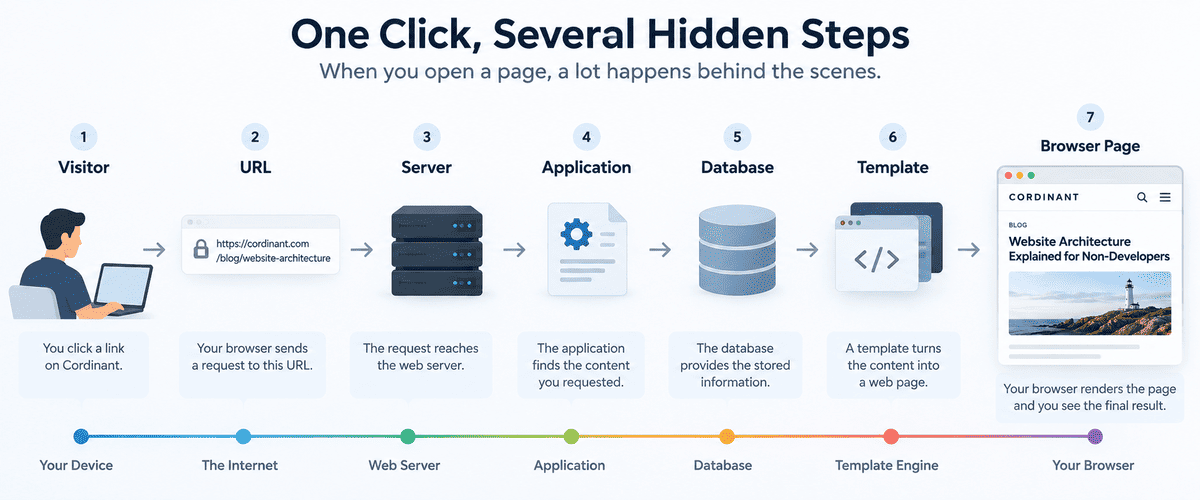
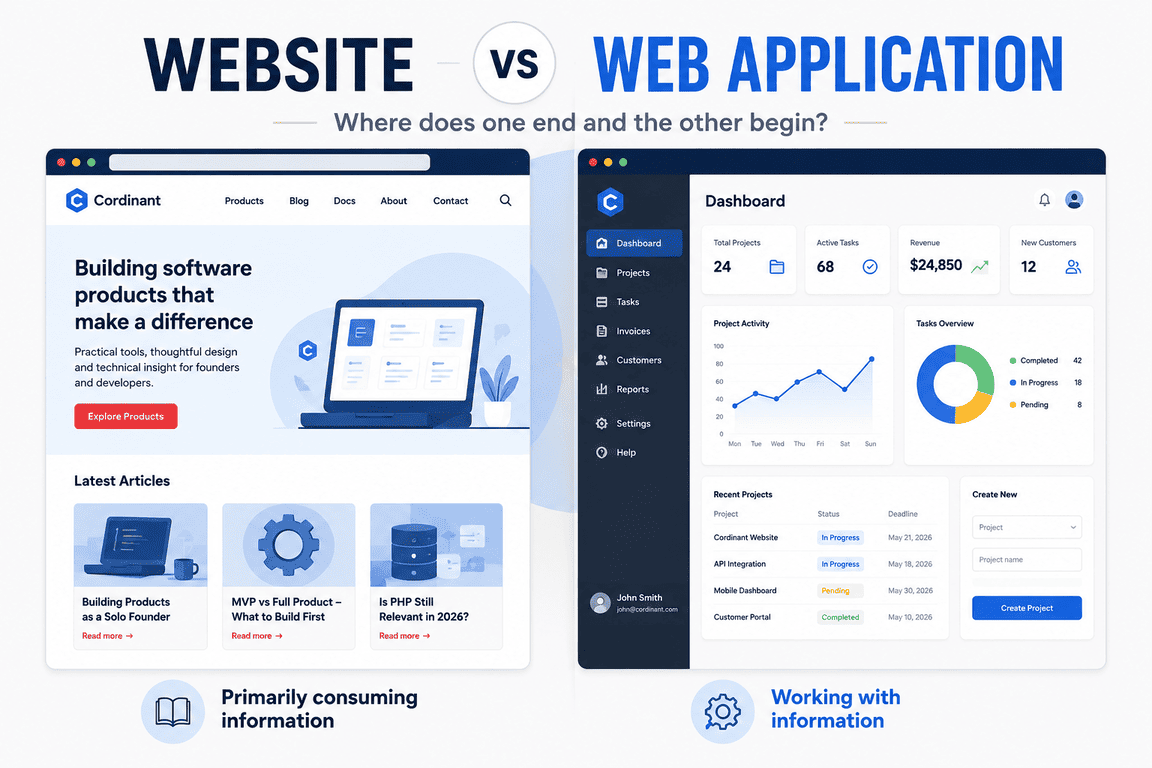
This creates two very different views of the same system.
There is the frontend — what the visitor interacts with.
And there is the backend — the systems that manage information and make much of the frontend possible.
The distinction is not perfect in every technical architecture, but it is a useful mental model for someone who does not work in development.
On Cordinant, a visitor can see an article.
I can see the article too, but I can also access an administration interface where its underlying content is managed.
Same website. Very different views.
A Page Does Not Have to Be a Page
This was one of the ideas that became more obvious to me while developing my own site.
It is natural to imagine a website as a folder full of pages:
home.html
about.html
article-one.html
article-two.html
article-three.html
That approach is perfectly possible and can be appropriate for some websites.
But dynamic websites often work differently.
Instead of creating a completely separate page for every blog article, the system can have one article template and many records in a database. The template stays largely the same while the content changes according to the article requested.
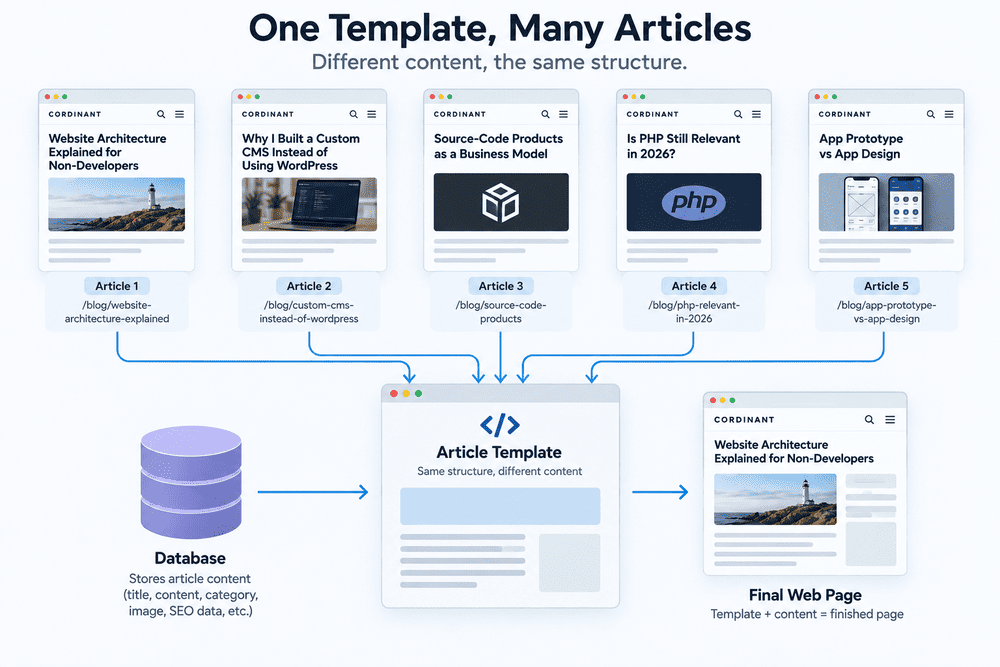
Conceptually, it looks more like this:
Article URL → Article data → Shared template → Finished page
Cordinant uses this kind of thinking for areas where content follows a common structure.
A blog article has characteristics that other blog articles also have. Product pages have their own shared structure. Documentation has another. This makes it possible to manage different kinds of content without treating every public URL as an unrelated piece of the website.
That is architecture at work.
Not something particularly dramatic. Mostly decisions about what should be shared, what should be separate and how information should move through the system.
The CMS Is Behind the Website, Not the Website Itself
Content management systems can make this distinction confusing because systems such as WordPress often combine many responsibilities into one large package.
Cordinant uses a custom CMS, but I find it more useful to think of that CMS as an internal tool rather than as the website itself.
Visitors do not need the admin interface.
They need the result produced from the information managed through it.
For example, I can create an article in the admin area and enter its title, content, category and other information. That data is stored and later used by the public website to construct the article page.
The rough relationship is:
Admin interface → stored content → public website
This separation becomes useful when different content types need different information.
A blog article might need a category and publication date. A product needs product-specific information. Documentation needs sections and items arranged differently from an ordinary article.
They can still share parts of the same underlying system.
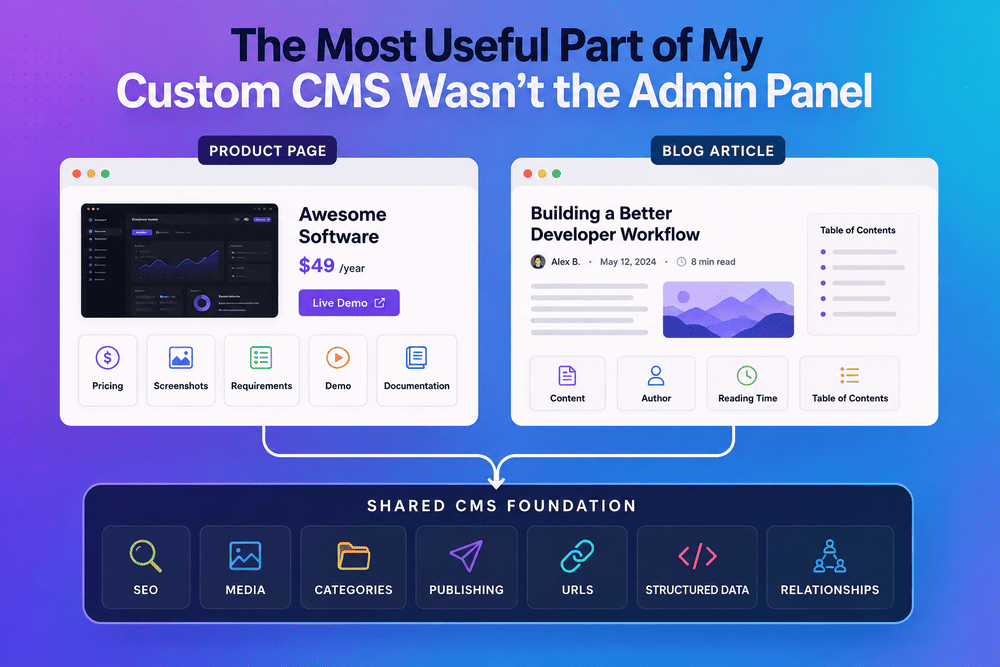
I encountered this while expanding Cordinant. Products, blog posts and documentation look different on the public website, but that does not mean everything underneath them needs to be completely unrelated.
Finding that boundary between shared structure and specialised structure is a significant part of website architecture.
The Database Is the Website's Memory
A database can sound intimidating if you have never worked with one, but its role is easier to understand if we forget about SQL and tables for a moment.
It is essentially structured memory.
Imagine that Cordinant needs to remember an article.
It may need to remember its title, URL slug, content, category, publication status and SEO information. Those pieces of information have to live somewhere.
The database provides a structured place for them.
The same principle applies to products and documentation. Different information can be stored separately while still being connected.
For example:
Product → Documentation sections → Documentation items
That relationship is more useful than keeping all the documentation as one enormous unstructured block of text.
The structure also affects what I can build later.
If information has already been separated logically, I can potentially display it differently, edit one part without rewriting another, or build another interface around the same information.
This is one reason architecture can feel unimportant at the beginning and increasingly important later.
Early on, storing everything together may seem easier.
Months later, you discover why the distinctions mattered.
URLs Are Part of the Architecture Too
URLs are easy to dismiss as addresses.
They are also part of how a website communicates its structure.
Compare something like:
example.com/page.php?id=27with:
example.com/blog/website-architecture-explainedBoth can technically lead to the same information.
But the second tells a person something before the page even loads. It indicates that the content belongs to the blog and gives an idea of what the page contains.
Cordinant uses clean public URLs for this reason.
There is also a difference between the URL a visitor sees and the way the server handles that request internally. A readable public address does not necessarily correspond directly to a physical file with the same name.
That was another useful shift in how I thought about websites.
The public URL structure is partly a navigation and communication system. The internal implementation can be different.
Navigation Is the Visible Part of a Larger Hierarchy
When people discuss website structure, navigation menus often receive most of the attention because they are visible.
But a menu and a website hierarchy are not exactly the same thing.
Not every page needs to appear in the main navigation. A blog may eventually contain hundreds of articles, but putting hundreds of links in the header would obviously make no sense.
Instead, websites create layers.
On Cordinant, someone might move through a path such as:
- Homepage → Blog → Article
- Homepage → Products → Captain's Toolkit → Documentation
The navigation provides entry points. Categories, contextual links, product links and internal links provide additional routes.
This begins to resemble a network more than a menu.
A well-organised website gives visitors several sensible ways to reach relevant information without making every possible destination visible at once.
Search engines also discover and interpret pages partly through links and site structure. That gives architecture an SEO dimension as well as a usability one.
An isolated page may technically exist, but if nothing useful leads to it, its place within the website becomes much less clear.
Website Architecture and Website Design Are Different Problems
It is easy to mix architecture and design because both affect what visitors experience.
Suppose I change the Cordinant homepage background, typography, button styles or spacing.
That is mainly a design change.
Suppose I decide that documentation should become its own public section, that products should connect to their documentation, that the header should contain a Documentation link and that the new section should be represented properly in the site's URL and sitemap structure.
That is much closer to an architectural change.
The distinction is not always clean. Design decisions can influence structure, and structural decisions can strongly affect design.
Still, separating the two ideas is useful.
| Website Design | Website Architecture |
|---|---|
| What should this look and feel like? | What belongs here, how is it organised, and what is it connected to? |
| Typography and colours | Pages and content hierarchy |
| Buttons and visual components | URLs and routing |
| Spacing and page layout | Content relationships |
| Visual presentation | How different systems work together |
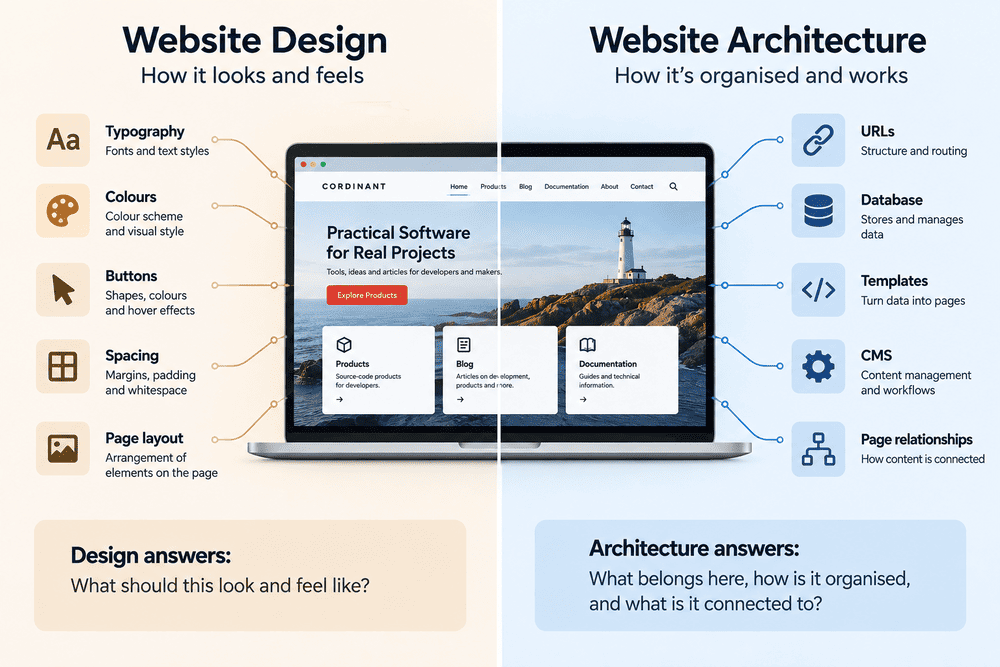
A beautiful interface cannot completely compensate for confused architecture.
The reverse is also true. Excellent architecture does not automatically produce an attractive or pleasant website.
They solve different problems.
Frontend and Backend Are Connected by Information
There is another way of looking at the architecture: follow a piece of information.
Take the title of a Cordinant blog article.
I enter that title through an admin interface. The application saves it. When someone requests the article, the website retrieves the title and inserts it into the public page.
The title may also be used elsewhere.
It could appear on the blog listing page, in internal links or in metadata associated with the page.
One piece of information can therefore travel through several parts of the system.
Admin → Application → Database → Application → Template → Browser
Not every website follows exactly this arrangement. Modern web architecture includes many different approaches, frameworks and infrastructure choices.
But the underlying question remains useful:
Where does the information come from, where does it live, and where does it need to go?
Once you start looking at websites this way, architecture becomes much easier to recognise.
Static and Dynamic Websites Solve Different Problems
Not every website needs a database, custom CMS or complicated backend.
A small static website can consist largely of files that are already prepared and delivered to visitors. If the content rarely changes and there are only a handful of pages, this can be remarkably effective.
Dynamic architecture becomes more attractive when information changes regularly or the website contains repeated content structures.
A blog is an obvious example.
If there are five articles, maintaining them manually may be manageable. If there are hundreds, having structured article data and a shared publishing system becomes much more useful.
The same applies to products, directories, documentation, accounts, dashboards and many other types of content.
Neither model is automatically better.
Architecture makes more sense when it follows what the website actually needs rather than what happens to be fashionable.
Cordinant gradually needed more structure because it became more than a small collection of informational pages.
The site includes publishing, products and documentation, and I need to manage those areas without manually rebuilding pages every time something changes.
That requirement influenced the architecture.
SEO Starts Deeper Than Keywords
SEO is often discussed at the level of keywords, titles and descriptions.
Those matter, but there is a structural layer underneath them.
Search engines need to discover URLs. Pages need internal links. Similar content benefits from understandable organisation. Duplicate or inconsistent URLs can create unnecessary confusion. Sitemaps need to represent the pages that actually exist and are intended to be discovered.
This means some SEO problems are really architecture problems.
If the same content can accidentally appear through several URLs, changing the wording of the meta description does not solve the underlying issue.
If an important page is buried somewhere with no useful internal links, adding another keyword to its heading is not the most interesting problem either.
Working on Cordinant has made me think about SEO less as something added after a website is finished.
Some of it lives in the structure itself.
The way articles, products and documentation are connected affects both how people explore the site and how machines interpret it.
Architecture Becomes Visible When Something Changes
Good architecture is often difficult to notice while everything is working.
Changes expose it.
Imagine a business website with five manually created product pages. Adding a sixth is easy enough.
Now imagine 500 products.
Or imagine deciding that every product suddenly needs documentation, related articles, structured metadata and several new fields.
A decision that seemed perfectly reasonable at five pages may become awkward at 500.
This does not mean every small website should be engineered for millions of pages. Overengineering creates its own problems.
It means architecture is partly about deciding which assumptions are likely to change.
Cordinant itself has evolved.
The website did not begin with every section and relationship it has now. New requirements appeared as I added products, expanded the blog and created public product documentation.
Some existing structures could be extended.
Others needed reconsideration.
That experience made website architecture feel less like creating a perfect blueprint once and more like maintaining a structure that can survive reasonable change.
The Hidden Cost of "We'll Add It Later"
Many website features look isolated when they are first proposed.
- Add documentation.
- Add a blog.
- Add categories.
- Add clean URLs.
- Add SEO fields.
Each sounds like a small feature.
But a new section may affect navigation, the database, templates, administration, URLs, internal links, sitemaps and possibly other parts of the website.
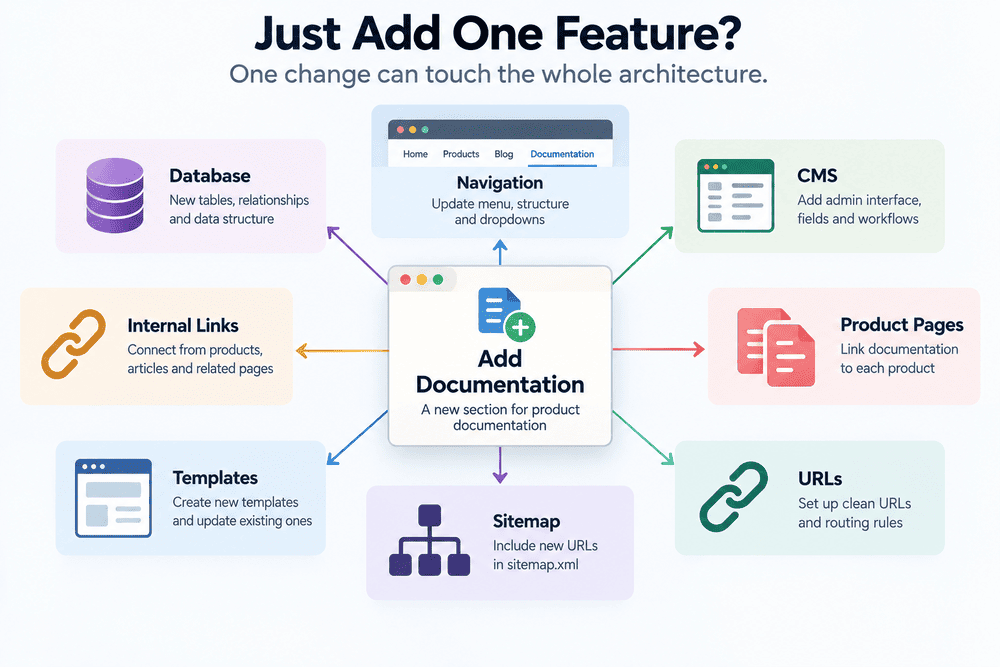
This is where the building analogy becomes useful again.
Adding a picture to a wall is easy. Adding another floor is not.
Software changes vary in exactly the same way. Two requests that sound equally small in ordinary language can have completely different consequences for the underlying system.
Architecture is what explains the difference.
Poor Architecture Does Not Always Look Poor
One of the more deceptive things about websites is that structural problems can remain invisible for a long time.
A visitor may see a polished homepage while behind it the content is difficult to update, URLs are inconsistent and the same information has been duplicated in several places.
From the outside, everything appears fine.
The person maintaining the website experiences a completely different product.
This is why judging a website entirely from screenshots tells us relatively little about its architecture.
Two websites can look almost identical while being built in radically different ways.
One might consist of mostly static pages.
Another could be generated from a CMS.
Another might use a frontend application communicating with an API.
Another could be part of a much larger platform with multiple services behind it.
Visual similarity does not imply structural similarity.
There Is No Universal "Correct" Website Architecture
Developers can become surprisingly passionate about architecture.
Framework versus no framework. Monolith versus microservices. Server-side rendering versus client-side rendering. Traditional CMS versus headless CMS. Custom software versus an existing platform.
Those discussions can make it seem as though there must be one modern architecture that every serious website should eventually adopt.
I do not find that view particularly useful.
A small company website and a global marketplace do not have the same problems. A personal blog and an online banking application should not be designed around identical assumptions.
Even two apparently similar websites may have very different requirements because the people maintaining them work differently.
For Cordinant, a custom PHP-based system makes sense in the context of what I am building and how I want to manage it. That does not make the same architecture the right choice for another personal website.
Someone who mainly wants to publish articles may be much better served by an existing CMS.
Architecture is a collection of trade-offs, not a badge of technical sophistication.
AI Makes Building Easier, but Structure Still Matters
AI-assisted development adds another interesting dimension.
It is now possible to describe a feature and generate a surprising amount of usable code quickly. That changes the speed at which individual components can be created.
But generating components and designing a coherent system are not quite the same problem.
If I ask AI to create an article editor, then a product manager, then a documentation system, each feature can look reasonable on its own.
The awkward questions appear between them.
- Should they share media management?
- How should products connect to documentation?
- Which metadata belongs to all content types?
- Should a new field be stored once or duplicated?
- What happens to existing URLs?
These are architectural questions.
AI can help explore possible answers, generate implementation ideas and review code, but it can also produce unnecessary complexity or inconsistent solutions if each feature is considered in isolation.
In my own work, AI is useful throughout development, but generated code still needs to fit the system that already exists.
A fast answer to the wrong structural question is still the wrong answer.
Cordinant From the Outside and From the Inside
Looking at Cordinant as a visitor, the architecture is mostly invisible.
There is a website with articles, products and documentation.
Looking at it from my side, I see something else.
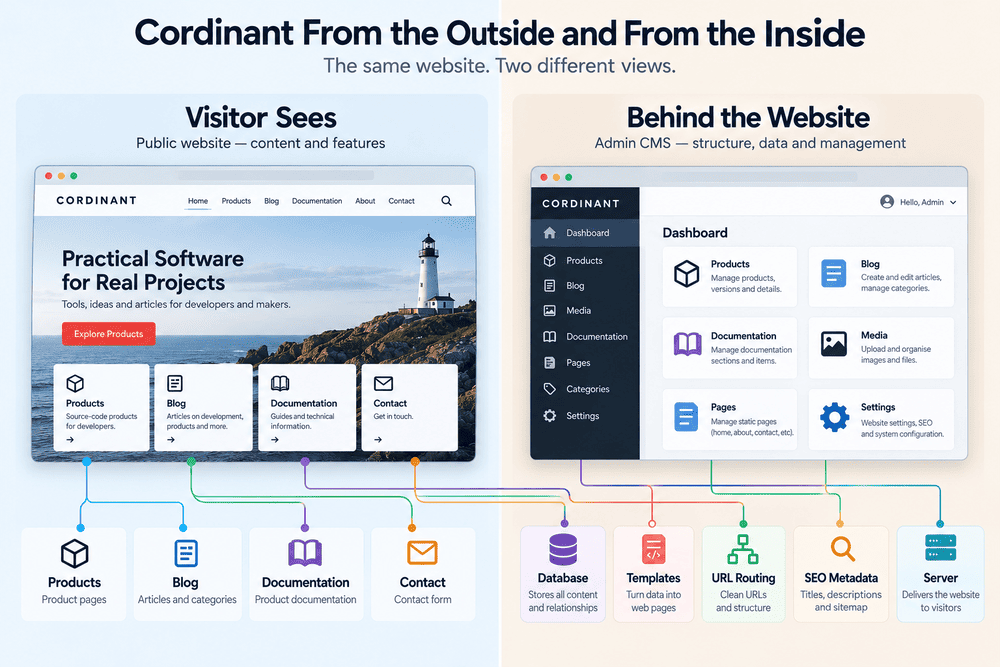
I see public pages and admin pages. Shared templates and specialised templates. Content stored in structured forms. Products connected to documentation. Blog articles managed through their own publishing workflow. URLs that need to remain consistent. Navigation that needs to reflect the public structure. SEO information that needs to reach the correct pages.
None of those individual pieces is particularly mysterious.
The complexity comes from the connections.
And that may be the simplest explanation of website architecture I can give.
It is not just the list of things a website contains. It is the set of decisions about how those things relate to one another.
The Website You Cannot See
When I first think about a website, I still tend to picture the visible version.
Pages. Buttons. Images. Text. Menus.
But the longer I work on my own website, the more I find myself thinking about the invisible version first: where information belongs, which parts should share a structure, what should remain separate, how a URL connects to content and what happens when another section is added later.
Visitors may never notice those decisions.
In many cases, that is probably a good sign.
The architecture is not supposed to be the interesting part of visiting a website. It is there so the visible website can make sense.
A website may look like a collection of pages. Underneath, it is really a collection of relationships.