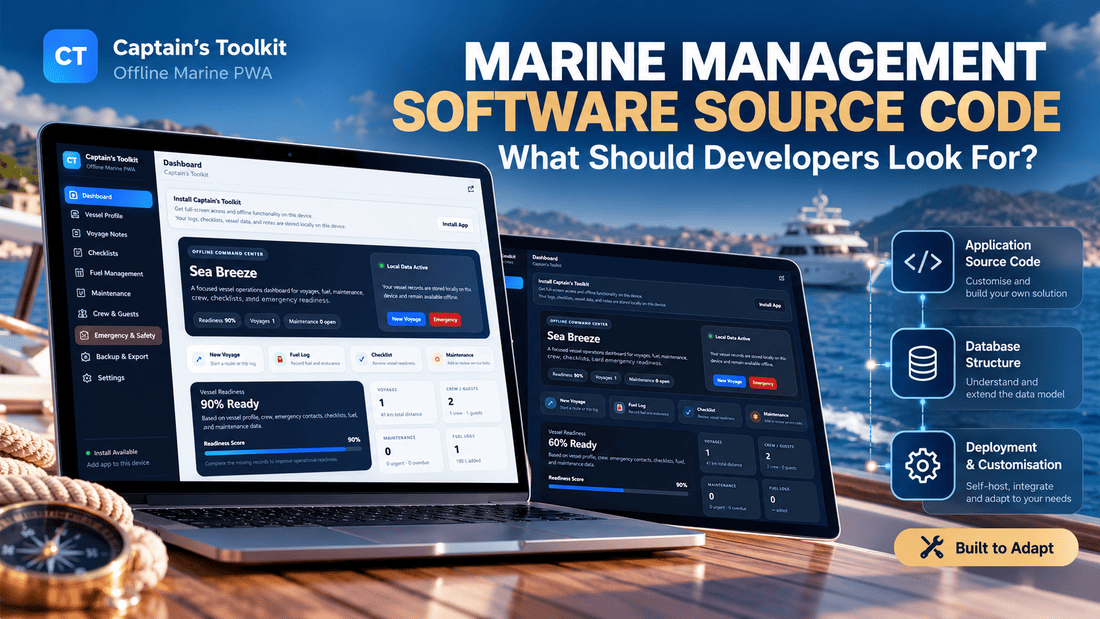
A marine management application can look convincing in a demo. There is a dashboard showing vessel information, neatly organised sections for maintenance and voyages, perhaps a fuel log and a few attractive charts. Everything appears to be in place, and it is tempting to assume that most of the difficult development work has already been done. But if you're planning to buy the source code and turn it into something of your own, the appearance of the application is only a small part of the decision.
The more interesting questions are usually hidden behind the interface. How is the information stored? Can the application work without an internet connection? How difficult would it be to add another vessel, change the maintenance workflow or introduce different types of users? And what exactly are you allowed to do with the code after buying it? These questions may seem less exciting than exploring a polished dashboard, but their answers can have a much greater influence on the time and money needed to complete a project.
This is what makes evaluating marine management software source code different from choosing a ready-made application. You're not simply looking for software that works today. You're looking for a foundation that can support whatever you intend to build tomorrow, whether that's a private vessel management tool, a maintenance application for a marine business or something more specialised.
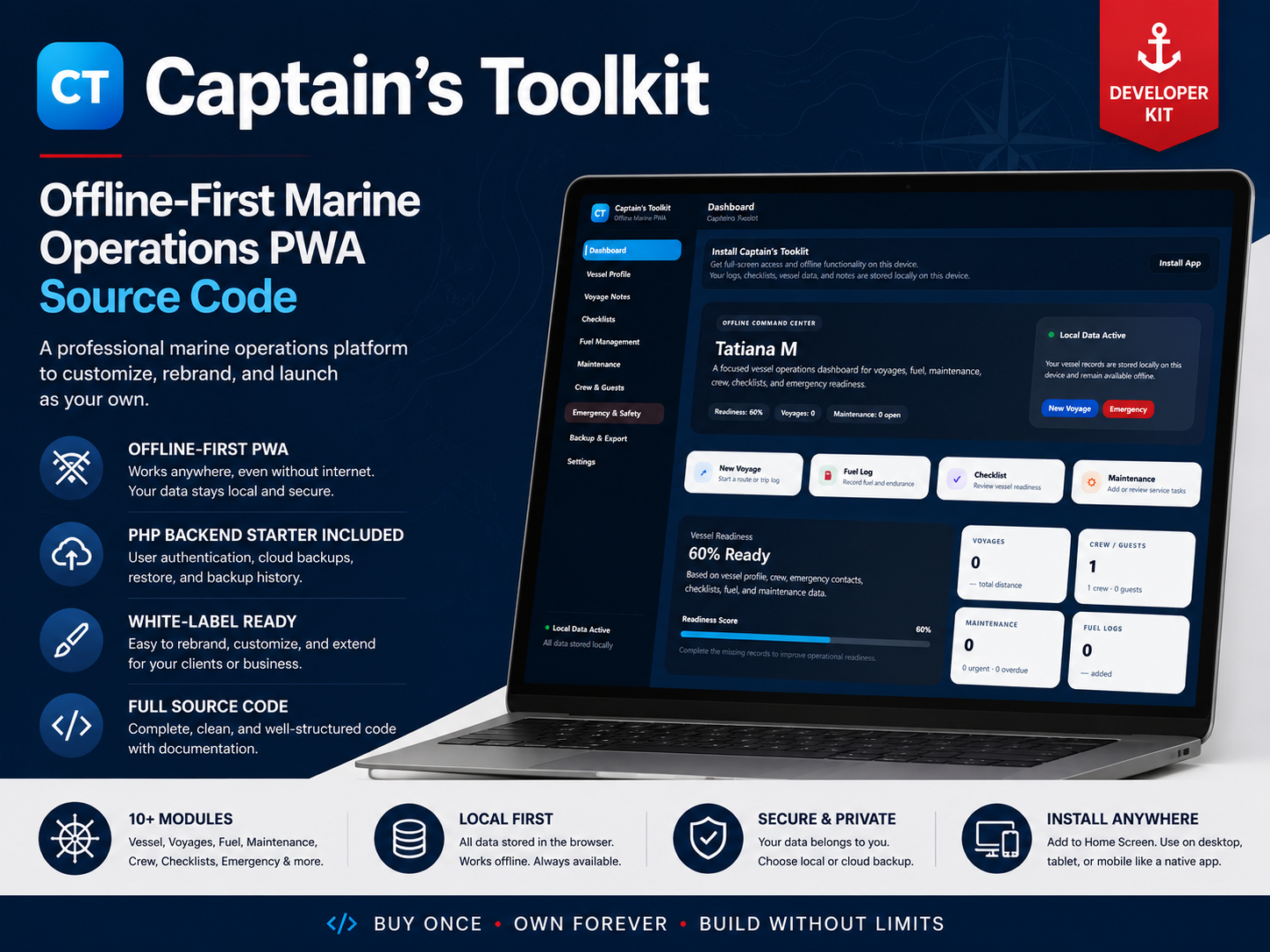
I've been thinking about this distinction while developing Captain's Toolkit, my own offline-first marine operations application. It has a fairly focused purpose, but it also provides a useful example of how the features, architecture and limitations of an existing codebase influence what developers can create from it.
What Are You Actually Buying When You Buy Marine Software Source Code?
There are several ways to acquire marine management software, and they don't all give the buyer the same level of control. A hosted platform generally provides access to an existing service. You create an account, configure the available features and use the application within the limits established by its provider. Hosting, updates and much of the technical maintenance are usually handled for you, which can be a sensible arrangement for businesses that simply need working software without becoming responsible for its development.
Buying source code is a different proposition. Instead of paying primarily for access to a service, you're acquiring the application files and components that make it possible to deploy, examine and modify the software yourself, subject to the licence. Depending on the product, these may include the interface, application logic, database schema, configuration files, installation scripts and documentation.
That doesn't automatically make source-code products more advanced than hosted alternatives. A specialised marine SaaS platform may offer considerably more functionality than a downloadable application, especially when it comes to integrations, reporting, multi-user operations and ongoing support. The attraction of source code lies in the opportunity to change how the software works rather than simply adjust the settings its original creator decided to provide.
Consider a small marine maintenance business that wants to record vessel service histories. An existing subscription platform might already support most of its requirements, but perhaps the business follows a particular inspection process, needs unusual maintenance categories or wants to connect the application to an internal customer database. With access to suitable source code, those changes may be possible without waiting for a software vendor to introduce them. Of course, someone still has to design, develop, test and maintain the modifications.
This distinction is explored more broadly in my article about custom software versus SaaS, where the question is not simply which approach is better, but how much control a business actually needs.
For marine software, that question becomes particularly interesting because the requirements of individual vessel owners, service providers and commercial operators can be very different.
Marine Management Software Can Mean Very Different Things
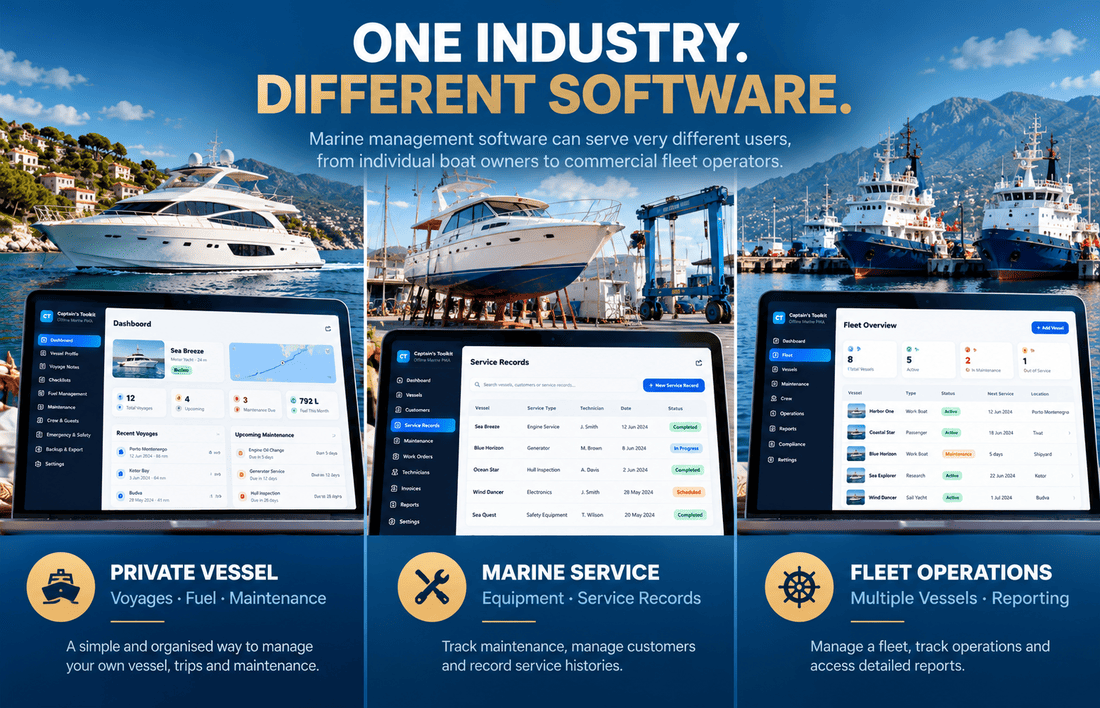
One complication with searching for marine management software is that the term covers a surprisingly wide range of applications. A private boat owner might want a convenient place to record voyages, fuel consumption, maintenance tasks and equipment information. A charter operator may need booking schedules, customer records, crew assignments and several vessels managed from one account. A larger commercial fleet has another set of requirements altogether, potentially involving operational reporting, multiple departments, external integrations and specialised compliance processes.
All three businesses could reasonably describe what they need as marine management software, even though the applications behind that description would be very different. This is why comparing products solely by their feature lists can be misleading. Two applications may both advertise vessel management, maintenance and reporting, while the underlying workflows and technical assumptions are designed for completely different users.
The differences become clearer when we look at the kinds of applications developers might want to create.
| Type of application | Typical requirements | Development considerations |
|---|---|---|
| Private vessel management | Vessel records, voyages, fuel logs, maintenance and checklists | Usually a relatively focused data model and workflow |
| Marine maintenance software | Service histories, equipment records, work orders and maintenance scheduling | Customer relationships, technician workflows and reporting |
| Small charter operations | Multiple vessels, staff access, operational checklists and bookings | Scheduling, permissions and multi-vessel administration |
| Commercial fleet management | Fleet-wide records, reporting, integrations and operational processes | More complex data relationships and access control |
| Maritime enterprise platform | Specialised workflows, external systems, security and industry requirements | Potentially extensive architecture and integration work |
These are broad categories rather than fixed software specifications. A simple-looking maintenance application can become complicated if it needs to support many technicians, customers, locations and approval processes. Meanwhile, a well-designed single-vessel application may handle its narrower purpose perfectly well without any of that additional complexity.
The important distinction is between the application someone wants to use today and the product a developer intends to create tomorrow. A codebase built around one vessel could be a useful starting point for a private boat management app, and it might also contain components worth reusing in a charter application. But extending it to manage a fleet could involve changes to the database, user permissions, navigation and reporting.
The presence of a vessel profile screen doesn't mean the underlying application was designed for hundreds of vessels. That is not necessarily a weakness in the original software. It may simply mean that the product was built for a different purpose.
The Features That Matter Are Not Always the Most Impressive Ones
When browsing software demos, it's easy to concentrate on whatever looks most polished. A dashboard with attractive charts usually receives more attention than a settings page, an export function or the structure of a maintenance record. Yet these less visible parts of an application can be just as important when the goal is to reuse its source code.
Vessel and voyage records
Vessel information is a natural starting point for many marine applications. Depending on the intended users, the system might need to store identifying details, engine information, fuel capacity, operating hours or other equipment records. Some of this information changes rarely, while other values, such as engine hours, may need to be updated regularly and used elsewhere in the application.
Voyage management introduces a different kind of information because it records activities taking place over time. A voyage might contain a date, duration, distance and other operational details, with those records later supporting reports, maintenance calculations or more specialised workflows.
For a developer, the interesting question is how these records relate to one another. If a business eventually wants to associate every voyage with a particular vessel and crew, the data structure needs to support those relationships. Adding another screen may be straightforward, but changing the assumptions behind the data model can be considerably more involved.
Maintenance, fuel and checklists
Maintenance tracking is another area where apparently simple features can hide complicated requirements. Recording a completed maintenance task is one thing; building a system that schedules recurring work according to dates, engine hours or equipment conditions is another. A maintenance module may already provide a useful foundation, but the developer still needs to establish whether its existing workflow matches the intended application.
Fuel records present similar possibilities. A basic fuel log can store quantities and dates, while a more specialised application might calculate consumption across voyages, compare operating periods or produce reports for several vessels. The additional calculations may be relatively straightforward, but their usefulness depends on whether the necessary data is recorded consistently.
Checklists can also grow beyond a collection of tick boxes. A charter operator might need separate procedures for departure, return, cleaning and equipment inspections, while a maintenance company may want technicians to attach photographs, record observations or obtain approval before closing a task.
None of these additional capabilities should be assumed simply because a source-code package contains a maintenance or checklist module. The useful question is how much of the required workflow already exists and how easily the software can accommodate changes.
Why data exports deserve more attention
Export functionality is rarely the feature that makes someone excited about a software demo, but it can become particularly valuable when an application is customised for a business. Operational records may eventually need to be reviewed outside the application, archived, transferred to another system or analysed in a spreadsheet.
It is also worth distinguishing between exporting data and backing up an application. An export may contain selected records, while a complete backup may need to preserve relationships, configuration and other information required to restore the system. A developer evaluating marine operations software should understand which capabilities are provided rather than treating every export button as a complete data protection solution.
Why Offline Functionality Deserves Its Own Conversation
Most web applications are designed around the assumption that an internet connection will be available whenever the user needs one. For marine software, that assumption deserves closer examination. A vessel may operate in an area with unreliable mobile coverage, and even when a connection is available, it may be inconvenient or expensive to rely on it for routine record-keeping.
That makes offline functionality an interesting architectural choice rather than merely another feature on a product page. An offline-first application is designed so that certain operations can continue locally without requiring a constant connection to a remote server. A Progressive Web App, or PWA, can provide a browser-based interface with capabilities that support this approach.
However, the phrase offline-first doesn't tell the whole story. One application might allow users to enter information offline and store it locally, while another might also synchronise records with a server when connectivity returns. A more complicated system may need to handle several devices editing related records independently, which introduces additional questions about data consistency and conflict resolution.
Imagine two crew members using separate devices while a vessel is offline. Both update the same maintenance record, perhaps recording different observations or changing the completion status. When the devices reconnect, the application needs a way to decide what happens to those changes. Simply storing information locally doesn't solve that problem.
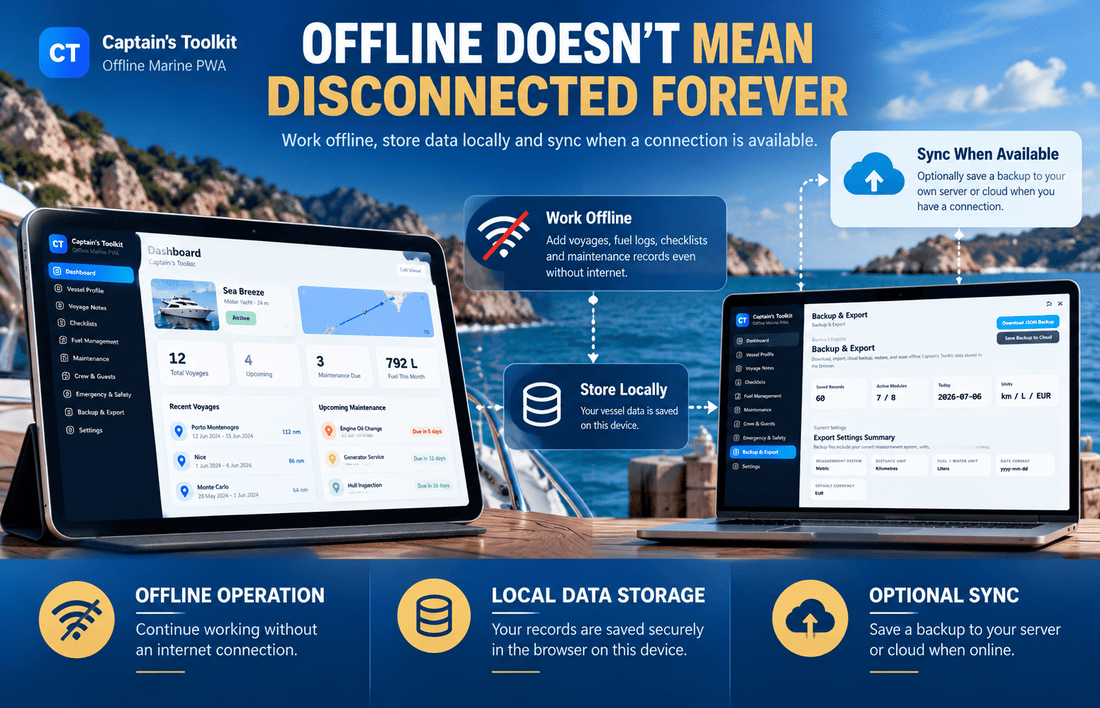
The distinction between different offline approaches is worth examining.
| Capability | Local offline application | Offline app with server synchronisation |
|---|---|---|
| Enter records without internet | Possible | Possible |
| Store data locally | Yes, if designed for it | Usually part of the architecture |
| Access records on another device | Requires a transfer or other mechanism | Possible through synchronisation |
| Recover data after device loss | Depends on backup arrangements | Depends on server storage and recovery design |
| Handle simultaneous changes | Usually less relevant for single-device use | Requires explicit conflict-handling decisions |
| Server requirements | May be unnecessary for local-only operation | Backend infrastructure is generally required |
This comparison describes common architectural possibilities, not a guarantee that every application in either category provides all the listed capabilities.
For a developer considering an offline marine management app, the practical questions are quite specific. Which operations remain available without a connection? Where are records stored? What happens if the browser's local data is cleared? Can information be transferred to another device? If synchronisation is supported, what happens when two copies of the same record change independently?
Not every marine application needs sophisticated synchronisation. A personal vessel log used on one device has different requirements from a shared operational system. The mistake would be treating those requirements as interchangeable simply because both applications advertise offline functionality.
The Code Behind the Interface Can Change the Entire Project
Suppose you find two marine operations applications with similar features and comparable prices. One has a well-organised codebase, understandable data structures and a clear installation process. The other looks equally good in the browser but contains tightly coupled components, unclear dependencies and very little documentation.
From the perspective of someone who only wants to use the finished application, these differences may not be immediately visible. For a developer planning extensive modifications, they could determine how much work the project requires.
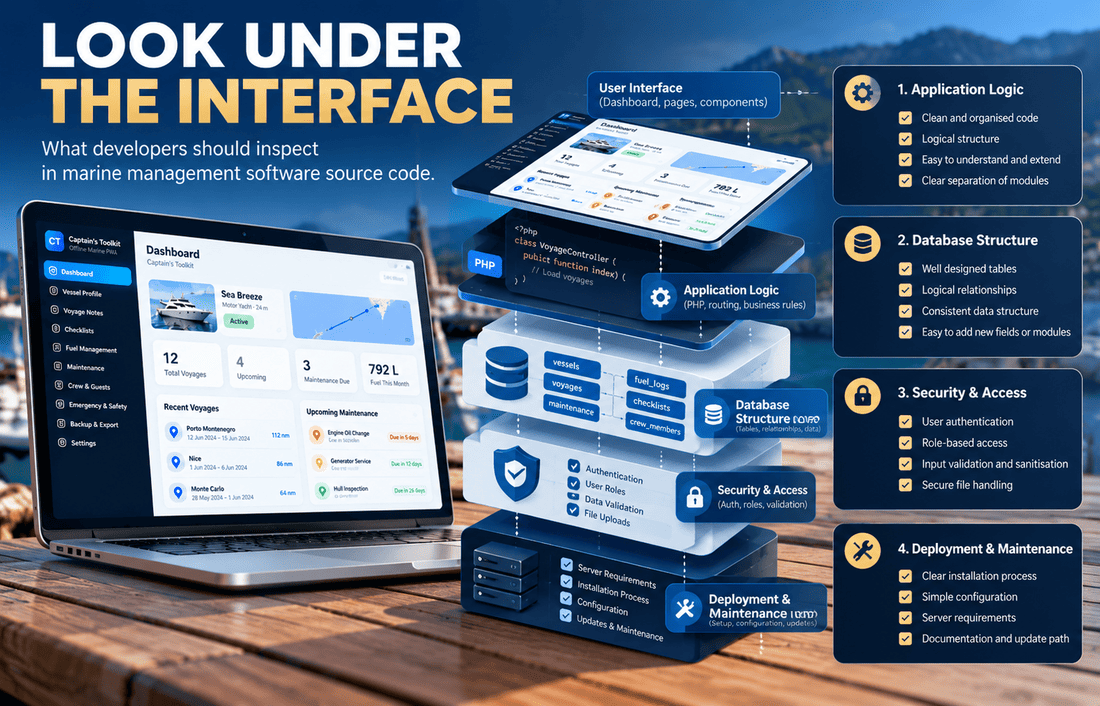
Database structure and application logic
The database is particularly important when the software manages operational records. Consider a system designed for one vessel, where the original structure assumes that all maintenance tasks, voyages and fuel records belong to that single vessel. If a developer wants to introduce multiple vessels, the change may affect much more than the vessel selection menu. Records need appropriate relationships, queries need to identify the correct vessel, and reports must avoid mixing information from different assets.
Introducing several customers or organisations adds another layer. The application may need to separate their data, manage access permissions and prevent one account from seeing another's records. These are architectural changes, not simply interface improvements, and they can affect a large part of an existing codebase.
This is why I would pay attention to the underlying data model before assuming that a single-vessel application can easily become a fleet management platform.
Installation and deployment
A source-code product should also be evaluated as something that must be installed and maintained. Does it require a particular PHP version? Is a database server necessary? Are configuration files documented? Does the installation process create the required tables? Can the application be deployed on ordinary web hosting, or does it depend on a more specialised environment?
The answers affect both the initial setup and the long-term maintenance of the project. A developer who already works with PHP and MySQL may prefer a familiar technology stack, while someone else might favour a different architecture because it better matches an existing product or hosting environment.
Neither choice is automatically superior. What matters is whether the technology fits the project and whether the developer can work comfortably with it.
Security and maintainability
Security is another area that can't be judged from screenshots. A working login form doesn't establish that authentication, session handling, permissions or input validation are implemented correctly. Applications storing crew details, vessel information or operational records need appropriate protection, and the requirements will depend on the data involved, the deployment environment and the users who can access the system.
Maintainability is closely connected to this. A codebase that is difficult to understand can make even routine updates risky, especially when modifications affect data handling or authentication. Before purchasing source code, it is worth checking whatever technical documentation, installation instructions, demonstrations and code samples the seller makes available.
If full source access is only provided after purchase, the licence, refund terms and available technical evidence become especially relevant. A polished demo is useful, but it isn't a code review.
The Licence May Matter as Much as the Features
There is another part of buying source code that can be easy to overlook, especially when a product is advertised as customisable or self-hosted. Having access to source files doesn't automatically mean you can use them for any commercial purpose.
Different licences may allow different activities. Some products permit modifications for personal or internal business use, while others may allow developers to create applications for clients. Redistribution, resale and white-labelling may be restricted or require additional rights, even when the buyer is allowed to modify the software.
The distinction matters if the intention is to build a commercial product rather than simply deploy an application for one organisation. A developer might want to purchase marine maintenance software source code, modify the interface and provide the resulting application to a customer. Another might want to create a branded product and sell copies to multiple businesses. Those are not necessarily equivalent uses under a software licence.
Before purchasing, I would want to understand the permitted deployment arrangements, modification rights, client usage, redistribution restrictions and any conditions attached to third-party components. It is also worth checking whether future updates and support are included, sold separately or not offered at all.
I explored this distinction in more detail in What Is a Source-Code Product and Who Actually Buys One?, including the different reasons developers, businesses and product creators might choose to purchase existing code.
The freedom to modify software is valuable, but it needs to be considered alongside the actual licence terms and the responsibility of maintaining the modified application.
Captain's Toolkit: A Focused Marine Operations Foundation
This is where my own project, Captain's Toolkit, fits into the discussion. I developed it as an offline-first marine operations application with a collection of practical modules rather than as an enterprise maritime management system.
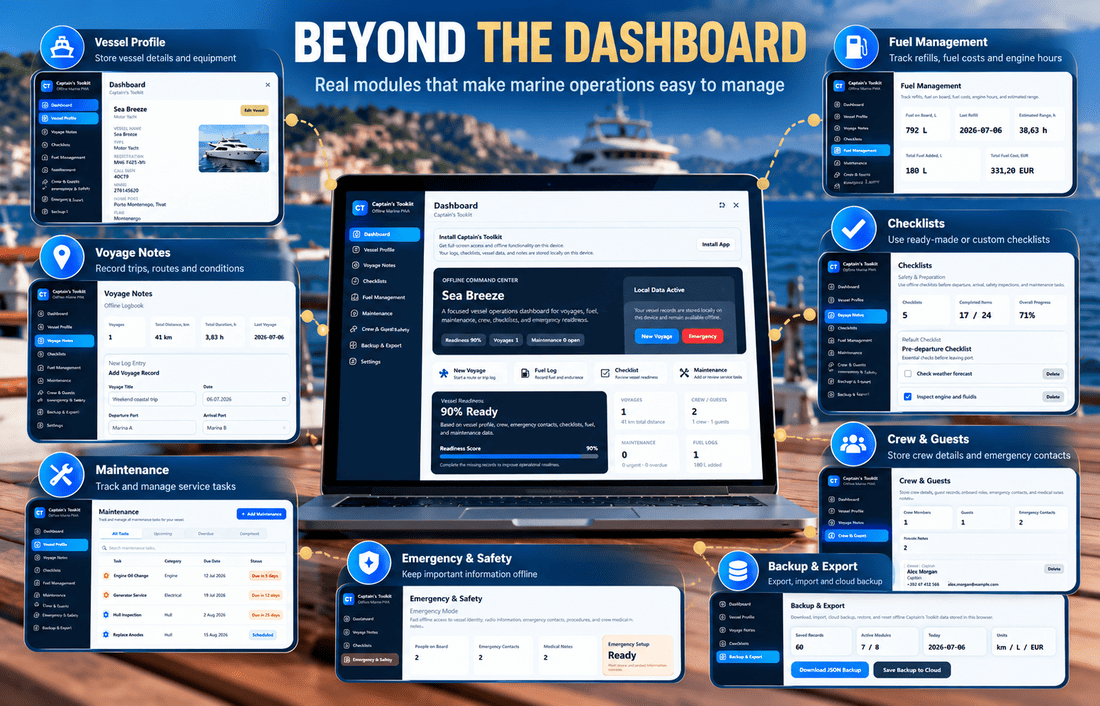
Its existing scope includes a dashboard, vessel profile, voyage records, fuel tracking, maintenance, crew information, emergency-related information, checklists, exports and settings. The application uses a PWA approach, with an optional PHP/MySQL backend, making it an example of a marine software product where local operation and server-side functionality are part of the architectural considerations.
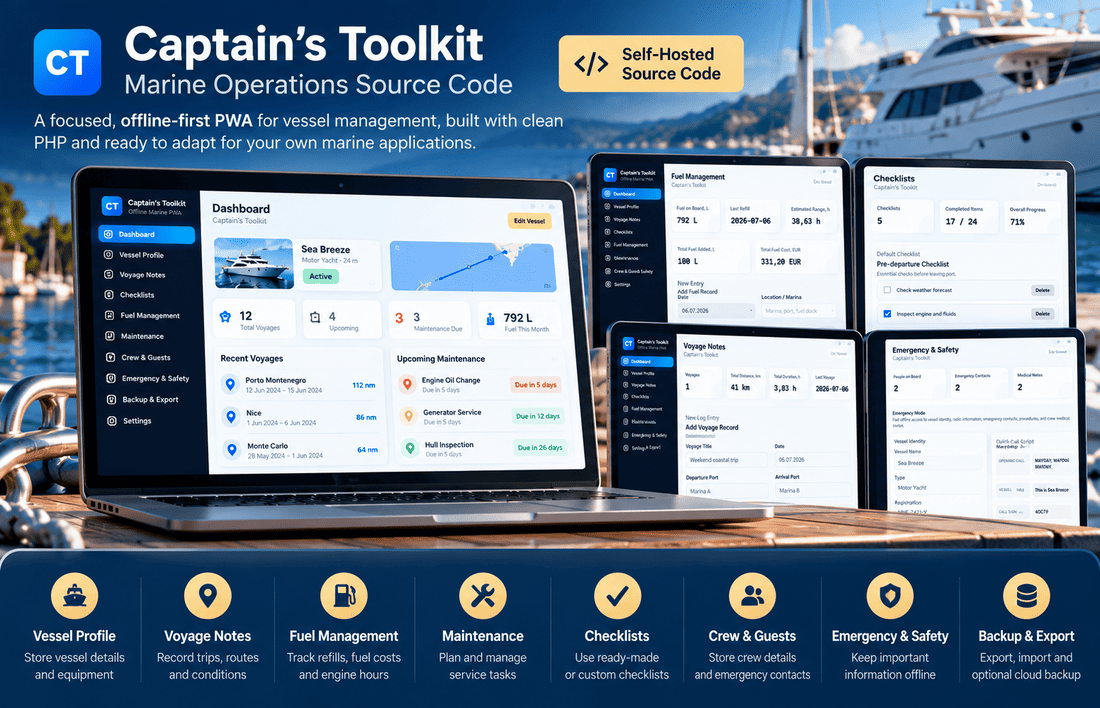
What interests me about this kind of product is that several of its components can be relevant to different applications. A voyage log could become part of a private boat owner's digital records, maintenance tracking could provide a starting point for a more specialised service application, and vessel information or checklists could be adapted for operational workflows in a small marine business.
However, those possibilities shouldn't be confused with functionality that already exists. Captain's Toolkit is not presented as a complete charter booking platform, a commercial fleet management system or a certified maritime compliance solution. Developing those types of products would require additional work, and the extent of that work would depend on the intended requirements.
That is an important distinction because I don't think a source-code product needs to pretend to solve every possible problem in its industry. A focused application can be useful precisely because it has a manageable scope, especially when the buyer wants to build something relatively close to its original purpose.
For a developer who wants to create an application related to vessel records, maintenance or everyday marine operations, starting from an existing codebase may be worth considering. For someone building a large commercial fleet platform, the same foundation might cover only a small portion of the necessary functionality.
Both assessments can be reasonable. You can explore Captain's Toolkit on Cordinant and review its public documentation to see how the product is organised and whether its existing features match the application you have in mind.
How Far Could an Existing Marine Codebase Be Adapted?
One of the more interesting aspects of buying source code is that the finished application doesn't necessarily have to look like the original product. The interface, workflows, data structures and branding may all be changed, depending on the licence and technical design. But adaptation has limits, and the further a new product moves from the original application's purpose, the more existing code may need to be replaced.
Take three possible projects built around a marine operations foundation.
A private vessel management application
A private vessel management application could retain much of the original focus on voyage records, maintenance, fuel and equipment information. The developer might redesign the interface, introduce different reports, add specialised reminders or create a more personalised experience for boat owners.
Because the intended purpose remains relatively close to the original, a substantial part of the existing functionality could remain relevant. The exact amount of reusable code would still depend on the new requirements and how the application was originally built.
A marine maintenance application for service providers
A maintenance application for marine service providers would probably require more substantial changes. Instead of recording tasks primarily for one vessel, the software might need to manage customers, multiple vessels, technician assignments, service histories, photographs, work orders and invoices.
Existing maintenance functionality could still be useful, but the surrounding business processes would need development. The relationship between customers, vessels, equipment and service jobs would become especially important, as would permissions for different staff members.
A small charter operations platform
A charter operations platform could move even further away from the original structure. Multiple vessels, staff permissions, scheduling, customer bookings and operational reporting would introduce relationships and workflows that may not exist in a single-vessel application.
The original vessel records and checklists might still provide a useful starting point, but the booking and operational management components could require considerable new development.
The difference becomes clearer when the existing Captain's Toolkit features and possible extensions are placed side by side.
| Existing Captain's Toolkit foundation | Possible additional development |
|---|---|
| Vessel profile | Multiple vessels, ownership and organisation relationships |
| Voyage records | Fleet-wide voyage reporting and advanced analysis |
| Maintenance tracking | Work orders, technician assignments and service approvals |
| Fuel records | Cross-vessel consumption reports and cost analysis |
| Crew information | Roles, permissions and staff scheduling |
| Operational checklists | Custom workflows, approvals and inspection attachments |
| Offline-first operation | More complex multi-user and multi-device data handling |
| Exports | Integrations with accounting or external business systems |
The right-hand column describes potential extensions, not features already included in Captain's Toolkit. Some additions might be relatively straightforward, while others could require significant changes to the database, application logic and interface.
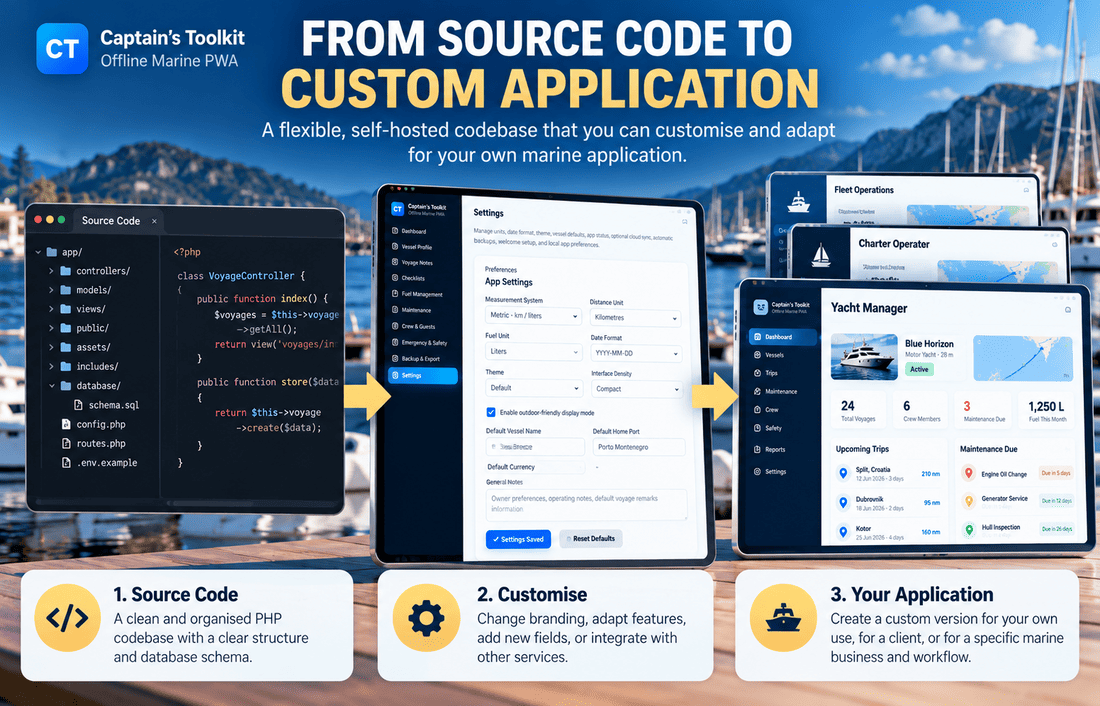
This is also why buying source code doesn't eliminate the need for product planning. It changes the starting point, but the developer still needs to decide what the new application should do, which existing components are suitable and which parts need to be redesigned.
When Starting From Scratch Might Actually Make More Sense
It would be misleading to suggest that purchasing an existing codebase is always the more efficient option. Sometimes the software you're trying to create is simply too different from the application available for purchase.
A developer building a specialised vessel tracking platform, for example, may need mapping, live location data, external integrations and a completely different set of operational workflows. A source-code package focused on maintenance and voyage records might contribute a few reusable ideas, but it wouldn't necessarily provide the architecture the new product requires.
There is also the question of familiarity. If a developer knows a particular framework extremely well, building a small application from scratch may be more comfortable than learning and modifying an unfamiliar codebase. Existing software can save work, but understanding someone else's decisions also takes time, particularly when the documentation is incomplete.
And occasionally, what looks like a shortcut turns into a long series of workarounds because the original application wasn't designed for the new requirements.
This reminds me of the difference between a working prototype and a product that is ready for wider use. In App Prototype vs App Design: What's the Difference?, I looked at how a convincing interface can create the impression that more development work has been completed than is actually the case.
A similar problem can appear when evaluating existing source code. A product may already have several working screens and useful modules, but that doesn't mean its architecture is suitable for a completely different business model.
One way to make the decision more concrete is to compare the two approaches against the intended project.
| Consideration | Buying existing source code | Building from scratch |
|---|---|---|
| Initial functionality | Existing modules may reduce early development work | All required functionality must be created |
| Architecture | Influenced by the original developer's decisions | Can be designed around the new requirements |
| Customisation | May involve adapting or replacing existing components | Features can be built specifically for the project |
| Learning curve | Requires understanding an unfamiliar codebase | Depends on the developer's chosen technologies |
| Deployment | Existing setup may provide a starting point | Installation and deployment must be developed |
| Long-term maintenance | Includes responsibility for inherited code | Includes responsibility for the new implementation |
| Commercial rights | Governed by the purchased licence | Governed by ownership and any third-party dependencies |
Neither column represents a universally better choice. The practical value depends on how closely the existing code matches the project and whether the buyer has the skills and resources to maintain it.
A large application full of functionality you don't need may be less useful than a smaller one whose structure closely matches your requirements. The amount of code isn't the same as the amount of useful code.
What I Would Check Before Making a Purchase
After considering the different types of marine software, technical architecture and possible adaptations, the buying decision becomes more concrete. Rather than relying entirely on a feature list, I would compare a prospective source-code product against the project I actually want to build.
The following questions provide a practical starting point.
| Question | Why it matters |
|---|---|
| Does the application match the intended users? | A private vessel tool and a fleet platform may require very different architectures |
| Which features are already working? | Screenshots and feature descriptions don't always reveal implementation details |
| Can the software operate offline? | Connectivity may be unreliable in marine environments |
| How is the data organised? | Database assumptions influence future modifications |
| What technology does it use? | The stack affects hosting, maintenance and developer familiarity |
| Is the installation documented? | Deployment difficulties can consume development time |
| What does the licence permit? | Modification and commercial distribution rights may differ |
| What would need to be rebuilt? | Extensive changes can reduce the value of buying an existing foundation |
Not every buyer will give these questions the same priority. Someone building a personal boat log might care most about offline functionality and straightforward installation. A development agency may focus more heavily on maintainability, licensing and the ability to adapt the application for clients. A technical founder considering a commercial marine product may be particularly interested in whether the existing data model can support future expansion.
There is also value in exploring the product documentation before making a decision. Installation requirements, supported workflows, screenshots and technical explanations can reveal limitations that aren't obvious from the main product page. If a seller provides a working demo, it is worth testing ordinary operations rather than looking only at the dashboard.
For example, try creating and editing records, moving between modules, exporting information and checking how the application behaves when a connection is unavailable, where the demo permits it. These simple activities may tell you more about the product's suitability than a long list of advertised capabilities.
The Value Is in the Starting Point, Not the Number of Features
When I look at marine management software source code, I find the relationship between the existing product and its possible future uses more interesting than the number of modules listed on a sales page.
A finished application is designed to serve a particular purpose. Source code makes it possible to question that purpose, change parts of the software and build something different from the original. But the freedom to modify an application doesn't mean every modification will be easy, and the value of a codebase depends heavily on how much of its existing structure remains useful.
Captain's Toolkit is one example of a focused marine operations foundation that could be relevant to developers working on related projects. Its vessel, voyage, fuel, maintenance and checklist features provide an existing starting point, while more specialised business requirements would still need to be designed and implemented.
For some projects, that may be a practical place to begin. For others, a different codebase, a hosted service or a completely new application may be more appropriate. The decision becomes easier when the intended product is clearly defined and the existing software is evaluated against those requirements rather than against an abstract list of features.
If you're exploring source code for a vessel management or marine operations project, you can take a closer look at demo Captain's Toolkit and its existing functionality and technical documentation.
Perhaps the most useful question to ask before purchasing source code isn't simply, "What does this software already do?" It's how much of what it already does belongs in the product you actually want to create.
Captain’s Toolkit
Self-hosted offline-first PWA source code for vessel records, voyages, maintenance, fuel, crew, safety and operational checklists.