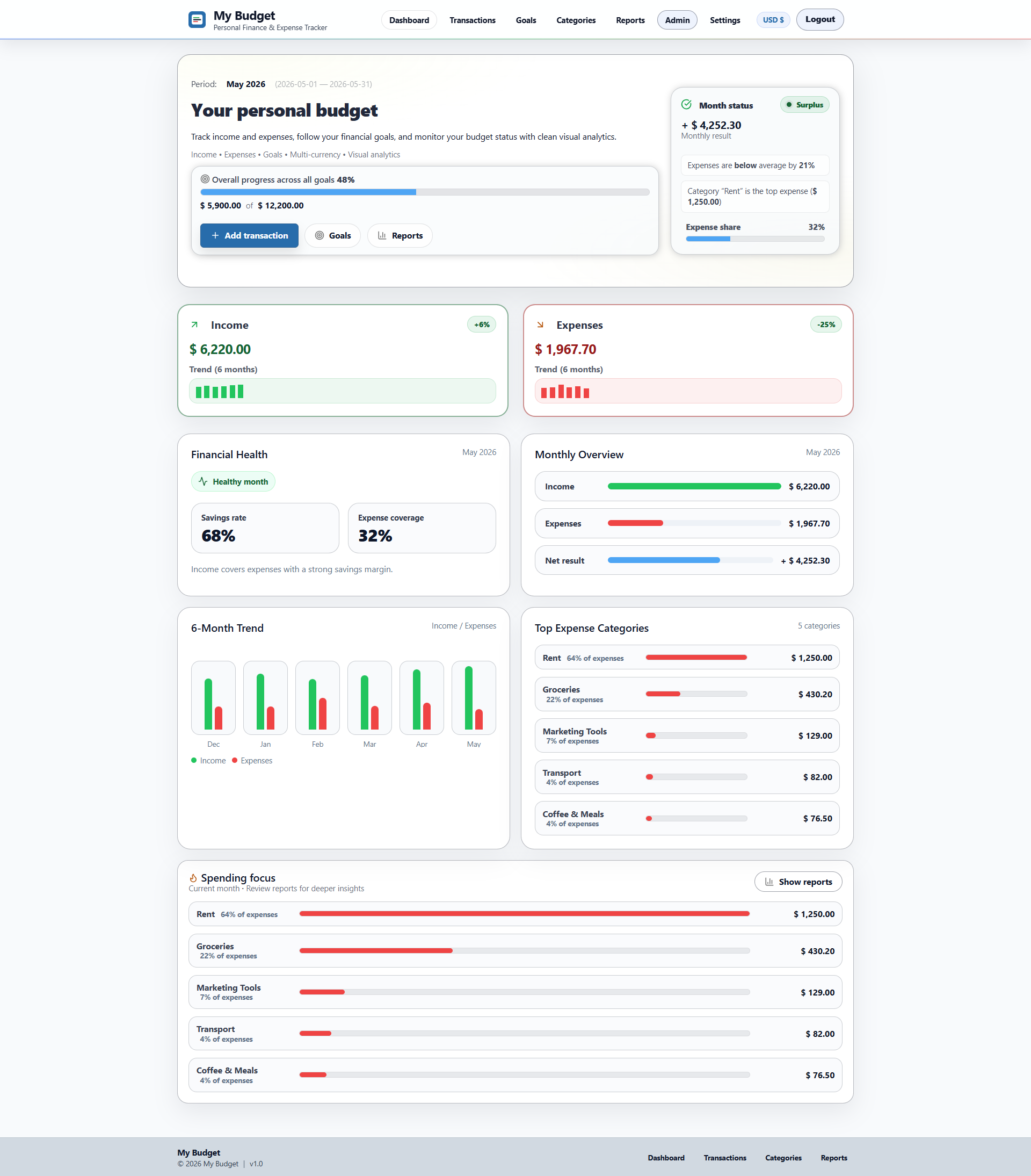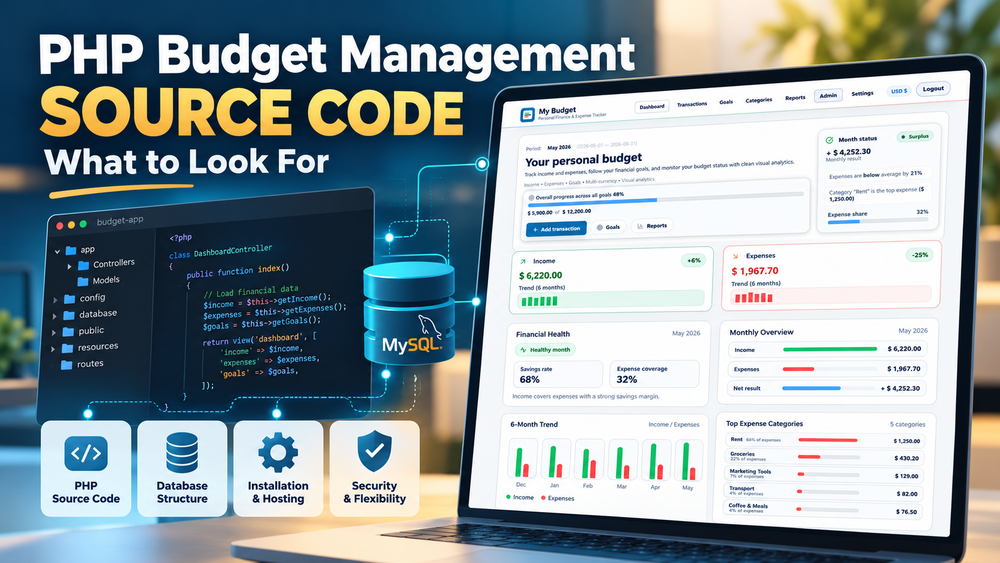
A budget management dashboard can make a good first impression. You open a demo and see income and expenses, colourful charts, transaction history, spending categories and perhaps a savings goal slowly moving towards completion. Everything looks organised, and it is easy to imagine using the application for a personal finance project or adapting it for something more specific.
If you are looking for PHP budget management system source code, that first impression can be particularly appealing. Instead of building an application from the beginning, you could start with something that already has a working interface, database and financial tracking features.
But a working demo only tells part of the story.
What happens when you want to change the way transactions are stored? Can you add another type of financial record without rewriting half the application? Will the system install on your hosting environment? And does the licence actually allow you to use the code for the product you have in mind?
These questions are less exciting than exploring a polished dashboard, but they can make a considerable difference to the value of the source code you purchase.
There is also an interesting distinction between buying software to use and buying software to develop further. The first is mainly about what the application does today. The second is about what you can realistically do with it tomorrow.
What Are You Actually Buying When You Buy PHP Budget Management Source Code?
The phrase PHP budget management system can describe several different things.
It might refer to a simple expense tracker created for a small personal project. It could be a more developed personal finance application with user accounts, reports and savings goals. Or it might be a financial management system intended for businesses, with additional requirements around permissions, reporting and financial records.
These applications may share similar screens while having very different underlying structures.
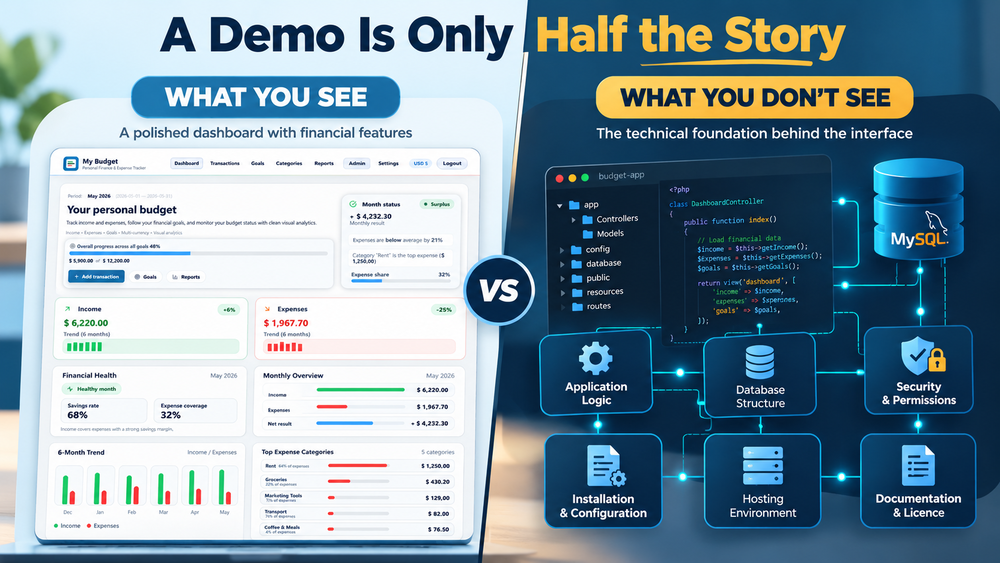
When buying source code, you are generally purchasing access to the files that make the application work, subject to the seller's licence. For a PHP/MySQL budget system, these may include the PHP application files, database schema, front-end assets, configuration files and installation instructions.
Some packages also provide an installer, documentation and a working demo. Others may offer little more than the application files and an SQL database export.
The distinction matters because having the source code does not automatically mean having a convenient starting point for development.
You might receive hundreds of PHP files that technically allow modification but are difficult to understand. Alternatively, a smaller application with a consistent structure and clear documentation might be easier to adapt.
There is also the question of licensing. A licence allowing you to install an application for your own project may not permit redistribution, resale or inclusion in another commercial source-code product. White-label rights, where available, may have their own conditions.
The important question is not simply whether the code is included. It is what that code allows you to build, how much work it will require and what you are legally permitted to do with the result.
The Features That Matter Beyond the Dashboard
Budget management applications tend to share a familiar collection of features. Income and expense tracking, categories, charts and reports appear in many products because they represent the basic activities people expect from financial software.
However, a feature appearing in a menu does not necessarily tell you how completely it has been implemented.
A dashboard might display the correct monthly totals using sample data, but that does not explain how it behaves when transactions are edited, deleted or moved between categories.
The interesting questions begin when you move beyond the default demonstration.
Transactions, Categories and Financial Records
Transactions are usually at the centre of a budget management system.
A typical application needs to distinguish income from expenses, associate records with categories and users, store dates and amounts, and make that information available for reports.
That sounds straightforward until the requirements become more complicated.
For example, what happens if a user changes a transaction from one category to another? Do the dashboard totals update correctly? If a category is deleted, what happens to the transactions associated with it? Can a user filter records across several months without losing the context of the results?
These are ordinary situations rather than unusual technical challenges. Yet they reveal more about an application's completeness than a screenshot of a transaction table.
The same applies to financial calculations. An application might handle basic income and expense totals well but require additional work for recurring transactions, transfers between accounts, multiple currencies or more complex budgeting rules.
Not every budget system needs those features. What matters is whether the existing functionality matches the intended project and whether the code can accommodate the missing parts.
Budgets, Savings Goals and Reports
Financial goals and reports make budget applications more interesting because they turn individual transactions into something people can interpret.
A savings goal, for instance, may involve a target amount, contributions, progress calculations and a history of changes. A monthly report may need to combine transactions from several categories and present them in a useful format.
There are different ways to implement these features.
One application might calculate progress dynamically from stored records. Another might store summary values and update them when transactions change. Both approaches can work, but they introduce different maintenance and consistency considerations.
Reports deserve similar attention.
A chart showing monthly spending may look convincing, but can the underlying data be filtered? Are date ranges handled consistently? Can records be exported? What happens when a report contains no data?
The purpose of checking these details is not to demand every possible feature. It is to understand whether the application contains working financial logic or mainly an attractive presentation of financial information.
Users, Accounts and Permissions
A budget application intended for one person has different requirements from a system designed for multiple users.
Once an application supports user accounts, it needs to associate financial records with the correct account and prevent users from accessing information that belongs to someone else.
An administrative interface adds another layer of responsibility. Administrative permissions should be defined carefully rather than treated as unrestricted access by default.
This becomes particularly relevant when adapting personal finance source code for a client project or a larger application.
A login screen is visible in a demo. The rules that protect financial records usually are not.
The Database May Matter More Than the Interface
A financial dashboard is the part of a budget application that people notice first. The database is the part that quietly determines what the application can remember, calculate and connect.
For a PHP/MySQL budget management system, the database may contain users, transactions, categories, goals, contributions and other related records.
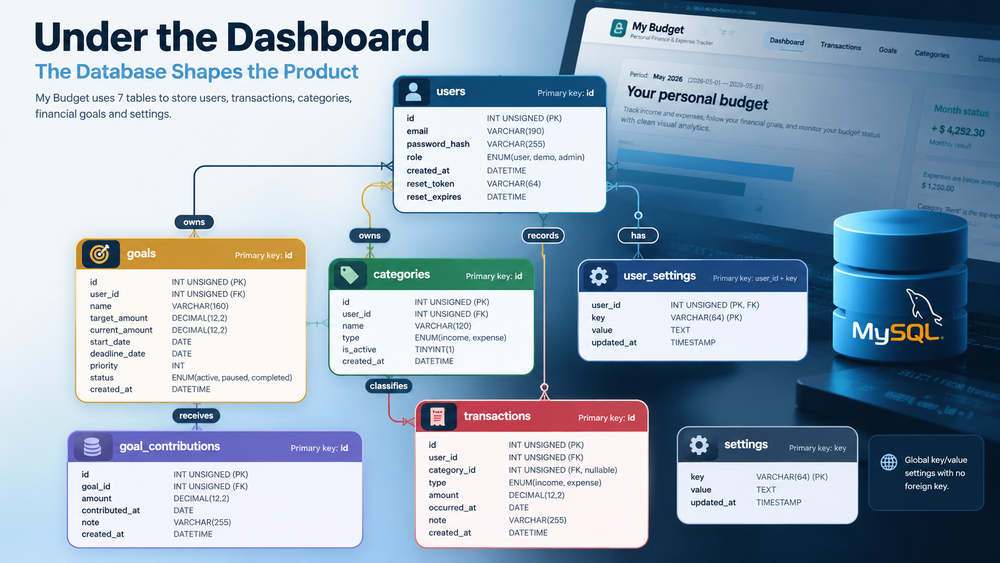
How these tables relate to one another affects almost every feature.
Consider a relatively simple example. You purchase a personal expense tracker and decide to adapt it into a financial management tool for freelancers.
At first, the change seems mostly visual. Replace a few labels, update the dashboard and introduce categories more relevant to freelance work.
Then you decide that each expense should optionally belong to a client or project.
Now the application needs additional information. You may need new database tables, relationships between projects and transactions, updated forms, filtering logic and reports that understand the new structure.
If you later want to distinguish business expenses from personal expenses, the data model may need further changes.
The original application might still provide a useful foundation, but the work has moved well beyond changing colours and text.
Financial values introduce their own considerations. Monetary amounts should be stored using suitable exact numeric types rather than relying on floating-point calculations that can introduce rounding errors. Dates, currencies and transaction relationships also need consistent handling.
Database design is rarely the most promotional part of a source-code product page. Yet it can determine whether a planned modification takes a relatively small amount of work or becomes a larger restructuring exercise.
For developers evaluating PHP budget source code, access to the database schema and an understanding of its relationships can be more informative than another collection of dashboard screenshots.
Security Is Not an Optional Extra in Financial Software
A budget management application does not have to connect to a bank or process payments to contain sensitive information.
Personal income, expenses, financial goals and transaction descriptions can reveal quite a lot about an individual or a business. Even a relatively simple expense tracker deserves appropriate protection.
PHP provides the tools needed to build secure applications, but security depends on how those tools are used.
Passwords should be stored using suitable password-hashing mechanisms rather than plain text or reversible encryption. Database queries should use parameterised statements where appropriate to reduce SQL injection risks. Output handling needs to account for cross-site scripting, while state-changing requests generally require protection against cross-site request forgery.
Authentication is only part of the picture.
An application might correctly require a user to log in but still contain an authorisation problem. For example, changing a transaction ID in a request should not allow someone to view or modify another user's record.
That kind of issue may not be obvious during a normal demo session.
Session handling, configuration protection, error reporting and server permissions also deserve attention. Production environments should not expose database credentials, debugging details or installation tools unnecessarily.
Seeing security-related functions in the code does not prove that the entire application is secure. Proper evaluation may require code review, testing and attention to the deployment environment.
There is no reason to assume that a small PHP application is insecure simply because it is small. Equally, a sophisticated interface or an expensive licence does not guarantee good security practices.
The relevant question is whether security has been considered throughout the application rather than added as a collection of isolated features.
Installation, Hosting and the Reality of Self-Hosted PHP
One attraction of PHP applications is the range of environments in which they can run.
Depending on their requirements, PHP/MySQL applications may be deployed on shared hosting, a VPS, a dedicated server or a local development environment.
This flexibility is useful, but it does not mean every PHP application will work on every server without adjustments.
The required PHP version is an obvious starting point. An application written for a newer PHP release may use language features that are unavailable on an older hosting configuration.
Database compatibility matters too. MySQL and MariaDB are closely related, but differences in versions, SQL behaviour and configuration can still affect an application.
Then there are the less visible deployment details: database credentials, writable directories, URL rewriting, session configuration and web-server settings.
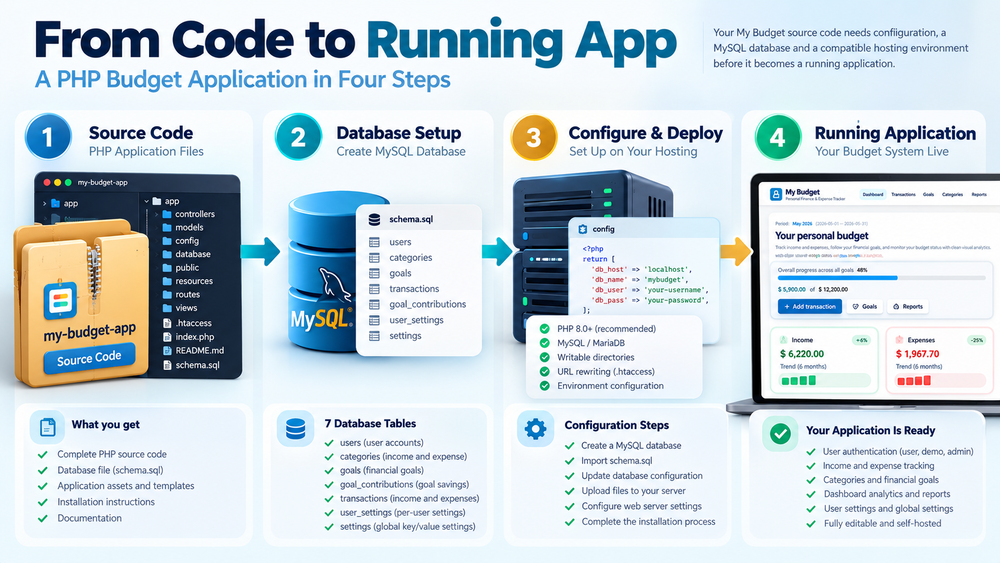
An application that works on the seller's demonstration server may depend on configuration choices that are not present in your hosting environment.
This is where installation documentation becomes particularly valuable.
A clear installation process should explain the system requirements, database setup, configuration steps and any server-specific considerations. It should also make it reasonably clear what to do when something does not work as expected.
An installer can simplify deployment, but it cannot eliminate every compatibility problem.
For a developer, a manual installation process may be perfectly acceptable. For someone planning to reuse the application across several projects, repeatable installation and understandable configuration may be much more important.
Self-hosting provides control over where the software runs and how it is configured. It also transfers responsibility for deployment, updates, backups and server security to the person or organisation operating it.
That responsibility is part of the decision, not a hidden disadvantage that should only become apparent after purchase.
How Much Can You Actually Change?
One of the appealing things about purchasing PHP source code is the possibility of modification.
You can open the files, inspect the application logic and make changes that would not normally be possible with a hosted service.
But customisation is not a single type of work.
Changing the application name, logo, colours or navigation is one level. Adding new reports or modifying existing financial calculations is another. Redesigning the underlying data model or introducing a different business workflow is something else entirely.
These changes may require very different amounts of effort.
For example, turning a personal budget dashboard into a branded household expense tracker might involve relatively modest changes if the underlying functionality already matches the intended use.
Turning the same application into a business expense approval system is a different proposition.
That could involve approval states, organisational roles, audit records, additional permissions and more complicated reporting. The original transaction management features may still be useful, but the new product would require substantial development.
There is also a difference between code that can technically be edited and code that is pleasant to maintain.
Clear separation between database operations, application logic and presentation can make modifications easier. Consistent naming, predictable file organisation and useful documentation reduce the amount of investigation needed before making changes.
Not every PHP project needs a large framework or elaborate architecture. A straightforward application can be entirely suitable for its purpose.
The more useful question is whether the structure makes sense for the size of the project and the changes you expect to make.
A source-code package should be evaluated as a starting point for a particular direction, rather than as a promise that every future feature will be easy to implement.
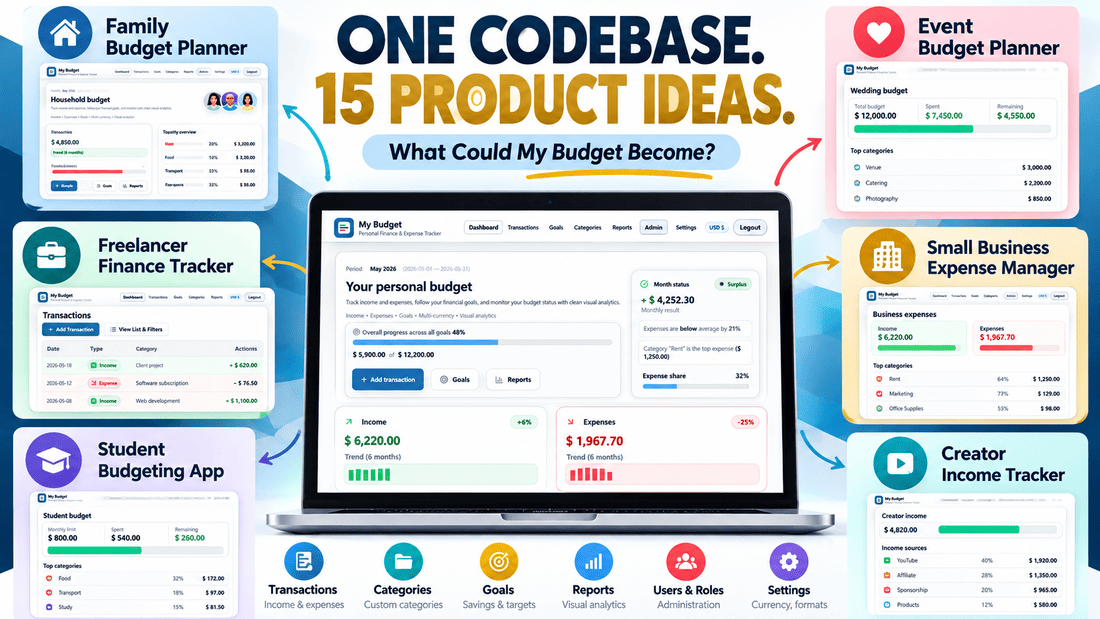
One PHP Budget Codebase, Several Possible Products
This question of customisation is particularly interesting when looking at a budget management system as a foundation rather than a finished product.
The basic financial concepts — income, expenses, categories, transactions, goals and reports — are relevant to several different applications.
A household budget planner, for example, might focus on shared expenses, spending categories and savings goals.
A freelancer expense tracker could use similar transaction management features but introduce clients, projects and business-related reporting.
A creator income tracker might organise revenue by platform or income source, while a small-business expense application could require additional users, approval workflows or more detailed financial records.
These products have overlapping foundations, but they are not interchangeable.
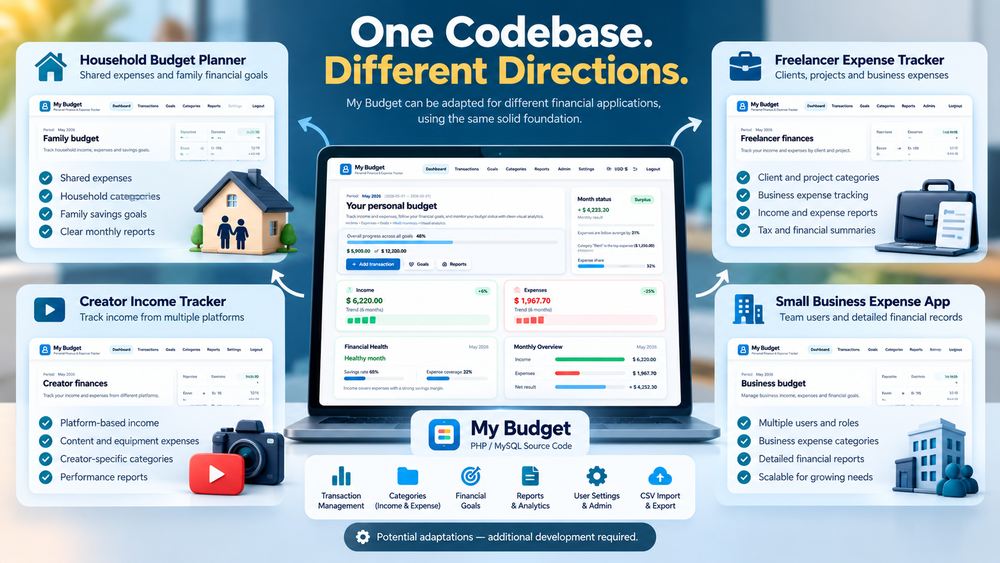
That is one of the ideas behind My Budget, a PHP/MySQL source-code product I have been developing for Cordinant.
My Budget includes financial transaction management, categories, dashboard analytics, financial goals, reports and CSV functionality. It also includes user authentication, administrative functionality, installation materials and documentation.
It is intended as an editable, self-hosted application codebase rather than a managed personal finance subscription service.
The possibility of using it as a starting point for other products is interesting to me because it changes how I think about the application.
A transaction form is no longer just a form for recording a household expense. It is also a component that might be adapted for another type of financial record. A reporting feature may be useful in its current form or provide a starting point for more specialised calculations.
At the same time, it would be misleading to suggest that all these product variations already exist.
A freelancer tool might need invoicing or project-specific reporting. A business expense system could require organisational permissions and approval processes. A more advanced finance application might need multi-currency handling, bank integrations or accounting-related functionality.
Those would be additional development tasks, not features automatically created by changing the application's branding.
This is the distinction I find useful when thinking about reusable source code: an existing application can reduce the amount of work needed to establish a foundation without removing the need to design and build the actual product.
The closer the intended product is to the original application's structure and functionality, the more useful that foundation may be.
When Existing Source Code Saves Work — and When It Doesn't
There are several ways to approach a budget management software project, and buying PHP source code is only one of them.
Building from scratch provides control over the application's architecture from the beginning. You can design the database around the exact requirements, choose the development approach and avoid adapting someone else's assumptions.
The trade-off is that even familiar functionality needs to be created.
Authentication, transaction management, categories, forms, validation, reports and installation procedures all take time. They may not be the most distinctive parts of the planned product, but they still need to work.
Existing source code offers a different starting point.
If an application already implements much of the required functionality, purchasing it may remove a considerable amount of initial development work.
However, that advantage depends on the quality and suitability of the code.
A poorly structured application can be difficult to extend. A system built around very different requirements may require extensive modifications. Sometimes the effort involved in understanding and restructuring an unfamiliar codebase can outweigh the work it initially appeared to save.
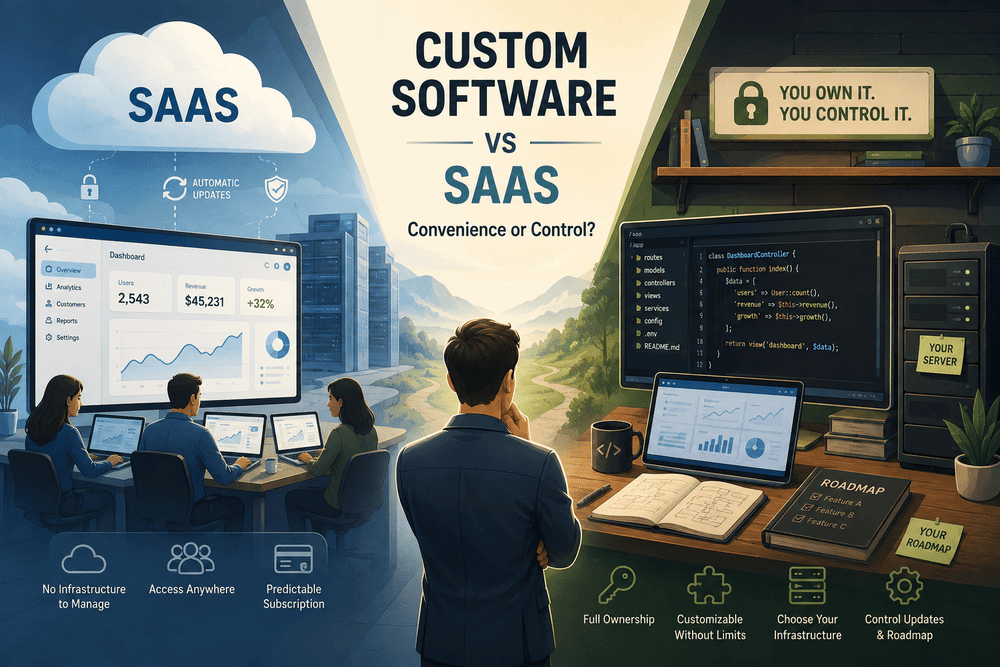
There is also the option of using a hosted SaaS application.
For someone who simply needs to track expenses or manage a budget, a hosted service may be more convenient than installing and maintaining PHP software. It can remove much of the operational responsibility, although it generally offers less control over the underlying application.
The choice changes when the objective is to create a new software product.
A hosted budget service may solve the financial tracking problem but provide little opportunity to modify the underlying code or develop a separate application from it.
This is why comparisons based only on purchase price can be misleading.
A low-cost PHP script may be an excellent starting point for a small project. It may also become expensive in development time if the code is difficult to work with.
A more developed source-code product may justify its price when its functionality closely matches the planned application. But paying more does not automatically guarantee better architecture or easier customisation.
The useful comparison is between the total work required by each approach, not simply between their advertised prices.
A Practical Checklist Before Choosing a PHP Budget System
After exploring a few budget management applications, it can become difficult to remember which one included a particular feature or technical requirement.
A short checklist helps separate the attractive parts of a demo from the practical questions that will matter during development.
Before purchasing PHP budget management system source code, it is worth checking the following:
- Functionality: Do transactions, categories, budgets, goals and reports behave correctly when records are created, edited or deleted?
- Database: Is the database schema included, and can you understand how the main financial records relate to one another?
- Security: Are authentication, authorisation, password handling and common web security protections implemented appropriately?
- Compatibility: Are the required PHP, MySQL or MariaDB versions and server dependencies clearly documented?
- Installation: Is there a usable installation process, and are configuration requirements explained?
- Customisation: Can the existing structure reasonably support the changes you intend to make?
- Documentation: Is there enough information to understand the application's setup and important components?
- Licensing: Does the licence permit your intended commercial use, modifications, branding and distribution?
- Maintenance: Are known limitations, dependencies and update arrangements clear?
- Missing functionality: Which features will still need to be designed, developed and tested?
Some of these questions can be answered by examining a demo. Others require documentation, access to the source code or clarification from the seller.
There is no universal checklist that guarantees a good purchase, and different projects will place different importance on each point.
For a small personal tool, simple installation and reliable expense tracking may be the main priorities. For an application intended for multiple clients, maintainability, licensing and extensibility may matter considerably more.
The purpose of evaluating the code is not to find an application with no limitations. It is to understand those limitations before they become part of your development work.
The Best Starting Point Is the One You Can Continue Building
It is easy to become interested in a PHP budget management system because of what appears on the screen.
A clean dashboard, working charts and a collection of financial features make the application feel tangible. You can see what has already been built, and that naturally encourages ideas about what else might be possible.
But source code has a second life beyond the demo.
Once you install it, explore the database, change a feature or try to adapt the application for another purpose, the qualities that were initially invisible become much more important.
A modest application with understandable code may turn out to be a better foundation than a more impressive-looking system that is difficult to modify. Equally, a comprehensive codebase can be a sensible choice when it already contains much of the functionality a project needs.
I think that is the most useful way to approach PHP budget management source code: not as a shortcut that makes development unnecessary, but as an existing piece of software whose value depends on where you want to take it.
Buying the code does not finish the development process. It simply changes where that process begins.
My Budget - PHP Finance App Source Code
A self-hosted PHP and MySQL personal finance application with transactions, financial dashboards, savings goals, reports, CSV export and full source code.
- Everything Needed for a Modern Finance Application
- Dashboard Analytics
- Visual overview of financial activity and trends.
- Transactions Management