Offline Marine Operations PWA Source Code
Offline-First Marine Operations PWA Source Code
A self-hosted marine operations codebase for developers, agencies and technical founders.
Start with working marine workflows for vessel records, voyages, maintenance, fuel, crew, safety and checklists — then customize the application for your own project or client.
Full Source Code
Offline-First PWA
Self-Hosted
Customizable
Documentation Included
One-Time License
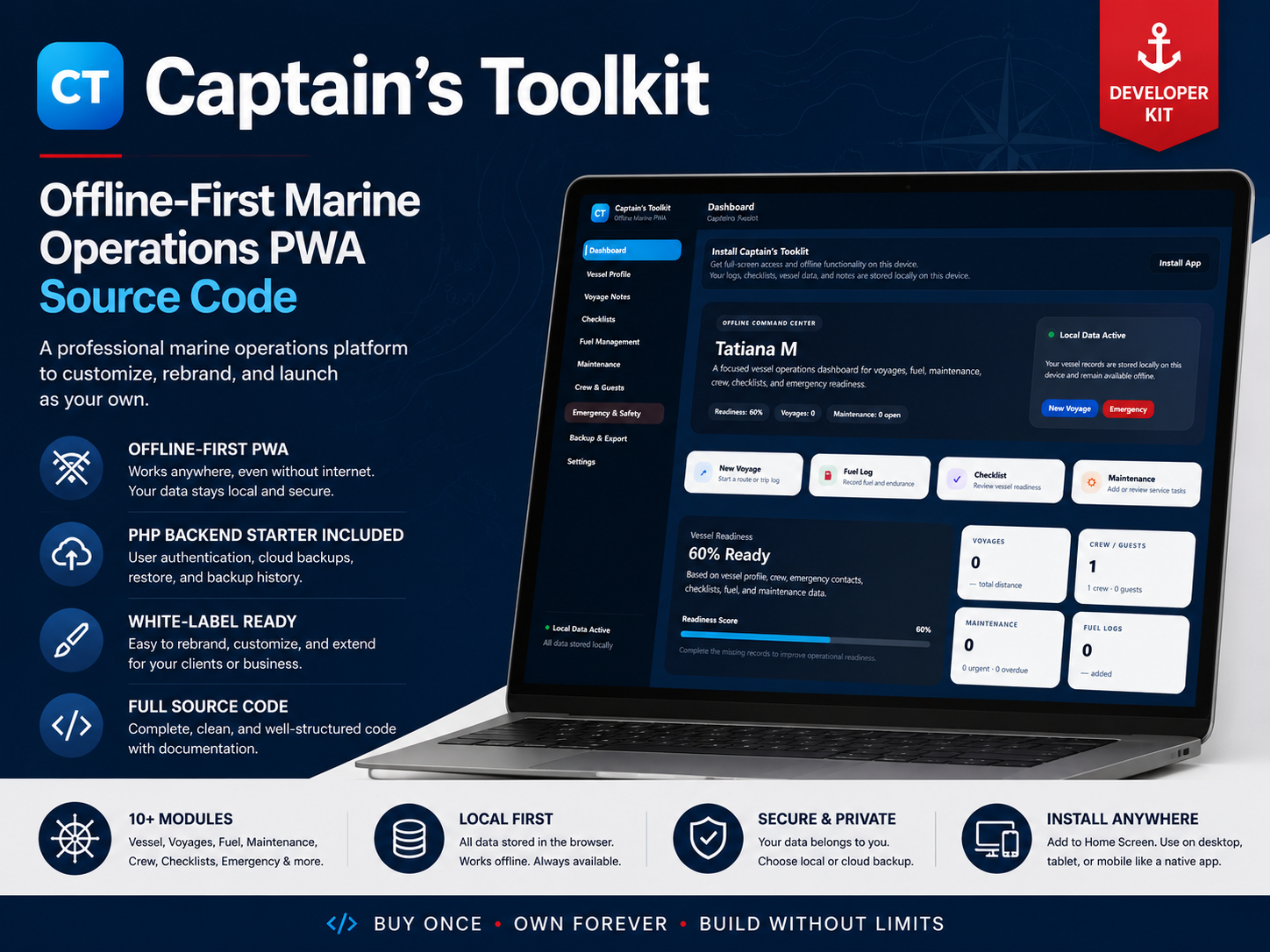
Product Overview
Captain’s Toolkit at a Glance
The essential technical and product details before you explore the application.
Overview
What Is Captain’s Toolkit?
A working marine operations application foundation you can customize and extend.
Captain’s Toolkit is a self-hosted offline-first Progressive Web App built around practical vessel-management workflows. It combines a working frontend application, marine-specific modules and full source code with an optional backend foundation for projects that need additional connected functionality.
Working Core Workflows
The application already includes structured interfaces for vessel records, voyages, maintenance, fuel, crew, emergency information, checklists and exports.
Built Around Offline Use
The frontend uses a Progressive Web App structure so core functionality can remain useful when a constant internet connection is not available.
Extend When Your Project Needs More
The core application does not depend on a full server-side platform. Optional backend foundations can be configured or extended for database-backed, synchronization or other connected workflows.
A Codebase, Not a Hosted Service
Captain’s Toolkit is sold as source code. Hosting, managed cloud infrastructure, billing, advanced multi-user SaaS functionality and enterprise fleet management are not included as finished services.
Inside the Package
What’s Included
The product package contains the application and the core resources needed to install, configure, and work with the codebase.
Application Source Code
Complete editable HTML, CSS and JavaScript source files for the marine operations application.
Marine Modules
Working screens and workflows for vessels, voyages, maintenance, fuel, crew, safety, checklists and exports.
PWA Files
Web app manifest, service worker and the files required for the Progressive Web App structure.
Responsive Interface
Application interface designed for desktop, tablet and mobile use.
Branding Configuration
Editable application name, interface copy, themes and visual settings for project customization.
Optional Backend Starter
PHP-oriented starter files for projects that require additional server-side or database-backed functionality.
Documentation
Installation, configuration, customization, backend setup and troubleshooting guidance.
Project Information Files
License information, version details and changelog included with the downloadable package.
Features
Key Features
Core application capabilities and technical foundations included in the codebase.
Vessel Profile
Keep vessel specifications, registration details and essential operational information together.
Voyage Records
Record trips, destinations, dates and voyage-related operational information.
Maintenance Tracking
Organize maintenance records, service information and recurring vessel tasks.
Fuel Management
Record refuelling activity and maintain fuel-related operational history.
Crew Records
Keep useful onboard personnel information within the application.
Emergency & Safety
Maintain important contacts, VHF information and emergency procedures in an accessible format.
Operational Checklists
Create and manage structured checklists for recurring onboard procedures.
Data Export
Export operational information when it needs to be used outside the application.
Modular Frontend Structure
Work with separate screens and marine modules that can be modified or extended for a specific project.
Editable Branding & Interface
Change product naming, interface text, themes, styles and project-specific presentation.
Optional Backend Foundation
Extend the frontend with the included PHP-oriented backend starter when server-side functionality is required.
Progressive Web App
Deploy an installable web application with a manifest and service worker.
Offline-Oriented Frontend
Core frontend functionality is designed to remain useful without permanent connectivity.
Self-Hosted Deployment
Run the application from your own compatible hosting environment instead of a proprietary software platform.
Preview
Product Preview
Explore the interface screenshots and main product screens.
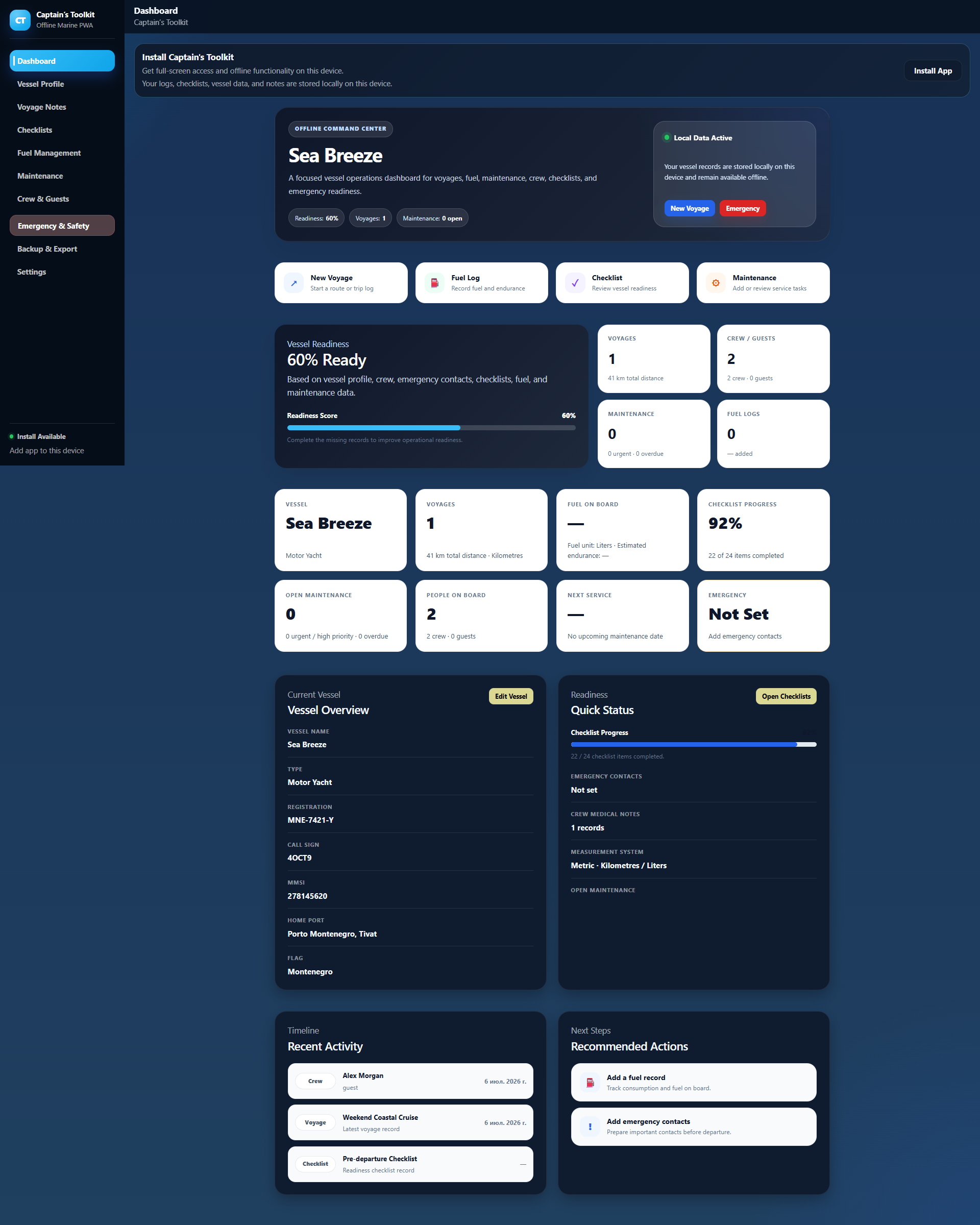
The dashboard gives users a quick entry point into vessel profile, voyages, fuel, maintenance, crew, emergency information, checklists, exports, and settings. It matters because marine operations become easier to manage when every key area is visible from one place.
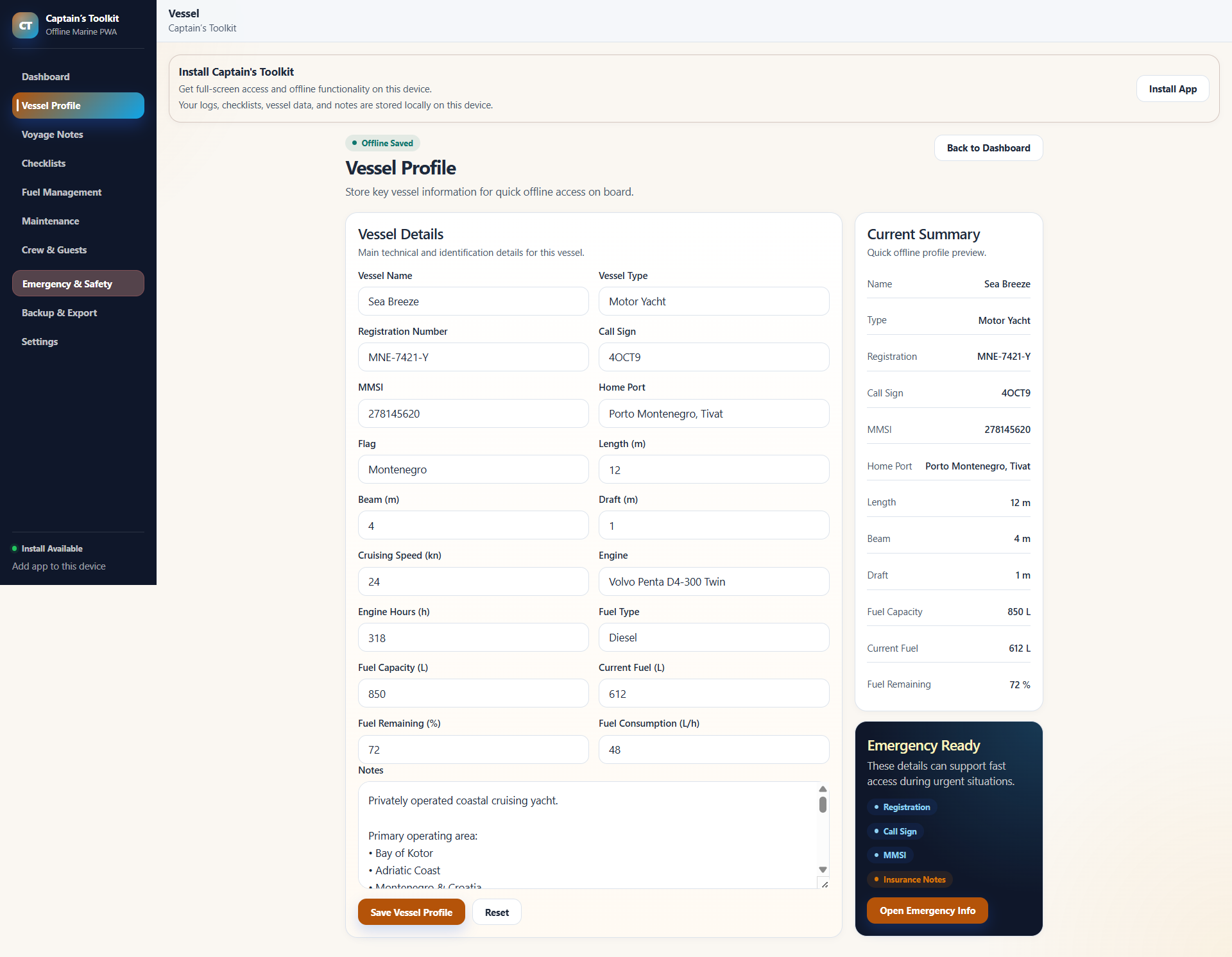
The vessel profile screen stores core boat information in a structured format. This helps owners, captains, and teams avoid scattered records and gives developers a clear foundation to customize.
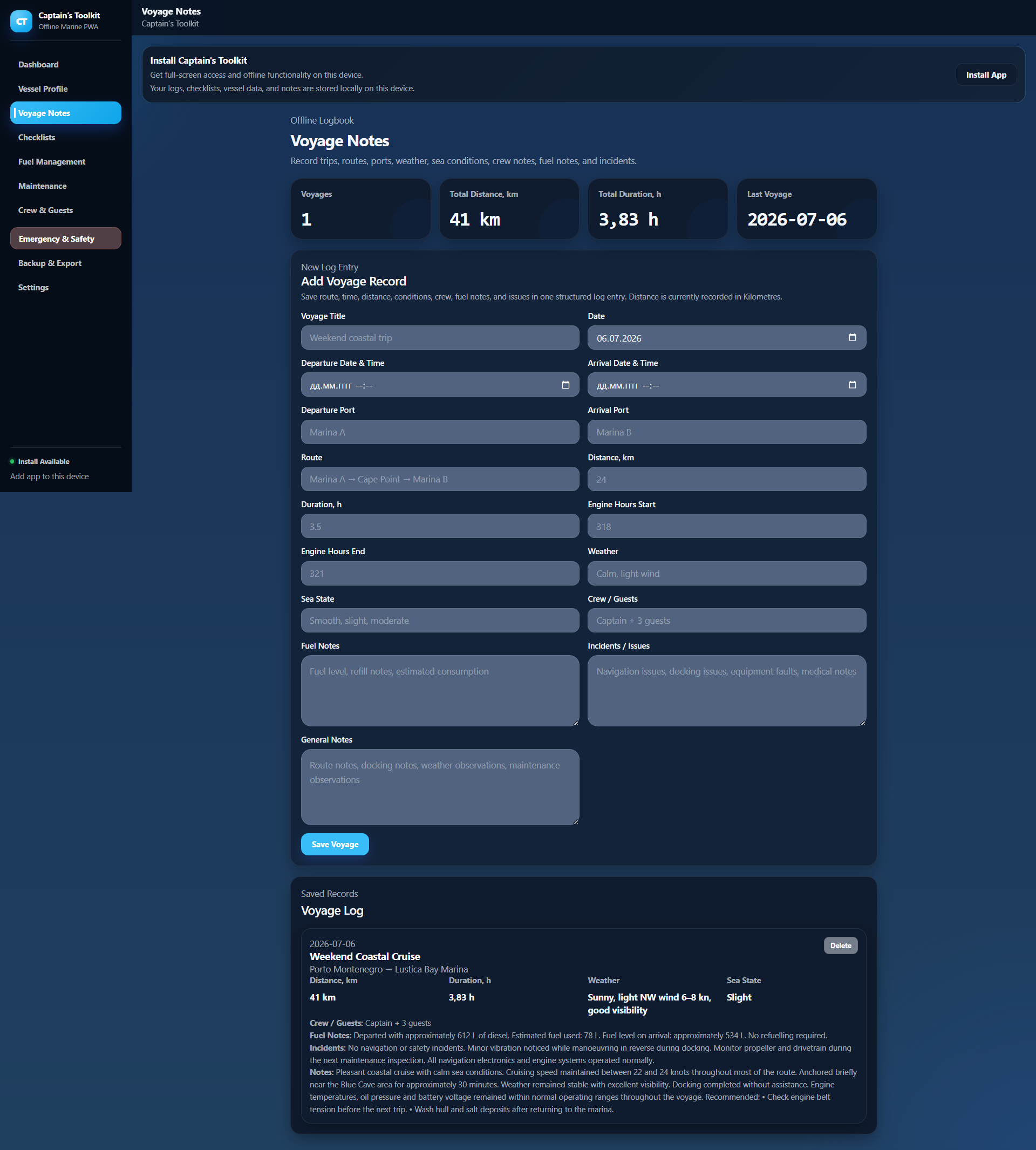
The voyages screen keeps travel and operation records separate from maintenance or fuel data. This makes the product more practical than a generic notes app.
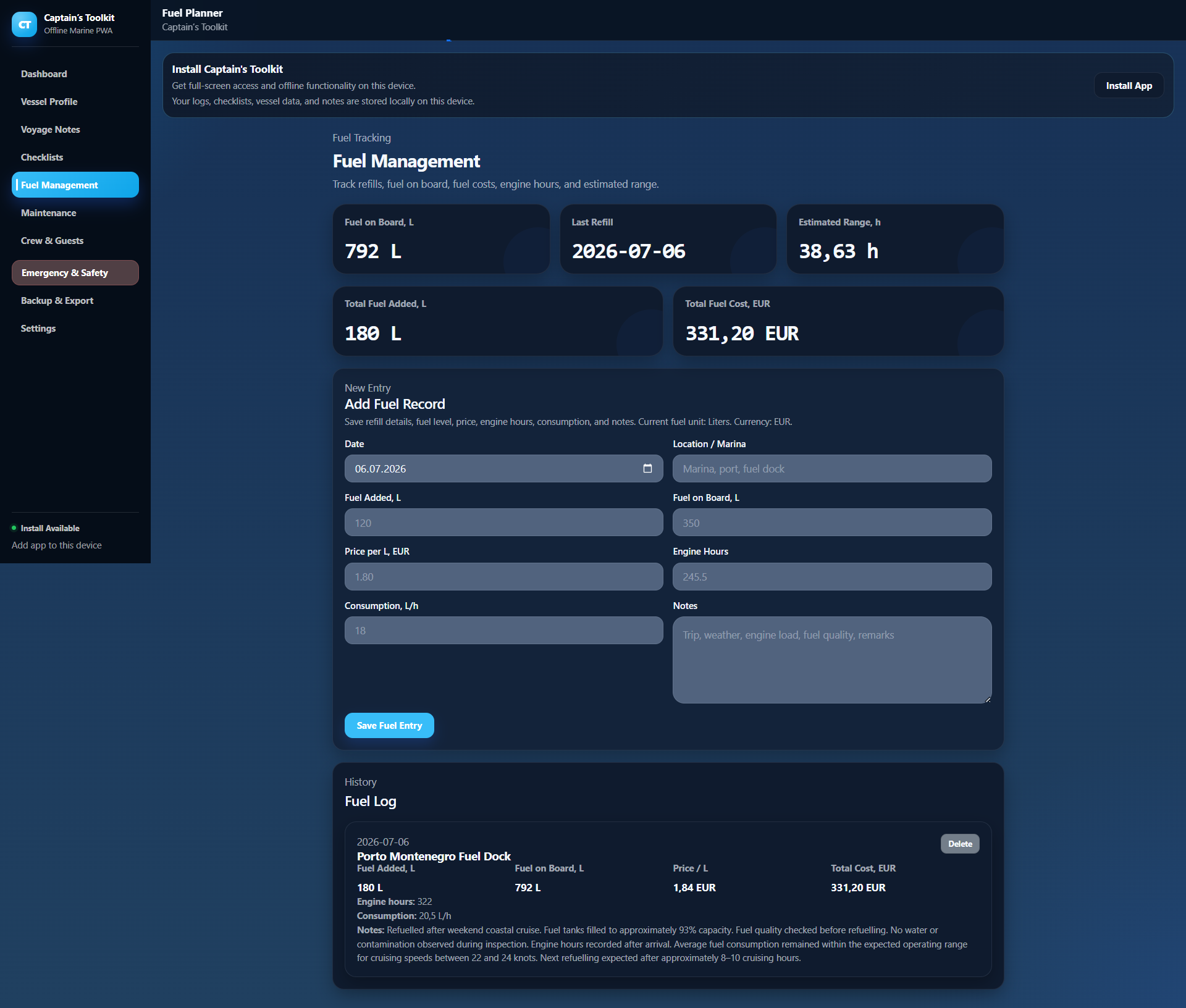
The fuel module helps users maintain a clear history of fuel-related activity. For marine businesses or private owners, this creates better visibility over recurring operational data.
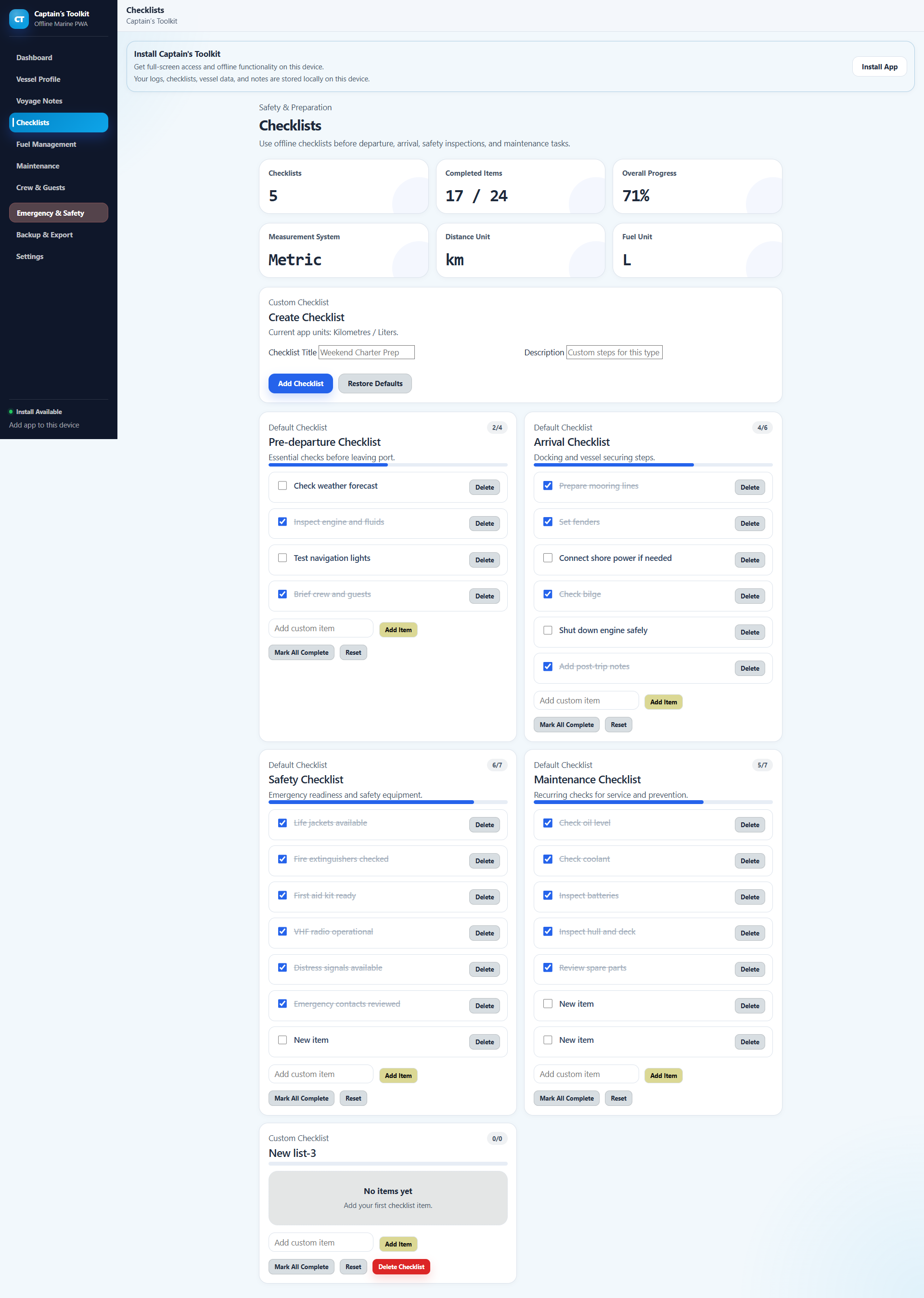
Checklists help users prepare, inspect, and repeat important tasks consistently. This is especially useful for pre-departure checks, safety routines, maintenance reviews, and training.
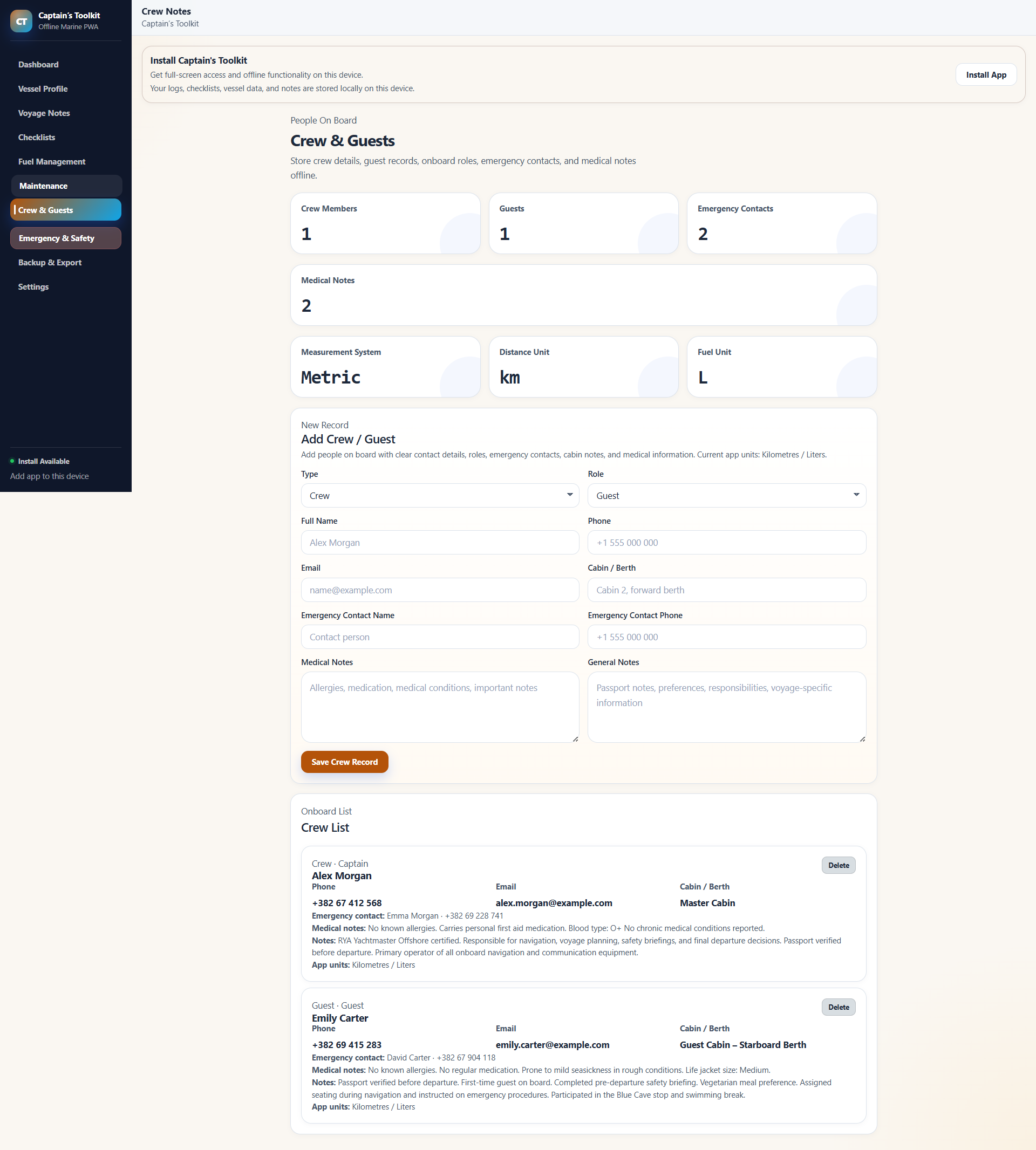
The crew screen gives users a dedicated place for crew information. It can be adapted for captains, charter teams, training groups, or internal company use.
The exports screen supports the idea that users should control their own data. This is important for backups, audits, client handover, or future system migration.
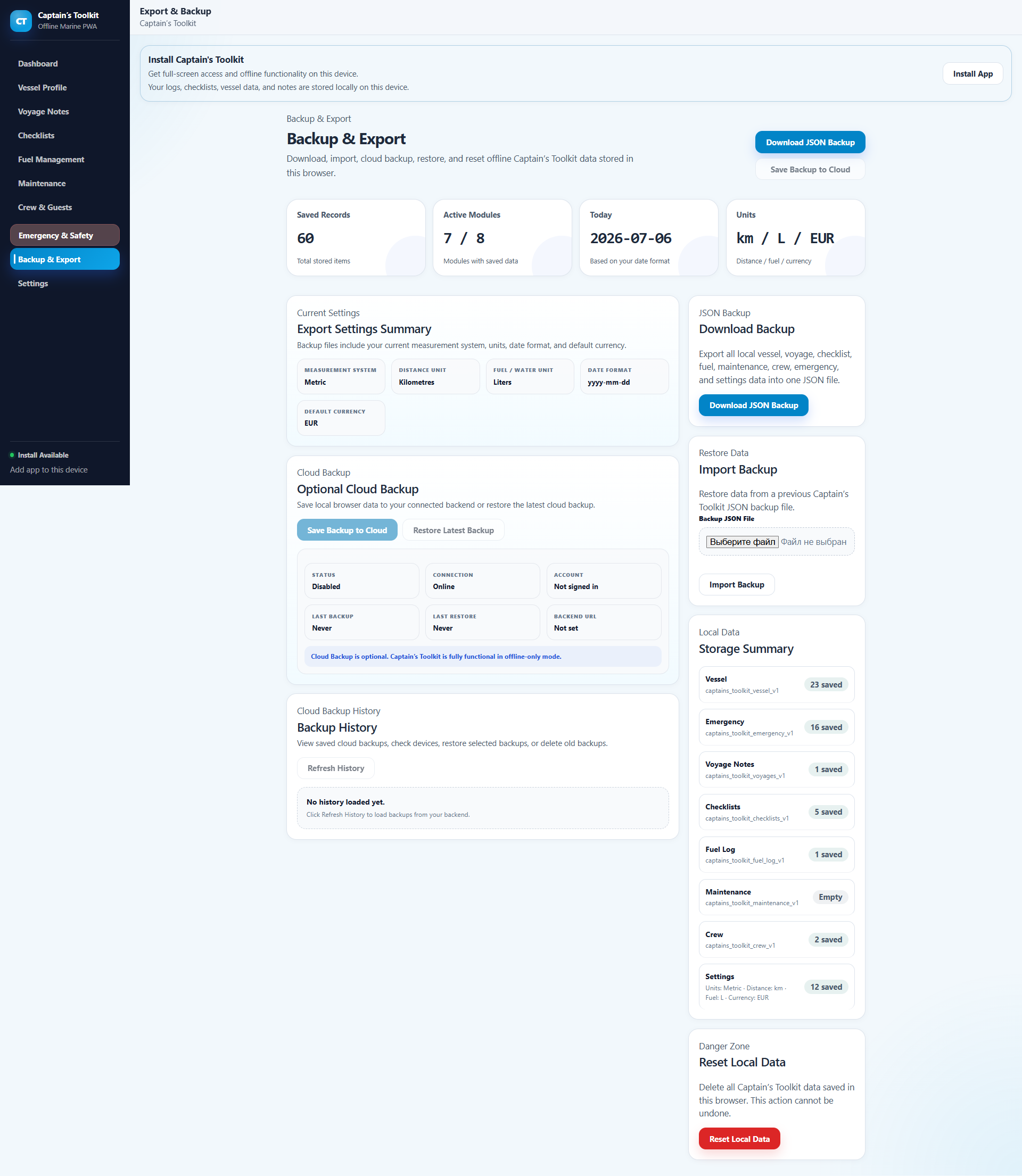
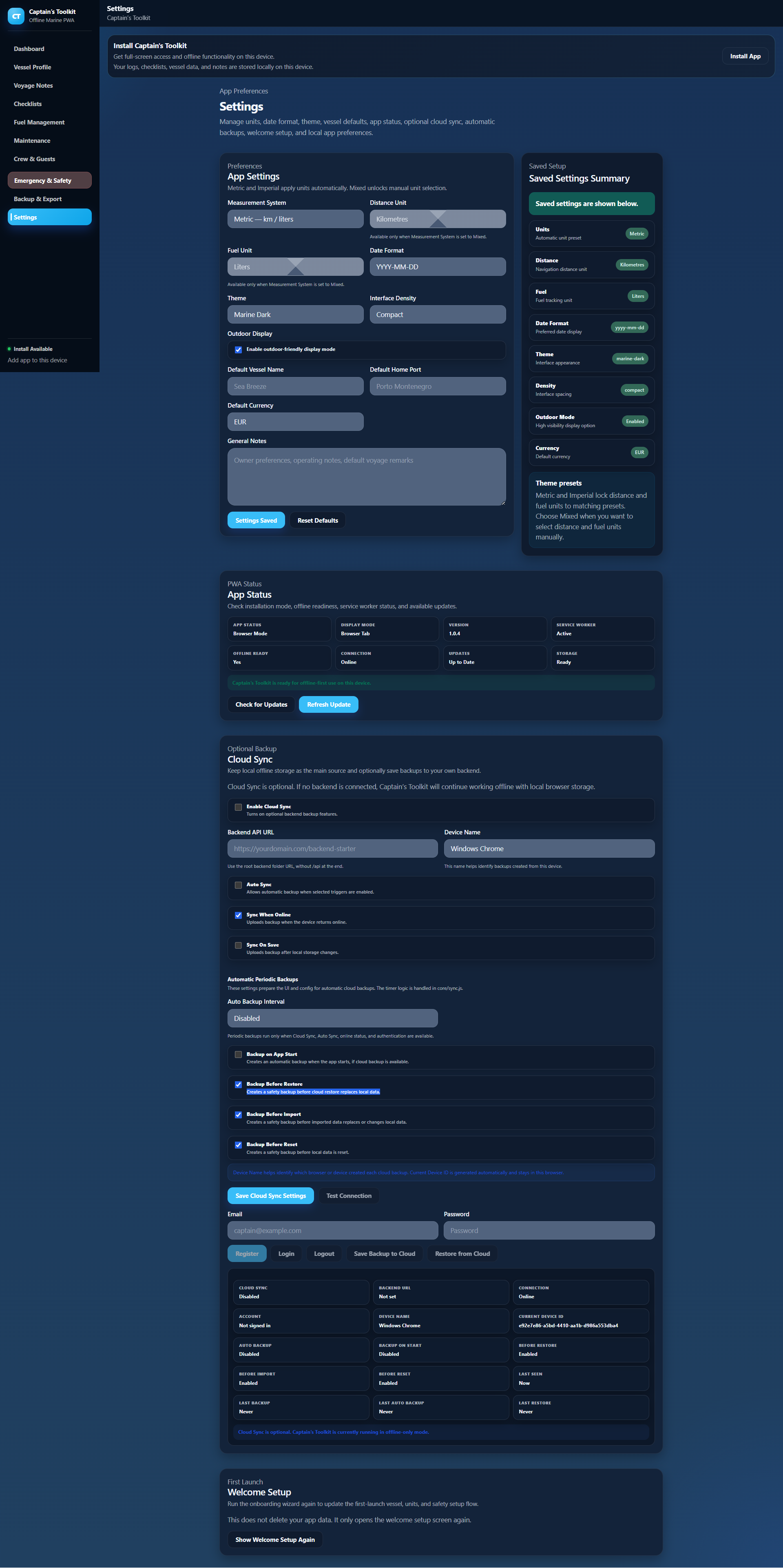
Settings give users and developers a clear place to manage application preferences, themes, units, demo behavior, and sync-related configuration.
Use Cases
A Foundation for Different Projects
Adapt the same underlying application to different project types without presenting features the product does not actually include.
Developers & Freelancers
Use the existing marine application structure as a starting point for custom development.
Custom Vessel Management App
Adapt the existing vessel, voyage, maintenance, fuel and safety workflows for a specific project.
Client Marine Application
Rebrand and extend the codebase for an appropriate client project under the permitted licence terms.
Agencies & Technical Founders
Start with a working marine-domain application instead of designing every core workflow from an empty project.
Marine Software MVP
Test a specialised marine software concept before investing in larger backend or SaaS infrastructure.
White-Label Project Foundation
Customize branding, interface and workflows to create a differentiated marine application under the applicable licence.
Marine Operations Projects
Adapt the codebase to focused operational scenarios where its existing modules provide a useful starting point.
Yacht Operations Tool
Adapt vessel records, maintenance, voyages, checklists and safety information for day-to-day yacht operations.
Sailing School or Marine Service Tool
Extend the existing operational modules for training, vessel servicing or other specialised marine workflows.agency
Technical Details
Technical Stack & Requirements
Captain’s Toolkit uses familiar web technologies and can run as a frontend-first PWA. Additional server-side requirements apply only when you use or extend backend functionality.
Application Stack
- Frontend
- HTML, CSS and JavaScript
- Application Type
- Progressive Web App
- PWA Components
- Web App Manifest and Service Worker
- Backend
- Optional PHP-oriented backend foundation
- Database
- MySQL-compatible database for applicable backend workflows
Server Requirements
- Frontend Hosting
- Compatible web hosting capable of serving the application files
- Browser
- Modern browser with the required web and PWA capabilities
- HTTPS
- Recommended and generally required for full PWA functionality outside local development
- Backend Hosting
- PHP-compatible hosting if optional backend functionality is used
- Database
- MySQL-compatible database if database-backed backend functionality is configured
- Technical Knowledge
- Basic web deployment knowledge; PHP and database knowledge recommended for backend customization
Explore Before You Buy
Review the Documentation
Check the public documentation before purchasing to understand the application structure, core functionality, installation process, technical requirements and optional backend setup.
Read DocumentationDetailed buyer documentation is also included with the downloadable product package.
Licensing
Choose Your License
Captain’s Toolkit is sold as a one-time source-code purchase. Review the permitted project, client and commercial use for each licence before purchasing.
Standard License
For one permitted personal, internal or commercial end project.
$89
- Single project use
- Commercial use
- Full source code
- Documentation included
- Branding and customization
- Multiple client projects
- SaaS deployment
Extended License
For broader commercial use, client projects, multiple deployments or SaaS commercialization under the Extended Licence terms.
$249
- Multiple project use
- Commercial use
- Full source code
- Documentation included
- Branding and customization
- Client projects
- Multiple deployments
- SaaS deployment
Review the complete licence terms before purchasing. The selected licence determines how the source code may be used, deployed, and incorporated into commercial or client projects.
Before You Buy
Questions Before Buying
Is hosting included?
No. Captain’s Toolkit is a source-code product, not a hosted SaaS service. You deploy it in your own compatible hosting environment.
Do I receive the full source code?
Yes. The application source files are included so you can inspect, modify and extend the project.
Does the core application require PHP or MySQL?
The core frontend is built with HTML, CSS and JavaScript and does not require a full PHP/MySQL backend for basic frontend operation. Backend-oriented functionality has separate requirements.
Does Captain’s Toolkit work offline?
It is designed as an offline-first PWA. Core frontend functionality can remain available without a constant internet connection, subject to browser and platform behaviour.
Is cloud synchronization included?
Captain’s Toolkit should not be treated as a finished cloud synchronization platform. The package provides backend-oriented foundations that can be configured or extended for connected workflows.
Does it include a complete multi-user authentication system?
No complete SaaS-style authentication, user-role and multi-user platform should be assumed. These capabilities may require configuration or additional development depending on the project.
Can I change the design and branding?
Yes. You can modify the product name, branding, colours, themes, interface text and other frontend elements.
Can I add, remove or modify modules?
Yes. The codebase is intended to be customized and extended for different projects.
Can I use Captain’s Toolkit for client work?
Client and multi-project use depends on the selected licence. Review the Standard and Extended Licence terms before purchasing.
Can I build a SaaS product with it?
The codebase can serve as a technical foundation where permitted by the selected licence, but billing, multi-tenancy, managed cloud infrastructure and other complete SaaS services are not included out of the box.
Is this a finished enterprise fleet-management system?
No. Captain’s Toolkit is a customizable marine operations codebase. Enterprise fleet management, advanced permissions, centralized reporting and similar functionality require additional development.
Ready To Launch Faster?
Try the live application, review the documentation and choose the licence that fits how you plan to use the source code.